
The Event Log is a record of significant hardware and software events that occurred at any time the software is running. The log is recorded in time sequence using the computer clock. Log event descriptions provide information, warnings, and error notifications. The Event Log provides the user with a history of their analysis process. This history may be useful for processing documentation or for troubleshooting capture issues and problems.
Information messages can include the starting and stopping of recording and the time that this event took place. Warnings in the log could be notifying the user that the capture file just opened contains unsupported content. Event Log error events include, for example, telling the user that the capture file is invalid.
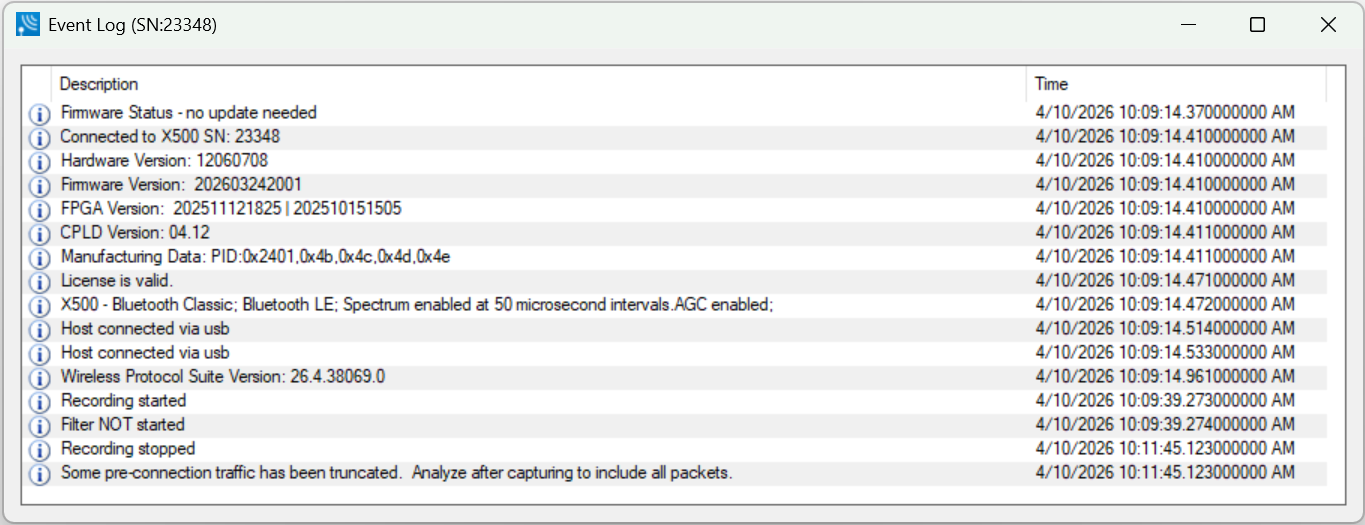
The Event Log View contains event icons in the first column (no heading), event descriptions in the second column (Description), and the time the event occurred in the third column (Time).
A description of each Event Log column is in the following table.
Event Log Columns
|
Heading |
Icon |
Description |
|
Event |

|
Information: Events related to the normal flow of the capture process, e.g. “Connected to X500 SN: 12345”, “Recording started', “Recording stopped”. |

|
Warning: Events that raise concern about the capture process integrity. |
|

|
Error: Events that compromise the capture process or that may invalidate some of the captured data. |
|
|
Description |
— |
Description of the event with additional information related to the Event icon. |
|
Time |
— |
The actual time of the event in live capture mode, or the recorded time when running a previously captured file. The recorded time is based on the clock of the computer running the Wireless Protocol Suite software. |
Saving the Event Log
The Event log is automatically saved to "%appdata%\Frontline Test Equipment\Analyzer’s Name\Logs\" as a .txt file. Logs are retained for each session.