
The SierraNet M1288 Probe employs Teledyne LeCroy’s T.A.P.6 non-intrusive probing technology, which enables complete protocol capture, fast signal locking, and very little loss and jitter. The M1288 Probe is used only with the M1288 Analyzer to capture data up to 800GB/s.
There are two M1288 Probe models available:
|
Model |
Description |
|---|---|
|
HSF-M1288-QSFP |
SNET M1288 QSFP-DD Probe |
|
HSF-M1288-OSFP |
SNET M1288 OSFP Probe |
The OSFP connectors on the OSFP probe cables can be swapped in the field, by the customer, between a ‘Fin’ configuration and a ‘Flat’ configuration.
Note: To learn more about toggling the cables of the SNET M1288 Probe, refer to the guide “OSFP 800G Cable Shell Replacement.pdf”, which can be found under the Documents folder once you install Net Protocol Suite.
M1288 Probe Front Panel
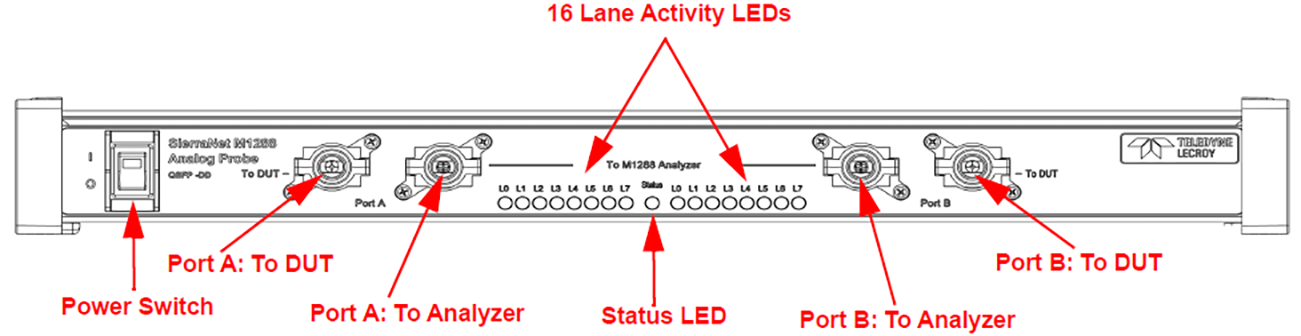
The M1288 Probe has 4 connection cables:
-
To DUT: The outermost probe connection cables are labeled 'To DUT'. These need to be connected to the Devices Under Test (DUT).
-
To M1288 Analyzer: The innermost probe connection cables are labeled as ‘To M1288 Analyzer’. These need to be connected to ports P3 and P4 of the SierraNet M1288 Analyzer.
Note: The ‘captive’ Probe cables (the innermost cables) are the only cables that need to be connected to the SierraNet M1288 Analyzer. The analyzer uses sideband signals in the cables to control the Probe.
Additionally, the left pair of Probe connections is labeled as 'A', and the right pair of connections is labeled as 'B':
-
DUT traffic on the 'A' side will be recorded by the Analyzer port connected to the 'A' side, and
-
DUT traffic on the 'B' side will be recorded by the Analyzer port connected on the 'B' side.
See Connecting the SierraNet M1288 Analyzer.
M1288 Probe LEDs
The M1288 has the following LEDs:
-
Status: The middle LED displays the connectivity status between the probe and the M1288 analyzer:
-
Red: No(0) Analyzer cables connected to the M1288 Analyzer ports (P3/P4)
-
Blue: One(1) Analyzer cable is connected to one of the M1288 Analyzer ports (P3/P4)
-
Blinking Green: Both Analyzer cables are successfully connected to both M1288 Analyzer ports (P3/P4)
-
-
Lane Activity: 16 Lane LEDs denote activity on the respective lane.
M1288 Probe Back Panel
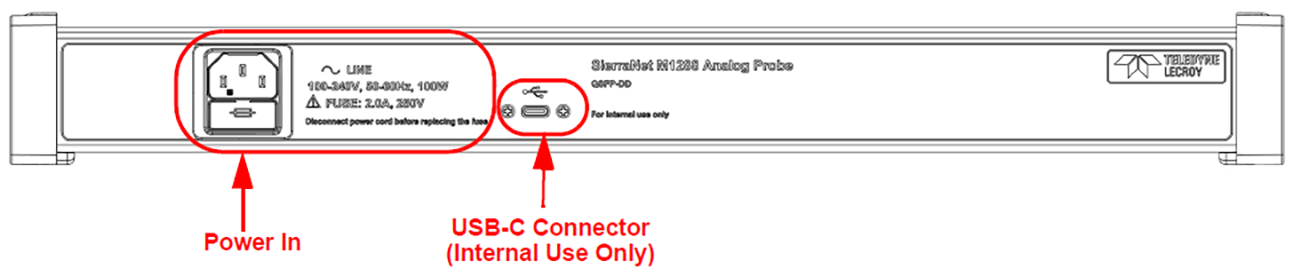
On the back, the M1288 Probe has Power In and a single USB-C connector.
Note: The USB-C connector is labeled For Internal use only; customers should not use it.