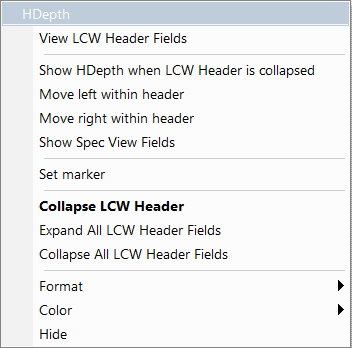
From the field context menu, you can find Format, Color, and Hide menu selections.
-
You can change the Format of the cell value to Hex, Decimal, Binary or ASCII.
-
You can change the Color of the field header.
-
You can Hide ALL instances of the field in the trace, which you can also do in the Display Options dialog (see Color Display Options).
-
To unhide ALL instances of a field, select View > Unhide cells and select the field from the list of hidden fields, or right-click in the trace background, select Unhide cells, and select the field to unhide from the list. You can also use the Display Options dialog (see Color, Format, and Hiding).
Hide/Show Field when Packet Section is Collapsed
A right-pointing arrow 
When a set of fields is in the collapsed state, with collapsible/expandable fields, you can choose whether to show or hide them. Thus, you can determine which fields are more critical to view in these two modes.
Do NOT confuse this with Hide Fields, which hides a field everywhere without regard to collapse/expand state.