
Timestamping is the process of precise recording in time of packet arrival. Timestamps is an optional parameter in the Main windows and Event Display that can assist in troubleshooting a network link. The Timestamp resolution is 5 ns.
The timestamps for packets, captured by the system, are based on a hardware clock in the sniffer. However, they are relative to the host time when record starts. For example, if one starts recording at 4:00 PM according to their host computer, all the packets will have a timestamp that is after 4:00 PM.
Switching to Relative Timestamp
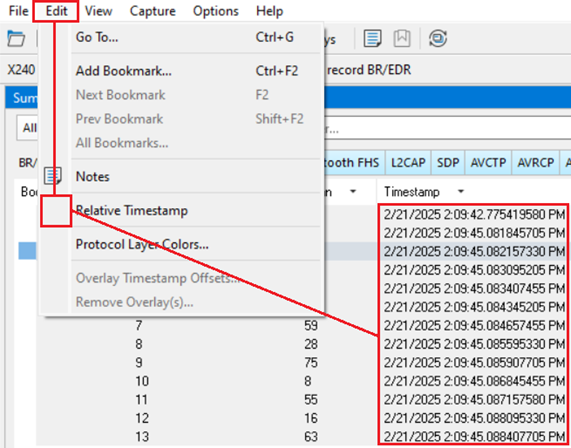
With Relative Timestamp option unchecked, the timestamps will be in date and time format.
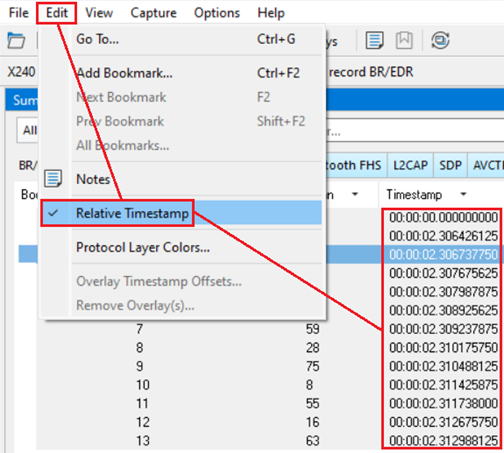
After checking the Relative Timestamp option, the timestamps are shown as the amount of time that has passed since the first byte was captured. It works just like a stopwatch in that the timestamp for the first byte is 0:00:00.0000 and all subsequent timestamps increment from there. The timestamp is recorded as the actual time, so you can flip back and forth between relative and actual time as needed.
The options in this section affect only how the timestamps are displayed on the screen, not how the timestamps are recorded in the capture file.