
To access the Script Mode Port Settings, click the pencil 
Note: If the icon says “Easy Mode” instead of “New Script”, then click to switch to “New Script.”
Commands
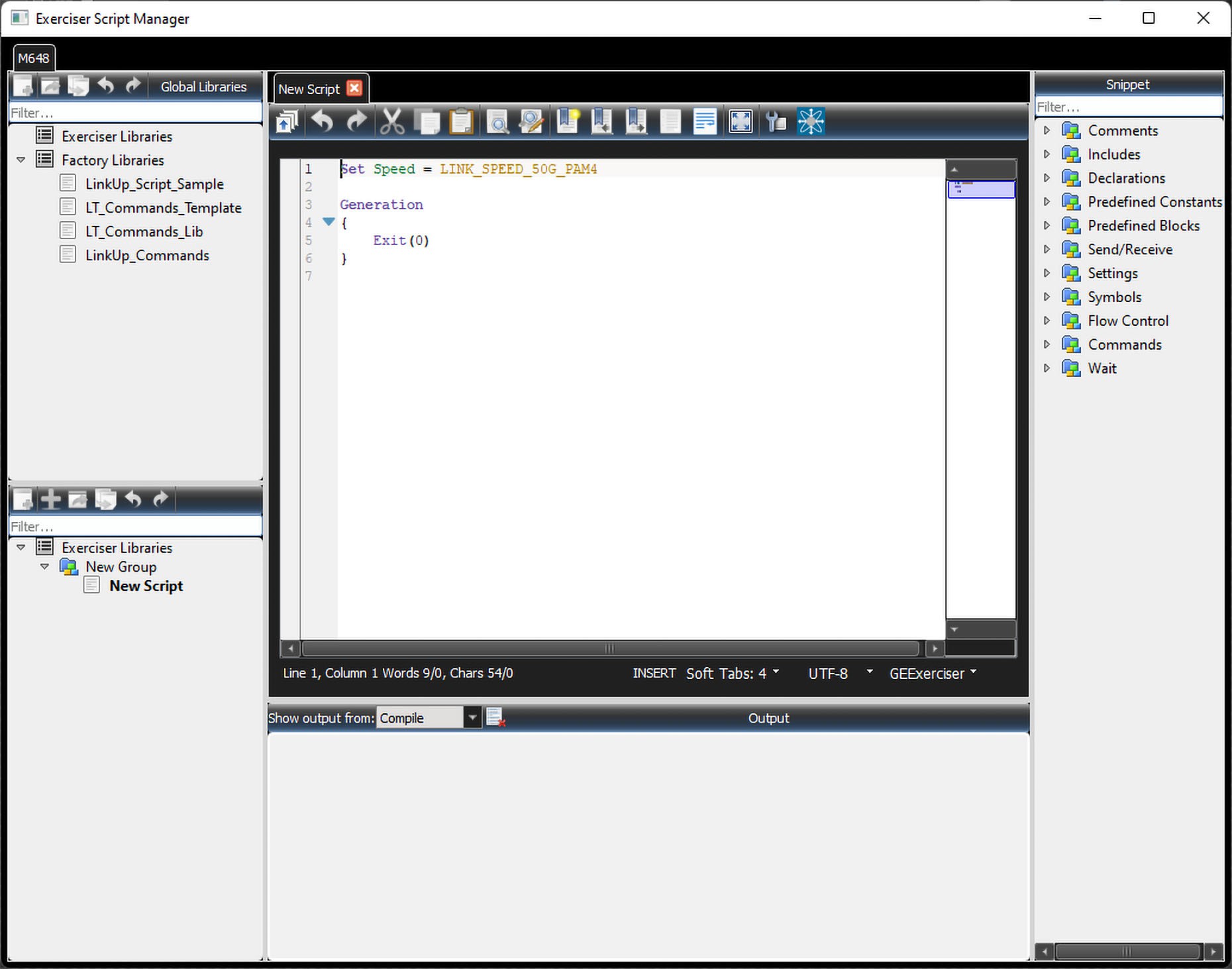
Easily add commands to the New Script window by dragging and dropping commands from the Snippet area into the New Script window. The commands are organized into folders. Some folders also have sub-folders. The following sections describe the commands in more detail.
Note: The installation contains the following files, which include examples for using the AN/LT Ethernet Exerciser:
-
LT_Commands_Lib, LT_Commands_Template
-
LinkUp_Script_Sample
-
LinkUp_Commands
Comments
Line Comment
# is the Comment symbol for a line comment. Anything on the line after the # symbol is ignored. Example: AutoFillWordInsertion = ON # This is an example of a line comment.
Block Comment
All the text between /* and */ is ignored.
Example:
/*
This is an example of a block of comments.
*/
Includes
The directive %include “FileName.inc” includes the file FileName.inc. This lets you add common definitions and templates into new scripts.
The language parser makes sure the same file is not included more than once.
Example:
%include “path_to_include\SomeInc.inc”
# This directive actually includes file 'path_to_include\SomeInc_1.inc'.
Absolute paths are also allowed:
%include “c:\absolute\path\to\include\SomeInc.inc”
Note: Default path: “C:\Users\Public\Documents\LeCroy\NET Protocol Suite\”
Declarations
Constant
Only unsigned integers are defined as constants. Some constants are predefined in the Sierra Exerciser.
Examples:
Const SOME_HEX_DATA = 0xAABBFFEE #defines hexadecimal constant
Const SOME_DEC_DATA = 12 # defines decimal constant
Data Pattern
Data patterns are streams of hexadecimal values. Data Patterns are used to implement some of the fields used in FC NVMe, which are very long, such as:
-
Host Identifier (128 bits),
-
Host NVMe Qualified Name (2048 bits), and
-
NVMe Subsystem NVMe Qualified Name (2048 bits).
Examples:
DataPattern MyPattern_1 = 11223344 DataPattern MyPattern_2 = 11223344 AABBCCDD
DataPattern MyPattern_3 = 11223344 AABBCCDD 10203040
DataPattern MyPattern_Recursive_1 = 12345678 MyPattern_1 MyPattern_2
Variables
Variables are similar to definitions in programming languages. Define up to 250 32-bit or 125 64-bit variables. There are no constraints on variable names, except that you cannot use keywords. The available variables are:
-
Var32
-
Var64
-
Var32_Ref
-
Var64_Ref
Variable scopes are general and defined in the script header before the Generation block. Start variable names with @.
Example:
VAR32 @VariableName1, @VariableName2, ...
VAR64 @VariableName
Note: VAR64 holds field values greater than 32 bits, such as FCAddress.
Global
Global scripts define a procedure. Procedures allow creating simple syntaxes for complex reusable parts in scripts. You can write such code once as a procedure and use it anywhere required. Along with the Procedure script command, you can define procedures with:
-
Procedure(params...)
-
Procedure_Inline
Note: Place Global scripts outside of the generation block.
Procedure(params...)
Define a procedure with parameters.
Parameter Types:
-
PARAM_ID: for sending numeric values to procedures
-
PARAM_ID_REF: for sending and receiveing numeric values to/from procedures
-
PARAM_VAR32: for sending 32-bit variables values to procedures
-
PARAM_VAR32_REF: for sending and receiveing 32-bit variables values to/from procedures
-
PARAM_VAR64: for sending 64-bit variables values to procedures
-
PARAM_VAR64_REF: for sending and receiveing 32-bit variables values to/from procedures
Example:
Procedure ProcedureName
(
  PARAM_ID	param1, #e.g. 1, 2 + i, i
  PARAM_ID_REF	param2, #e.g. i
  PARAM_VAR32	@param3, #e.g. @a, @a + @b, 2
  PARAM_VAR32_REF	@param4, #e.g. @a
  PARAM_VAR64	@param5, #e.g. @a, @a + @b, 2
  PARAM_VAR64_REF	@param6 #e.g. @a
)
Procedure_Inline
Define an inline procedure.
Example:
Procedure_Inline ProcedureName
Predefined Constants
The Predefined Constants are:
-
TRUE: TRUE values are equal to 1
-
FALSE: FALSE values are equal to 0
-
ON: ON values are equal to 1
-
OFF: OFF values are equal to 0
-
INFINITE: Used in Loop or Wait instructions
Example:
Loop(INFINITE) {}
Wait(INFINITE) { when {WF_LINK_UP} do {} }
FEC Type
-
FEC_Disabled
-
BR_FEC_Enabled
-
RS_FEC_Enabled
Link Speed
-
Link_Speed_10G
-
Link_Speed_25G
-
Link_Speed_50G_PAM4
-
Link_Speed_Auto
Reserved Variables
-
LRAN - Last Received Auto Negotiation
-
LRLT - Last Received Link Training
-
Random - Loads the variable with a random value (Generated at runtime)
Example:
Var32 @some_var = Random
Predefined Blocks
Generation Block
The Generation block is the starting point of script execution. The following settings are only valid before Generation block:
-
GenerationMode
-
AutoConnect
-
AutoReconnect
Example:
Generation
{
  #implementation here ...
}
Send/Receive
Send Symbol
Send Predefined GIGE symbols.
Format:
SendSymbol (SYMBOL_NAME, MINIMUM_COUNT)
Supported symbol names are:
-
Idle_Idle
-
Idle_LocalFault
-
Idle_RemoteFault
-
Idle_LinkInterrupt
-
LocalFault_Idle
-
LinkInterrupt_Idle
-
RemoteFault_Idle
-
LocalFault_LocalFault
-
RemoteFault_RemoteFault
-
LinkInterrupt_LinkInterrupt
The MINIMUM_COUNT value is considered as a lower minimum. If no other Send instruction or EXIT_SEND_SYMBOL instruction is executed the exerciser will continue to repeat the last data on the line.
SendTrainingFrame
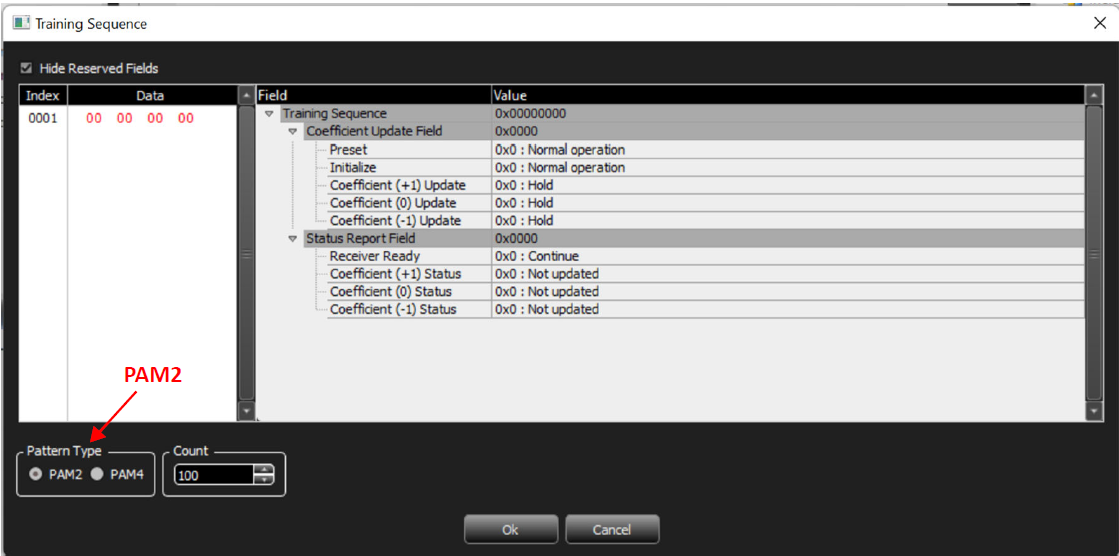
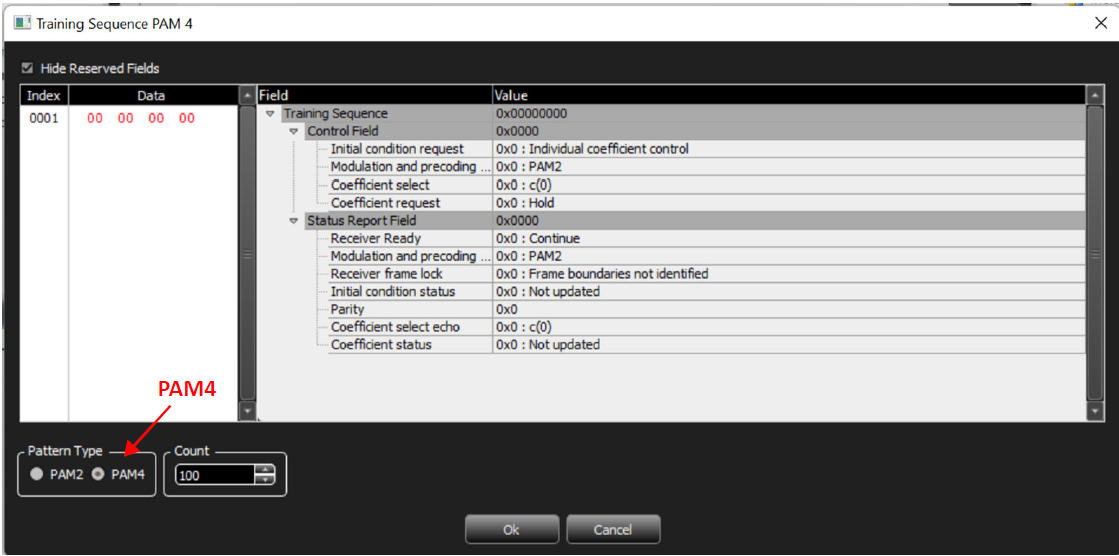
Transmits a specific Training Frame. Two options are available: PAM2(default) and PAM4. See figures below.
Format:
SendTrainingFrame "Training Frame"
{
  TrainingFrameData = "32bit_Hex_Data"
  #field value overwriting [optional]:
  Field[start_bit:end_bit] = value
  Field[start_bit:end_bit] = value
  Field[start_bit:end_bit] = value
  ...
}(Minimum_Count)
Example:
SendTrainingFrame "Training Frame"
{
  TrainingFrameData = "00000010"
  Field[4:5] = 0x1
}(100)
The MINIMUM_COUNT value is considered as a lower minimum. If no other Send instruction or EXIT_MANUAL_TRAINING instruction is executed, the exerciser continues to repeat the last data on the line.
SendAutoNegFrame
Transmits a specific Auto-Negotiation Frame.
Format:
SendAutoNegFrame "Frame Name"
{
  AutoNegFrameData = "48bit_Hex_Data"
  #field value overwriting [optional]:
  Field[start_bit:end_bit] = value
  Field[start_bit:end_bit] = value
  Field[start_bit:end_bit] = value
  ...
}(Minimum_Count)
Example:
SendAutoNegFrame "Auto Negotiation IEEE.std 802.3"
{
  AutoNegFrameData = "000000080000" Field[19:19] = 0x1
}(100)
The MINIMUM_COUNT value is considered as a lower minimum. If no other Send instruction or EXIT_MANUAL_AUTONEG instruction is executed, the exerciser will continue to repeat the last data on the line.
SendRawAutoNegFrame
Transmits user specified 106 bits of Manchester encoded data.
Format:
SendRawAutoNegFrame(FrameMarker_8bit, AN_Data_96bits, RandomBit_2bits, Minimum_Count)
Example:
SendRawAutoNegFrame(0xF0, CCCCCCCC CCCCCCCC CCCCCCCC, 0b10, 200)
Note: The MINIMUM_COUNT value is considered as a lower minimum. If no other Send instruction or EXIT_MANUAL_AUTONEG instruction is executed the exerciser will continue to repeat the last data on the line.
Settings
FECEnabled
Possible values are:
-
FEC_DISABLED (default)
-
RS_FEC_ENABLED
-
BR_FEC_ENABLED
Supported FEC values based on speed:
-
10G -> Only FEC_DISABLED
-
25G -> All 3 values are supported.
-
50G -> Only RS_FEC_ENABLED
Note: Using unsupported FEC type for the specified speed will result in undefined behavior.
Example:
Set FecEnabled = RS_FEC_ENABLED
Speed Settings
Two possible scripts are available: Speed and Rx_Speed.
Speed
Default speed setting specified from unit license. Values are:
-
LINK_SPEED_10G
-
LINK_SPEED_25G
-
LINK_SPEED_50G_PAM4 (default)
Example:
Set Speed = LINK_SPEED_50G_PAM4
Rx_Speed
Default Rx speed setting specified from unit license. Values are:
-
LINK_SPEED_10G
-
LINK_SPEED_25G
-
LINK_SPEED_50G_PAM4
-
LINK_SPEED_AUTO (default)
Example:
Set Rx_Speed = LINK_SPEED_AUTO
Wait Settings
WaitTimeout
Set the default timeout value (us) when it's not specified in the wait and wait_for
commands. Accepts Any integer between 0 to 1,206,323,052,078.
Example:
Set WaitTimeout = 1000
Symbols
The Symbols folder contains the following commands:
-
Idle_Idle
-
LocalFault_Idle
-
RemoteFault_Idle
-
LinkInterrupt_Idle
-
Idle_LocalFault
-
Idle_RemoteFault
-
Idle_LinkInterrupt
-
LocalFault_LocalFault
-
RemoteFault_RemoteFault
-
LinkInterrupt_LinkInterrrupt
The following is an example of coding using these commands:
SendSymbol(Idle_Idle, 10000)
Flow Control
Loop
Loop for a certain number of times.
Format:
Loop (Counter) { instructions }
Example:
Loop (10)
Loop(INFINITE)
Infinite Loop.
Format:
Loop (Counter) { instructions }
Example:
Loop (INFINITE) #Neverending loop. In this case, you can only use exit to finish the script.
If/ElseIf/Else
Example:
@lt_mp_response	= @received_link_training & LT_MP_Req
if (@lt_mp_response == LT_MP_Resp_PAM4)
{
  @mp_response	=	LT_MP_PAM4
}
elseif (@lt_mp_response == LT_MP_Resp_PAM4_Pre)
{
  @mp_response = LT_MP_PAM4_Precoding
}
else
{
  @mp_response = LT_MP_PAM2
}
While
@mp_response = LT_MP_PAM2
Example:
while (@NCQ_Temp0)	{
  @NCQ_Temp1= @NCQ_Temp1 >> 1
If (@NCQ_Temp1 != 0) then { … }
@NCQ_Temp0 = @NCQ_Temp1 & 0x00000001	}
BreakWhile
If it’s called inside a While loop block, program execution point would jump to the next instruction after the While block.
ContinueWhile
If it's called inside a While loop block, program execution point would jump to the first instruction inside the While block. Nested while and if are supported, the keyword then is optional.
Wait/When/ElseWhen
Waits for conditions with a timeout. If the timeout is not defined, WaitTimeout value (us) will be used.
Format:
Wait [(timeout value us)] {When {conditions} Do{instructions} [ElseWhen {conditions} Do{instructions}] [On_Timeout{instructions}] }
Example:
Wait (1000)
{
When { WF_LINK_UP } Do
{}
ElseWhen { WF_TIMEOUT } Do
{
}
On_Timeout
{
}
Wait_For
Waits for conditions until a timeout(us). If the timeout is not defined, it waits until one of the conditions is fulfilled.
If timeout is not defined and WF_TIMEOUT condition is added, the default timeout value (1 ms) is used for timeout.
Format:
Wait_For [(timeout value)] { list of conditions }
Example:
Wait_For (100) { WF_LINK_UP }
WaitForTrainingFrame
Wait for a specified Training Frame.
Format:
WaitForTrainingFrame(Training_Sequence, Mask)
Example:
WaitForTrainingFrame(0x80004000, 0xC0004000)
WaitForAutoNegFrame
Wait for a specified Auto-Negotiation Frame.
Format:
WaitForAutoNegFrame(AutoNeg_pattern, Mask)
Example:
WaitForAutoNegFrame(0x400000000000, 0xFF0000000000)
Return
Return from procedure to the caller.
Exit
Call this command in any branch of the Exerciser program to stop execution. The Exit code can be specified either with a constant or a variable. When the variable name is recognized, the exerciser reads the data in the specified variable and considers it as the exit code.
Note: The maximum value that is allowed for the exit code is 255 (0xFF).After exit, the Port Status dialog displays the exit code.
Format:
Exit [(code value)];
Exit = Exit(0)
Example:
Exit (1)
Call
This command moves the execution point to the calling procedure and comes back after the procedure is finished.
Example:
Call procedure_name
Commands
LinkUp
The exerciser will go through connection sequence using the current settings. Generation will not resume until the connection is established. If the program is manually stopped before this command finishes, the exerciser will remain in the state in which it tries to linkup with the specified settings.
Format:
LinkUp([AN_Enabled/An_Disabled], [LT_Enabled/LT_Disabled])
Example:
LinkUp(AN_Enabled, LT_Enabled) LinkUp(AN_Disabled, LT_Disabled)
LinkDown
The exerciser will break the existing connection to DUT.
EXIT_MANUAL_TRAINING
After sending a manual training frame, the exerciser moves to a state in which it continuously sends training frames until this command is executed. For example, when a wait command is written after a send_training_frame instruction, the exerciser keeps sending the last training frame instead of idles. In that case, this command is used to exit from manual training and move on to normal data.
EXIT_MANUAL_AUTONEG
After sending a manual auto-neg frame, the exerciser moves to a state in which it continuously sends auto-neg frames until this command is executed. For example, when a wait command is written after a send_autoneg_frame instruction, the exerciser keeps sending the last auto-neg frame instead of idles. In that case, this command is used to exit from manual training and move on to normal data.
EXIT_SEND_SYMBOL
After using SendSymbol instruction, the exerciser moves to a state in which it continuously sends the symbol until this command is executed. For example, when a wait command is written after a SendSymbol instruction, the exerciser keeps sending the last symbol instead of idles. In that case, this command is used to exit from Symbol state and move on to normal data.
Delay
The exerciser will wait for the specified time (ns) before executing the next command.
Format:
Delay [(value_in_ns)]
Example:
Delay (1)
Wait
WF_LINK_UP
Waits for the link up
WF_TIMEOUT
Waits until the specified timeout