
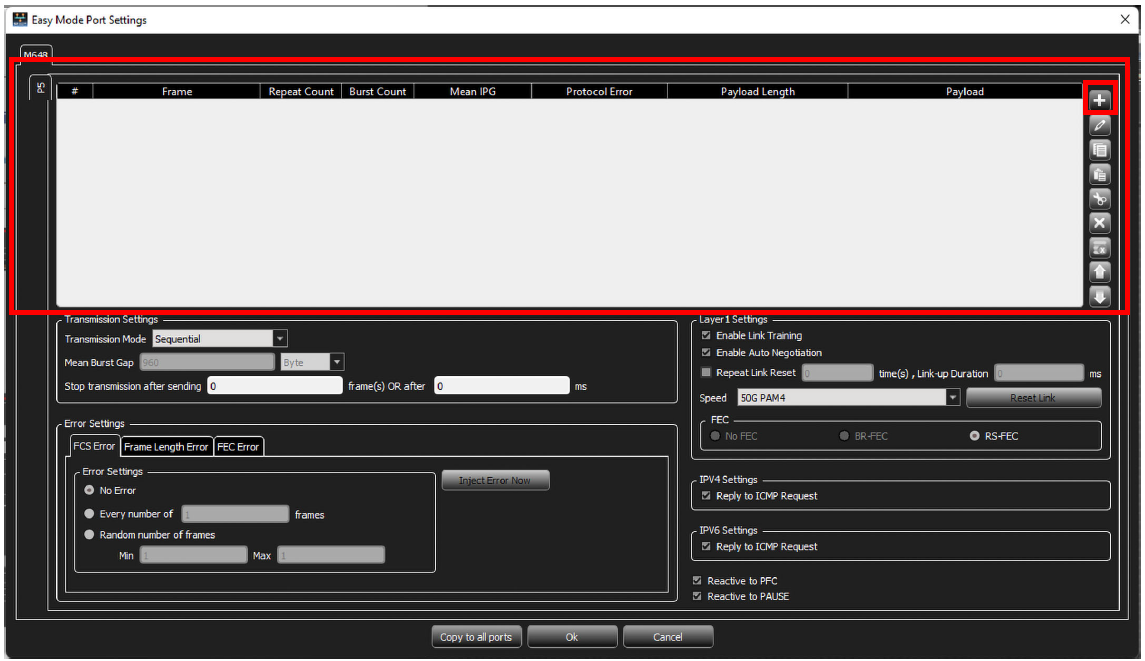
To access the Easy Mode Port Settings, click the pencil 
Note: If the icon says “New Script” instead of “Easy Mode”, click to switch to “Easy Mode.”
-
Define the Frame(s) to be sent:
-
Click the

-
Expand the Preset or Pattern to display the desired frames.
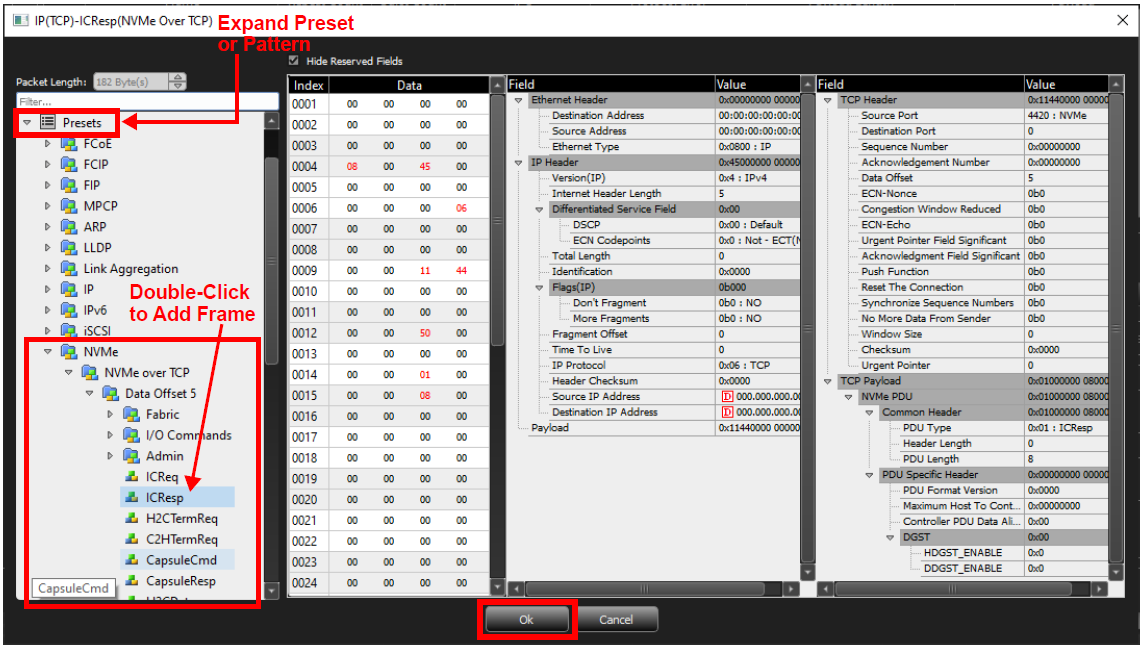
Add Frame -
Double-click on the frame you want.
-
When you are finished adding frames, click Ok. The added frame(s) appears in the Frame Display Area.
-
Note: The Length field gets calculated and updated automatically. The Exerciser cannot send a frame with length less than 64 bytes.
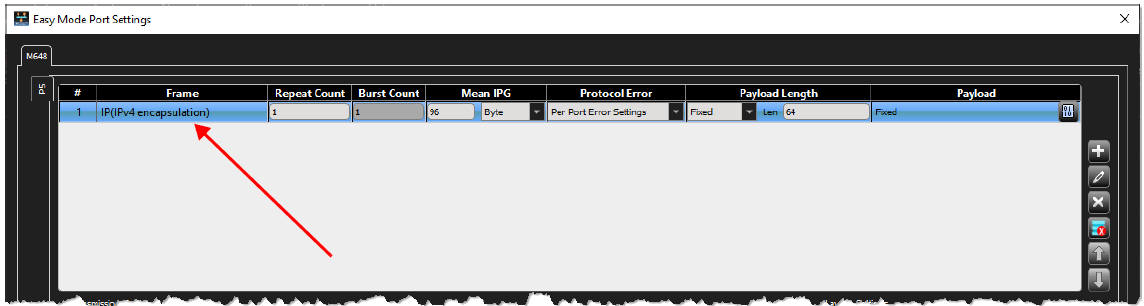
Frame Display Area
Easy Mode Window: Frame Display Area
|
Setting/Control |
Description |
|---|---|
|
Frame number |
Counts the number of frames from 1 through total |
|
Frame |
Name of selected frame |
|
Repeat Count |
Number of times to repeat each frame |
|
Burst Count |
Number of bursts for the Repeat Count. This field is only active in Burst-Interleave Transmission Mode. Note: Repeat Count must be a Multiple of the Burst Count. |
|
Mean IPG |
Interpacket Gap: You can set the IPG in bytes or nanoseconds. Note: The minimal IPG is speed-dependent and automatically set by the software. |
|
Protocol Error |
You can inject errors from the drop-down menu. The default is Per Port Error Settings, as defined in the bottom pane of the dialog. |
|
Payload Length |
Length of data to be included in the frame:
Note:The payload length field gets calculated and updated automatically. The payload length is only incremented for frames that are repeated when the Repeat Counter is used. The payload length is limited to 1999 bytes. |
|
Payload |
Define the Payload: Select the Pattern Type, then select the Payload Pattern Size and specify the Payload Pattern that will be repeated up to the Payload Length.
|
|
Custom |
Define exactly what you want the pattern to be, or you can import a file. |
|
Controls |
|
|
|
Add frames |
|
|
Edit the selected frame |
|
|
Delete selection |
|
|
Removes all frames |
|
|
Move Up: Moves selected frame up |
|
|
Move Down: Moves selected frame down |
|
|
Copies all settings to other ports (if available in selected port configuration). |
|
|
Confirms settings |
|
|
Cancels all changes |





Transmission Settings
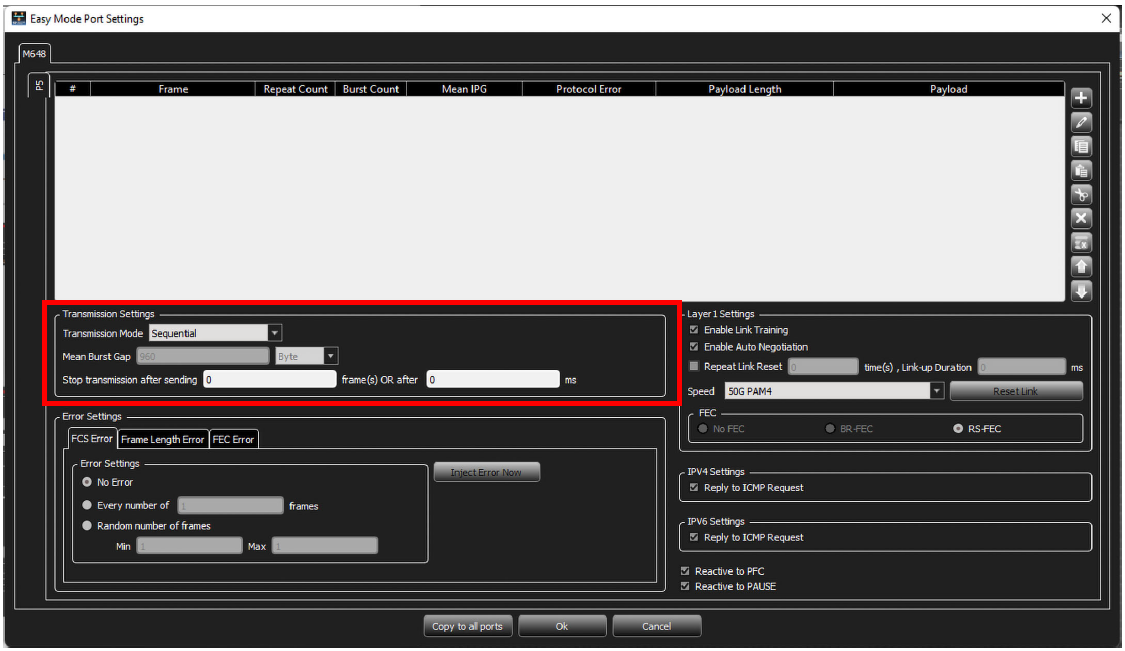
Easy Mode Window: Transmission Settings
|
Setting |
Description |
|---|---|
|
Transmission Mode |
Sequential: Frames are sent out according to the order defined in the top pane. Each frame is repeated as many times as specified in “Repeat Count” settings for that frame. Interleave: One frame is sent from each row in the top pane, until each one reaches “Repeat Count” settings. Burst-Interleave: “Burst Count” bursts, each of “Repeat Count” frames, are sent from each frame defined in the top pane. |
|
Mean Burst Gap |
Only applicable in Burst-Interleave Mode. This is the gap (defined in either bytes or nanoseconds) between consecutive bursts of frames (between each frame in the burst, the defined IPG will remain). |
|
Stop transmission after sending |
Stop sending frames after a set number of frames or milliseconds |
Example Transmission Mode
|
Option |
Example |
|---|---|
|
Interleave |
For example, if 3 frames have been defined:
The sequence of sending frames is:
... then the above sequence repeats. (Sequence repeats until the “Stop transmission” conditions have been met.) |
|
Burst-Interleave |
For example, if 3 frames have been defined:
... then the above sequence repeats. (Sequence repeats until the “Stop transmission” conditions have been met.) |
Error Settings
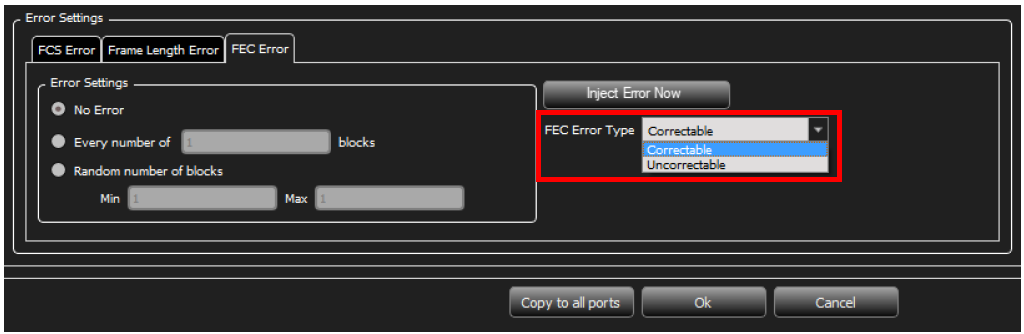
Easy Mode Window: Error Settings
|
Setting |
Description |
|---|---|
|
FCS Error |
|
|
Frame Length Error |
|
|
FEC Error |
Select FEC Error Type, Correctable or Uncorrectable, from the drop-down list. |
|
|
Press this button to inject the errors defined in Error Settings instantaneously. |

Layer 1 Settings
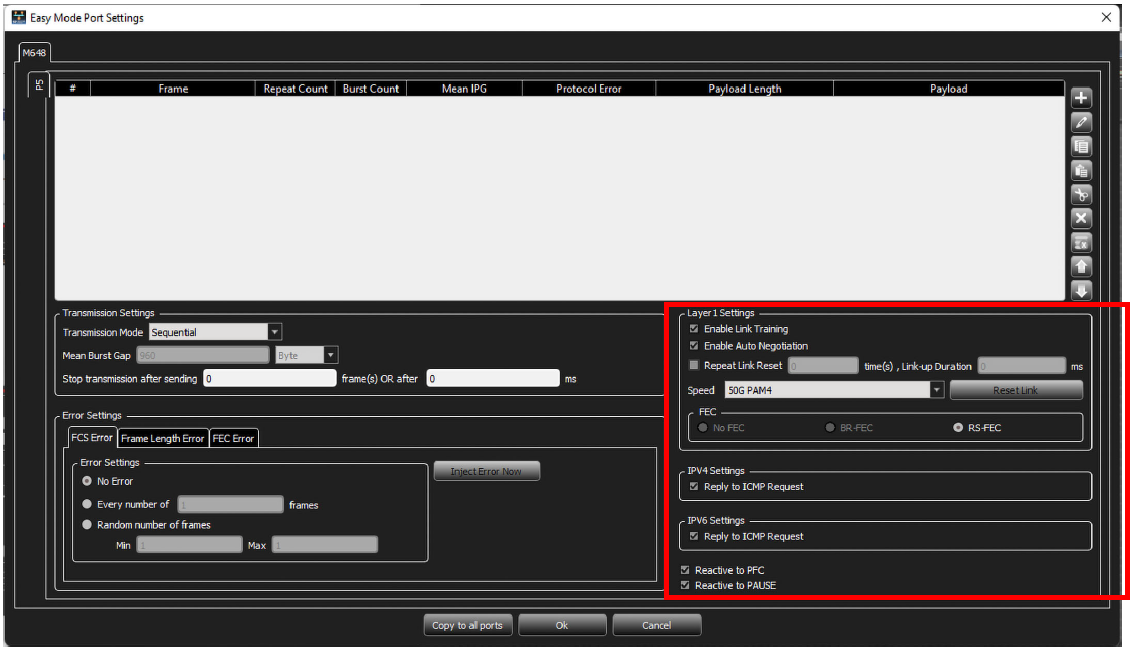
Layer 1 Settings
|
Setting |
Description |
|---|---|
|
Enable Link Training |
Enable/disable Link Training |
|
Enable Auto Negotiation |
Enable/disable Auto Negotiation |
|
Repeat Link Reset |
The number of time to execute link bring up cycles |
|
Link-up Duration (ms) |
The time (in ms) to keep the link up between Link Reset cycles |
|
Speed |
Select the desired generation speed: 10G, 25G or 50G PAM4 |
|
|
Reset the link per the Port Activation Settings |
|
FEC |
|
|
IPV4 Settings |
Enable/disable Reply to ICMP Request |
|
IPV6 Settings |
Reply to ICMP Request |
|
Reactive to PFC |
Enable/disable listening and responding to PFC |
|
Reactive to PAUSE |
Enable/disable listening and responding to PAUSE |
