
Comments
# is the Comment symbol. The line remainder after this symbol is ignored.
/* Something to be ignored */ is a Comment Block. All the text between /* and */ is ignored.
AutoFillWordInsertion = ON # This is an example of a line comment.
/*
This is an example of a block of comments.
*/
Includes
The directive %include “FileName.inc” includes the file FileName.inc. This lets you add common definitions and templates into new scripts.
The language parser makes sure the same file is not included more than once.
Example:
%include “path_to_include\SomeInc.inc”
# This directive actually includes file 'path_to_include\SomeInc_1.inc'.
Absolute paths are also allowed:
%include “c:\absolute\path\to\include\SomeInc.inc”
Note: Default Path: “C:\Users\Public\Documents\LeCroy\NET Protocol Suite\”
Settings
The Set "Constant Name" = Value statement sets different constants/modes using the following value types:
-
Predefined constants (TRUE, FALSE, ON, OFF, INFINITE)
-
Numbers
Examples:
Set AutoFillWordInsertion = ON
Set WaitTimeOut = 239
See 8.7.8.11, Generation Settings for more details.
Constants
Only unsigned integers can be defined as constants. Some constants are predefined in Sierra Exerciser.
Examples:
Const SOME_HEX_DATA = 0xAABBFFEE #defines hexadecimal constant
Const SOME_DEC_DATA = 12	# defines decimal constant
Predefined Constants
-
TRUE
-
FALSE
-
ON
-
OFF
-
INFINITE
Data Patterns
Data patterns are streams of hexadecimal values.
Examples:
-
DataPattern MyPattern_1 = 11223344
-
DataPattern MyPattern_2 = 11223344 AABBCCDD
-
DataPattern MyPattern_3 = 11223344 AABBCCDD 10203040
-
DataPattern MyPattern_Recursive_1 = 12345678 MyPattern_1 MyPattern_2
Note: Data Patterns can be used to implement some of the fields used in FC NVMe, which are very long, such as Host Identifier (128 bits), Host NVMe Qualified Name (2048 bits), and NVMe Subsystem NVMe Qualified Name (2048 bits).
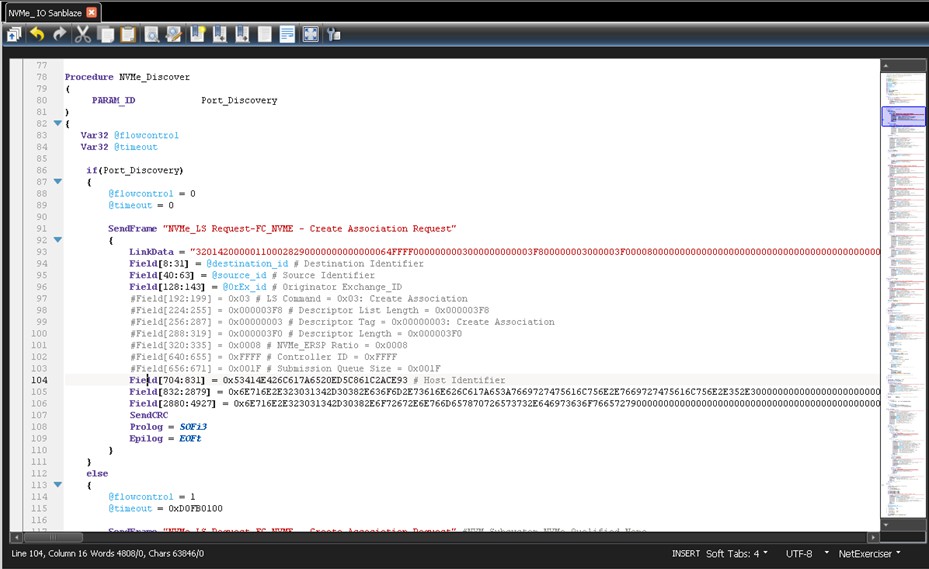
The following formats are supported for hex data and can be used when the data size is more than 64-bits:
-
Field[start_bit:end_bit] = "11111111222222223333333344444444"
-
Field[start_bit:end_bit] = [aa aa aaaa bbbbbbbb cccccccc 6666666677777777 88888888]
-
Field[start_bit:end_bit] = Hex("aaaaaaaabbbbbbbbcccccccc666666667777777788888888")
-
This format can be used directly for ASCII strings: Field[start_bit:end_bit] = String("AAAAAAAAAAAAAAAB")
Features
For now, data pattern identifiers can be used for values longer than 64 bits. If you want to enter values as string or as data pattern values, add the following feature:
Set GenerationMode = GEN_MODE_FC_INITIATOR Generation
{
datapattern host_id = 11111111222222223333333344444444 datapattern host_name =
aaaaaaaabbbbbbbbccccccccddddddddeeeeeeeeffffffff5555555566666666777777778888 8888
SendFrame "CASS (Create Association)-NVMe_LS Request-FC_NVME - Create Association Request" #InternalFrameType[0xef322803, 0x00000008]
  {
  LinkData = "320000000000000028000000000000000000000000000000030000000000000000000000000
0000000000000000000000000000000000000000000000000000000000000000000000000000
0000000000000000000000000111111112222222233333333444444440000000000000000000
0000000000000000000000000000000000000000000000000000000000000000000000000000
0000000000000000000000000000000000000000000000000000000000000000000000000000
0000000000000000000000000000000000000000000000000000000000000000000000000000
0000000000000000000000000000000000000000000000000000000000000000000000000000
0000000000000000000000000000000000000000000000000000000000000000000000000000
0000000000000000000000000000000000000000000000000000000000000000000000000000
000000000000000000000000000000000000A000000000000000000000000000000000000000
0000000000000000000000000000000000000000000000000000000000000000000000000000
0000000000000000000000000000000000000000000000000000000000000000000000000000
0000000000000000000000000000000000000000000000000000000000000000000000000000
0000000000000000000000000000000000000000000000000000000000000000000000000000
0000000000000000000000000000000000000000000000000000000000000000000000000000
0000000000000000000000000000000000000000000000000000000000000000000000000000
0000000000000000B00000000000000000000000000000000000000000000000000000000000
0000000000000000000000000000000000000000000000000000000000000000000000000000
0000000000000000000000000000000000000000000000000000000000000000000000000000
0000000000000000000000000000000000000000000000000000000000000000000000000000
0000000000000000000000000000000000000000000000000000000000000000000000000000
0000000000000000000000000000000000000000000000000000000000000000000000000000
0000000000000000000000000000000000000000000000000000000000000000000000000000
0000000000000000000000000000000000000000000000000000000000000000000000000000
0000000000000000000000000000000000000000000000000000000000000000000000000000
0000000000000000000000000000000000000000000000000000000000000000000000000000
0000000000000000000000000000000000000000000000000000000000000000000000000000
  000000000000000000000000000000000000000000000"
  #Field[0:7] = 0x32 # Routing Control = 0x32: NVMe_LS Request #Field[64:71] = 0x28 # Data Structure type = 0x28: NVMe over Fibre Channel
  #Field[192:199] = 0x03 # LS Command = 0x03: Create Association Field[704:831] = host_id #0x11111111222222223333333344444444 #Host Identifier = 0x11111111222222223333333344444444
  Field[832:2879] = host_name #0x0000000000000000000000000000000000000000000000000000000000000000000000000 0000000000000000000000000000000000000000000000000000000000000000000000000000
0000000000000000000000000000000000000000000000000000000000000000000000000000
0000000000000000000000000000000000000000000000000000000000000000000000000000
0000000000000000000000000000000000000000000000000000000000000000000000000000
0000000000000000000000000000000000000000000000000000000000000000000000000000
0000000000000000000000000000000000000000000000000000000000A # Host NVMe
Qualified Name = 0x00000000000000000000000000000000000000000000000000000000000000000000000000
0000000000000000000000000000000000000000000000000000000000000000000000000000
0000000000000000000000000000000000000000000000000000000000000000000000000000
0000000000000000000000000000000000000000000000000000000000000000000000000000
0000000000000000000000000000000000000000000000000000000000000000000000000000
0000000000000000000000000000000000000000000000000000000000000000000000000000
000000000000000000000000000000000000000000000000000000000A
#Field[2880:4927] = 0x00000000000000000000000000000000000000000000000000000000000000000000000000
0000000000000000000000000000000000000000000000000000000000000000000000000000
0000000000000000000000000000000000000000000000000000000000000000000000000000
0000000000000000000000000000000000000000000000000000000000000000000000000000
0000000000000000000000000000000000000000000000000000000000000000000000000000
0000000000000000000000000000000000000000000000000000000000000000000000000000
000000000000000000000000000000000000000000000000000000000B # NVM Subsystem
NVMe Qualified Name = 0x00000000000000000000000000000000000000000000000000000000000000000000000000
0000000000000000000000000000000000000000000000000000000000000000000000000000
0000000000000000000000000000000000000000000000000000000000000000000000000000
0000000000000000000000000000000000000000000000000000000000000000000000000000
0000000000000000000000000000000000000000000000000000000000000000000000000000
0000000000000000000000000000000000000000000000000000000000000000000000000000
000000000000000000000000000000000000000000000000000000000B
SendCRC Prolog = SOFi2 Epilog = EOFt
}
Exit(0)
}
If needed, you can add one or all of these features. For example:
Field[704:831] = String(“DEVICE NAME“)
OR
Field[832:2879] = aaaaaaaabbbbbbbbccccccccddddddddeeeeeeeeffffffff5555555566666666777777778888 8888
OR
Field[832:2879] = HEX("aaaaaaaabbbbbbbbccccccccddddddddeeeeeeeeffffffff55555555666666667777777 788888888")
Symbol Definitions
You can define named FC Symbols which contain two 32-bits DWORDS or one 64-bits QWORD. The last parameter in the parenthesis is the symbol count. These symbols can be used later for sending data.
Format:
Symbol symbol_name = [bb: value32_a, value32_b] (count) Symbol symbol_name = [value32_a, value32_b]
Symbol symbol_name = bb: value32_a, value32_b (count) Symbol symbol_name = bb: value32_a, value32_b
Symbol symbol_name = value32_a, value32_b (Count) Symbol symbol_name = value32_a, value32_b
Symbol symbol_name = value64 (count) Symbol symbol_name = value64
Here, “bb” is a two-bit symbol header value (10 by default for data and 01 for ordered sets). In case the user don’t provide header information, it would be calculated based on the symbol value types.
Value32_a and Value32_a are 32-bit DWORDs and Value64 is 64-bits Qword. Constants, variables and even variable expressions are also allowed to be used instead of values. For value64, 64-bits variables can be used.
Count is the number of symbols to send during SendData command. It can also be a constant (optional).
Examples:
var32 @a = 1 var64 @b = 2
const SOME_CONSTANT = 1 const COUNT = 2

Symbol symbol_1 = [10: 0x11224488, 0xaabb55dd](1) Symbol symbol_2 = [10: @a, 0xaabb55dd](1)
Symbol symbol_3 = [10: 0x11224488, @a]	(1) Symbol symbol_4 = [10: @b ]	(2)
Symbol symbol_5 = [10: 0x11224488aabb55dd ]	(2) Symbol symbol_6 = [10: 0x11224488, 0xaabb55dd] Symbol symbol_11 = 0x11224488, 0xaabb55dd (1) Symbol symbol_12 = @a, 0xaabb55dd (1)
Symbol symbol_13 = 0x11224488, @a (1) Symbol symbol_14 = @b (2)
Symbol symbol_15 = 0x11224488aabb55dd (2) Symbol symbol_16 = 0x11224488, 0xaabb55dd Symbol symbol_17 = SOME_CONSTANT, @a + 1 (COUNT) Symbol symbol_18 = 10: @a, @a + 1
Symbol symbol_19 = R_RDY, R_RDY(100)
Send Data
This command sends data to the other side of the connection. SendData command is symbol-based and the format is like this:
SendData
{
  Symbol_value Symbol_name
  SendData(value, mode, count)
}
Symbol value format is the same as the format used to define symbols:
[bb: value1, value2](count)
[value1, value2]
bb: value1, value2
value1, value2 (count)
value1, value2
expression_1, expression_2
ordered_set1, ordered_set2
CRC, ordered_set (suppose to use an EOF ordered_set here)
Note: You can use 32-bit variables instead of each value (value1 or value2) or a 64-bits variable instead of both values or mix of values and variables:
[bb:@first_var32, @second_var32](count)
[bb:@var32, value1](count)
[bb: @var64](count)
Note: When OrderedSets are used, you should comply with Spec rules, or use the raw format and calculate the symbol values manually.
@dword1 = 0x01000010
  SendData
  {
    [R_RDY, R_RDY]
    [SOFi3, @dword1]
    [0x00000000, 0x08000000]
    [10:0x00000000, 0x00000000]
    [10:0x00000000, 0x00000000]
    [10:0x00000000, 0x00000000]
    [10:0x00000000, 0x00000000]
    [10:0x00000000, 0x00000000]
    [10:0x00000000, 0x2BCBEC78]
    #[ 0x00000000, CRC]
    [01:EOFt ,Idle]
}
* CRC can be inserted manually or calculated automatically with the CRC keyword as a Symbol value.
SendCRC/CRC
SendCRC will calculate CRC of a SendData/SendFrame. When there are variable values in SendData, you must include SendCRC command instead of last DWORD. Otherwise, wrong CRC value will be sent.
The constraints are SendCRC is only supported on last DWORD before end of frame.
Send
To instruct the Exerciser to send a bigger volume of data inside a SendData frame, use the following commands:
Send(@varName, SEND_FIXED, repeat_count)
Send(value64, SEND_FIXED, repeat_count)
This command sends the value in the 64-bit variable for 'repeat' number of times. If a 32-bit variable is used here, lower DW would be used for Send command.
Send(@varName, SEND_PRBS_11, repeat_count)
Send(value64, SEND_PRBS_11, repeat_count)
This command sends the value in the 64-bit variable for ‘repeat’ number of times, by incrementing the variable by 1 in each iteration.
Send(@varName, SEND_PRBS_11, repeat_count)
Send(value64, SEND_PRBS_11, repeat_count)
This command sends the PRBS_11 value with the initial seed from the 64-bit variable for ‘repeat’ number of times.
Example:
SendData
{
  [R_RDY , R_RDY ](100)
  [SOFi3 , 0x01000010]
  Send(0x00000000, SEND_FIXED, 6) [0x00000000, CRC]
  [EOFt ,Idle]
}

@dword1 = 0x00000100 SendData
{
  R_RDY, R_RDY(100)
  SOFi3, 0x01000010
  Send(@dword1, SEND_INCREMENTAL, 6)
  0x00000000, SendCRC
  EOFt ,Idle
}
Note: When OrderedSets are used, you should comply with Spec rules, or use the raw format and calculate the symbol values manually.
Field Definition
-
Field length is in bits. ‘*’ means that the length is variable and is set based on the assigned value.
-
Field starting offset is calculated from frame start based on the length of the previous fields.
Examples:
Field32	: 32 = 0xAABBFFEE
FrameType	: 8 = 12
HashedDest : 24 = HEX_DATA
Reserved1	: 8 = 0xDA
Field16	: 16 = 0xAAAA
Reserved2	: 8 = 0xAD CRC	: 32
Data Field Definition
-
Data = { pattern }: Pattern is assigned to Data.
-
Data = count, value: A pattern of “count” times “value” is assigned to Data.
-
Data = count, start value, step: A pattern of values starting with “start value” with steps of “step” and a length of “count” is assigned to Data.