
Example .gexlib files and Include files are in two directories called \Samples and \Include that are typically installed in:
C:\Users\Public\Documents\LeCroy\NET Protocol Suite\Generation\Samples and C:\Users\Public\Documents\LeCroy\NET Protocol Suite\Generation\Include
Exerciser Script
The exerciser script consists of include statements, a Generation block, and optionally global statements.
The Generation block is the code responsible for the actual traffic generation. It is marked by the tag Generation. The composition and format of the Generation block is described later.
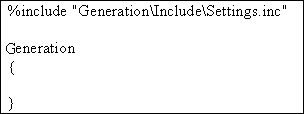
The include statements provide links to the Include files, which provide the definitions for primitives, frames and settings that hold for most or all of the generation session (global settings).
The exerciser settings and their default values are contained in the Teledyne LeCroy-provided Include file: Settings.inc
Settings.inc File
The Settings.inc file contains global statements about the link, the type of device being emulated, and other conditions that are to exist throughout part or all of the traffic generation.
This file may be included in the traffic generation file. The Settings.inc is located at:
C:\Users\Public\Documents\LeCroy\NET Protocol Suite\Generation\Include
Editing Settings.inc
Text in the Settings.inc file can be edited directly or copied into the beginning of the traffic generation file and edited there.
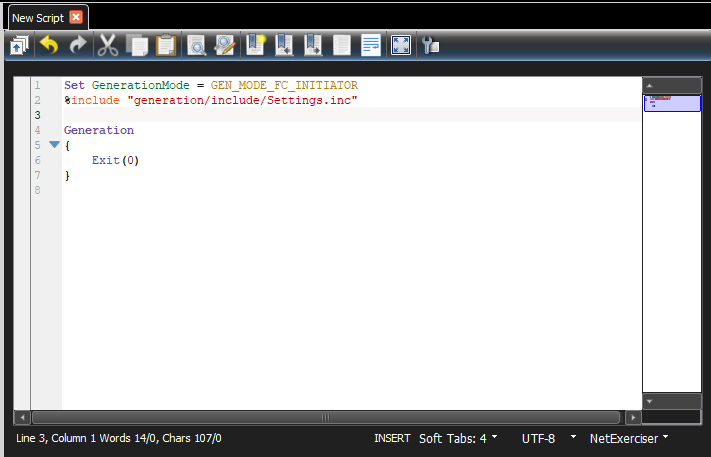
When editing global settings, keep in mind the following rule:
The last line encountered before the Generation block takes precedence. Thus, if the following two lines about the device emulation were added just above the Generation block, the second would take effect:
-
set GenerationMode = GEN_MODE_FC_TARGET
-
set GenerationMode = GEN_MODE_FC_INITIATOR
Placing Global Settings in the Generation Block
Some global settings, such as AutoFillWordInsertion = On/Off can be set and reset in the Generation block. For example, you might want to set AutoFillWordInsertion = ON prior to traffic generation, and then change to OFF halfway through the generation session.
# Generation Block Generation
{
  Set AutoFillWordInsertion = ON
  #
  # … some instructions here #
  Set AutoFillWordInsertion = OFF
  #
# … some other instructions here #
}
When placed within the Generation block and viewed in the trace window, global settings appear as colored bars interspersed amidst the traffic.
The Following global settings cannot be placed within the Generation block:
-
GenerationMode
-
AutoConnect
-
AutoReconnect
These commands should be configured either in the Setting.inc file or at the beginning of the traffic generation file as a global statement.
Symbol and Frame Definitions
The default value for all Frame fields is zero.
Special Conditions for Frames
CRC Calculations are calculated unless told otherwise: If the Cyclic Redundancy Check (CRC) is not explicitly set in the traffic generation file, the application assumes that you want it and calculates and displays it in front of the generated frames.
Note: CRC is a standard algorithm used by commonly available software to produce an eight-character, hexadecimal number using all the bytes in a Target file. This number, a “digital signature”, changes when any byte in the Target file changes. The digital signature does not change when the file name or creation date changes.
If you provide a CRC value, the application uses that value, even if it is incorrect. This gives you the option of configuring the generator to create CRC errors.