The LinkExpert API allows you to control LinkExpert using a Python module. The API is based upon socket communications between the LEX server and the Python client, which is located at:
C:\Program Files\Lecroy\LinkExpert\LexAPI
The LinkExpert API is a high level API that can be used without using a socket routine.
Setup Requirements — Windows
-
For Python version 3.0 and above, the Python module “LexApi.py” must be located at: C:\Program Files\Lecroy\LinkExpert\LexAPI.
-
Before working with the LEX API, create an object with the default protocol ID.
-
The LinkExpert server automatically closes when the last client socket disconnects from the process.
API Module Initialization
For creating the main API module, first setup a reference to the location of the API module: C:\Program Files\Lecroy\LinkExpert\LexAPI
Then, initialize the module with the default protocol. Refer to the following code example:
import sys
sys.path.append(r'C:\Program Files\Lecroy\LinkExpert\LexAPI') import LexApi
api = LexApi.LexApi("PCI
Note: If there is only one protocol available, then the protocol_id field can be empty.
API List and Parameters
The following table lists the code and its parameters used in this API. See API Sample Code for an example.
|
Code |
Description |
|---|---|
|
GetLastError() print(api.GetLastError()) |
There is family of errors which cannot be handled by a simple API call and can be raised during some internal process asynchronously. For getting information about this errors use this method. |
|
GetPackageManager() package = api.GetPackageManager() |
Return object for working with selected package. |
|
SetPackage(package_name, package_version) package.SetPackage( "PCIe 5.0 Compliance Package Tests", "" ) |
Select package for further manipulations where package_name is the selected package name and package_version is the selected package version. Note: This parameter is DEPRECATED. |
|
SetPackage2(package_id, test_ids) package_id = PackageId.PackageId( "PCIe 5.0 Compliance Package Tests", "" ) package.SetPackage2(package_id, ["test_id_1", "test_id_2"])]) |
Select package for further manipulations, where: package_id = This class keeps information for package identification: package name and package version test_ids (optional) = The list of test identifiers ( test codes ) which must be added to the session. If list is empty all tests from the selected package will be added to the session |
|
GetPackages() packages = package.GetPackages( ) |
Returns a list of available packages |
|
SelectTest(test_code, is_selected) |
Include or exclude the test in the currently selected package for session run. test_code = Test code. Unique test identifier is_selected = True - add the test to the session. False - exclude the test from the session |
|
GetPackageInfo(package_id) package_info = package.GetPackageInfo(package_id) |
Return information about requested package. The return type is "PackageInfo", where: package_id = This class keeps information for package identification: package name and package version |
|
RunTests() package.RunTests() |
Run all tests from the package. Asynchronous function. Must stop tests or wait for end of session before exiting. |
|
RerunFailed() package.RerunFailed() |
Some tests fail after the first run and pass after rerunning. With this command, you do not have to rerun whole session again. This method allows you to run only failed tests after a previous run. The function will throw an exception if session was not run previously or there are no failed tests for rerunning. |
|
StopTests() package.StopTests() |
Stop running session |
|
IsRunning() package.IsRunning() |
True = session running Otherwise, False |
|
GetReport() while package.IsRunning: report = package.GetReport() print( report.GetPassed() ) print( report.GetFailed() ) print(report.GetAborted() ) print( report.GetDone() ) print( report.GetTotal() ) for name, status in report.GetTests(): print( "{0}. {1}".format(name, status)) |
Return state of current session. A snapshot of the current session is kept in the "TestReport" object |
|
SaveTraceExpert(file_path) package.SaveTraceExpert( r"C:\workspace\report.html") |
Save current session in HTML format, where file_path is the full path for saving in HTML format (*.html). Use when the session is finished. |
|
SaveTraceExpertAsCSV(file_path) package.SaveTraceExpertAsCSV( r"C:\workspace\report.csv") |
Save current session in CSV format, where file_path is the full path for saving in CSV format (*.csv). Use when the session is finished. |
|
SaveTraceExpertAsExcel(file_path) package.SaveTraceExpertAsExcel( r"C:\workspace\report.xml") |
Save current session in Excel format, where file_path is the full path for saving in Excel format (*.xml). Use when the session is finished. |
|
SaveSession(file_path) package.SaveSession( r"C:\workspace\session.lsxp") |
Save current session to the file. This function should be called when a session is finished. file_path = Full path to the session file (*.lxpt) |
|
GetDeviceManager() device = api.GetDeviceManager() |
Return device manager for manipulation with connected devices. |
|
GetConnectedAnalyzer() analyzer_name = device.GetConnectedAnalyzer() |
Returns the name of the connected analyzer. If the analyzer is not connected or not initialized, returns an empty string. |
|
GetConnectedExerciser() exerciser_name = device.GetConnectedExerciser() |
Returns the name of the connected exerciser. If the exerciser is not connected or not initialized, returns an empty string. |
|
WaitConnectedDevices(timeout_s) device.WaitConnectedDevices() |
Waits until analyzer and exerciser are connected. timeout_s (optional) = Timeout in seconds. By default this value is 300 |
|
WaitConnectedAnalyzer (timeout_s) device.WaitConnectedAnalyzer (200) |
Wait until analyzer is connected. timeout_s (optional) = Timeout in seconds. By default this value is 300 |
|
WaitConnectedExerciser (timeout_s) device.WaitConnectedExerciser() |
Wait until exerciser is connected. timeout_s (optional) = Timeout in seconds. By default this value is 300 |
|
EnableSingleDevice (serial, is_enable) device.EnableSingleDevice( 1500, True ) |
Enables or disables device for application. LinkExpert requires an analyzer and an exerciser or an exerciser only. If you have an inappropriate number of connected analyzers or exercisers, you can disable extra devices for LinkExpert. serial = device serial number is_enabled = true, selected device enabled |
|
ConnectNetworkDevice (serial, ip, is_analyzer) device.ConnectNetworkDevice(1500, "192.168.7.9" True) |
Connect network device by IP and serial number. This device should be discovered on the network by LinkExpert/PeTracer before connection. serial = device serial number ip = IP address of device which must be connected is_analyzer = True, it is an analyzer. False, it is an exerciser |
|
DisconnectNetworkDevice (serial, is_analyzer) device.DisconnectNetworkDevice(1500, True) |
Disconnect network device by serial number. serial = device serial number is_analyzer = True, it is an analyzer. False, it is an exerciser |
|
ConnectEthernetDevice (ip, device_name, check_device_availability) device.ConnectEthernetDevice("192.168. 7.9", "Summit M5X", True) |
Connect undetected device by IP and device name. LinkExpert/PeTracer may not discover some devices on the network. Use this to directly connect remote device. ip = IP address of device which must be connected device_name = Name of the selected device: Summit T34, Summit T54, Summit Z58, Summit Z516, Summit Z416, etc. check_device_availability = Additionally check if device exists and connected to network |
|
IsAnalyzerConnected() device.IsAnalyzerConnected() |
Returns True if analyzer is connected. |
|
IsExerciserConnected() device.IsExerciserConnected() |
Returns True if exerciser is connected. |
|
IncludeRecording (serial, is_analyzer, is_include) device.IncludeRecording( 1500, True, True ) |
Include or exclude device from recording by serial number. Some analyzers can be excluded from recording and as a result will be unavailable in the connected device list. There are some exercisers with embedded analyzers which visible as two independent devices. This method can turn off analyzer from connected exerciser for working only with single exerciser. serial = device serial number is_analyzer = True, it is an analyzer. False, it is an exerciser is_include = Include or exclude device from recording |
|
GetSettingsManager() settings = api.GetSettingsManager() |
Returns settings manager. |
|
SetLinkWidth(lane_count) settings.SetLinkWidth(1) |
Set link width for the session where lane_count is the number of lanes: 1 = 1 lane 2 = 2 lanes 4 = 4 lanes 8 = 8 lanes 16 = 16 lanes 20 = Auto (x2 maximum) 40 = Auto (x4 maximum) 80 = Auto (x8 maximum) 1600 = Auto (x16 maximum) |
|
SetLinkSpeed(speed) settings.SetLinkSpeed(0) |
Set link speed for the sesssion, where speed is the speed index: 0 = Auto 1 = 2.5 Gt/s 2 = 5.0 Gt/s 3 = 8.0 Gt/s 4 = 16.0 Gt/s 5 = 32.0 Gt/s |
|
SetPrecoding (stream, is_enabled) settings.SetPrecoding(EStream.UPSTREAM , False) settings.SetPrecoding(EStream.DOWNSTRE AM, True) |
Set precoding settings. stream = EStream. Set precoding for particular stream. is_enabled = True - enable precoding. |
Descriptions of Internal Types
|
Type |
Type Name |
Definition |
|---|---|---|
|
Enum |
EStream |
EStream.UPSTREAM - corresponds to the upstream EStream.DOWNSTREAM - corresponds to the downstream |
|
Enum |
ESpeed |
ESpeed.AUTO - Auto ESpeed.GEN1 - 2.5 Gt/s ESpeed.GEN2 - 5.0 Gt/s ESpeed.GEN3 - 8.0 Gt/s ESpeed.GEN4 - 16.0 Gt/s ESpeed.GEN5 - 32.0 Gt/s |
|
int |
Number of lanes |
1 - 1 lane 2 - 2 lanes 4 - 4 lanes 8 - 8 lanes 16 - 16 lanes 20 - Auto (x2 maximum) 40 - Auto (x4 maximum) 80 - Auto (x8 maximum) 160 - Auto (x16 maximum) |
|
class |
PackageID |
The class keeps information for package identification: package name and package version |
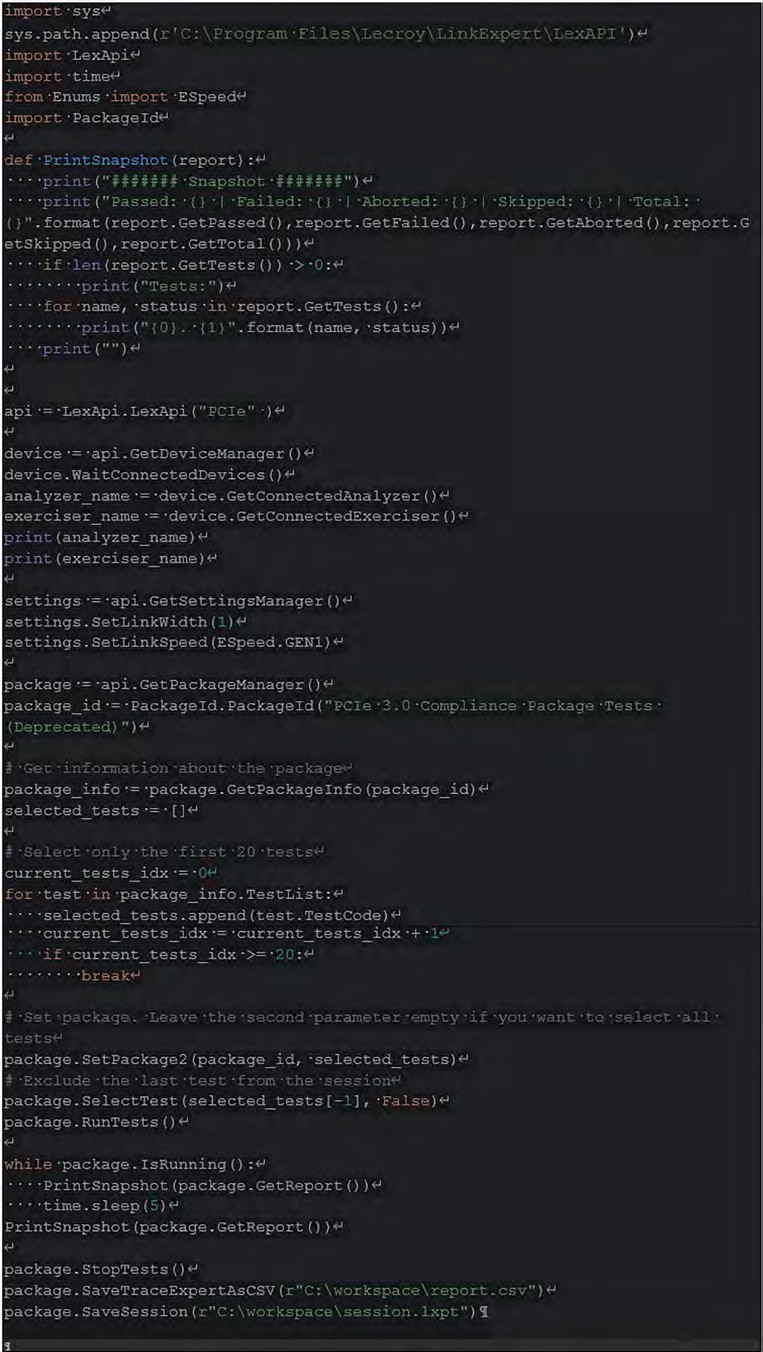
API Sample Code
The figure below shows a sample of the API code. The code shows how to run LinkExpert tests and save result to the CSV and LXPT files.