
Script languages such as Visual Basic (VB) and Javascript, which are used in HTML pages, and Windows Script Host (WSH), can implement and automate exposed functionalities in client applications. However, these script engines cannot efficiently create automation objects dynamically, handle events, or control operation remotely. For example, an HTML script language can only handle events from an automation object if the object is created with the <OBJECT> tag when the page is loaded. If the object is created at runtime, events from the object cannot be handled. An automation object can only be launched remotely if the name of the remote server is already known when the script client begins running. If the remote server is not yet known, automation objects cannot be launched.
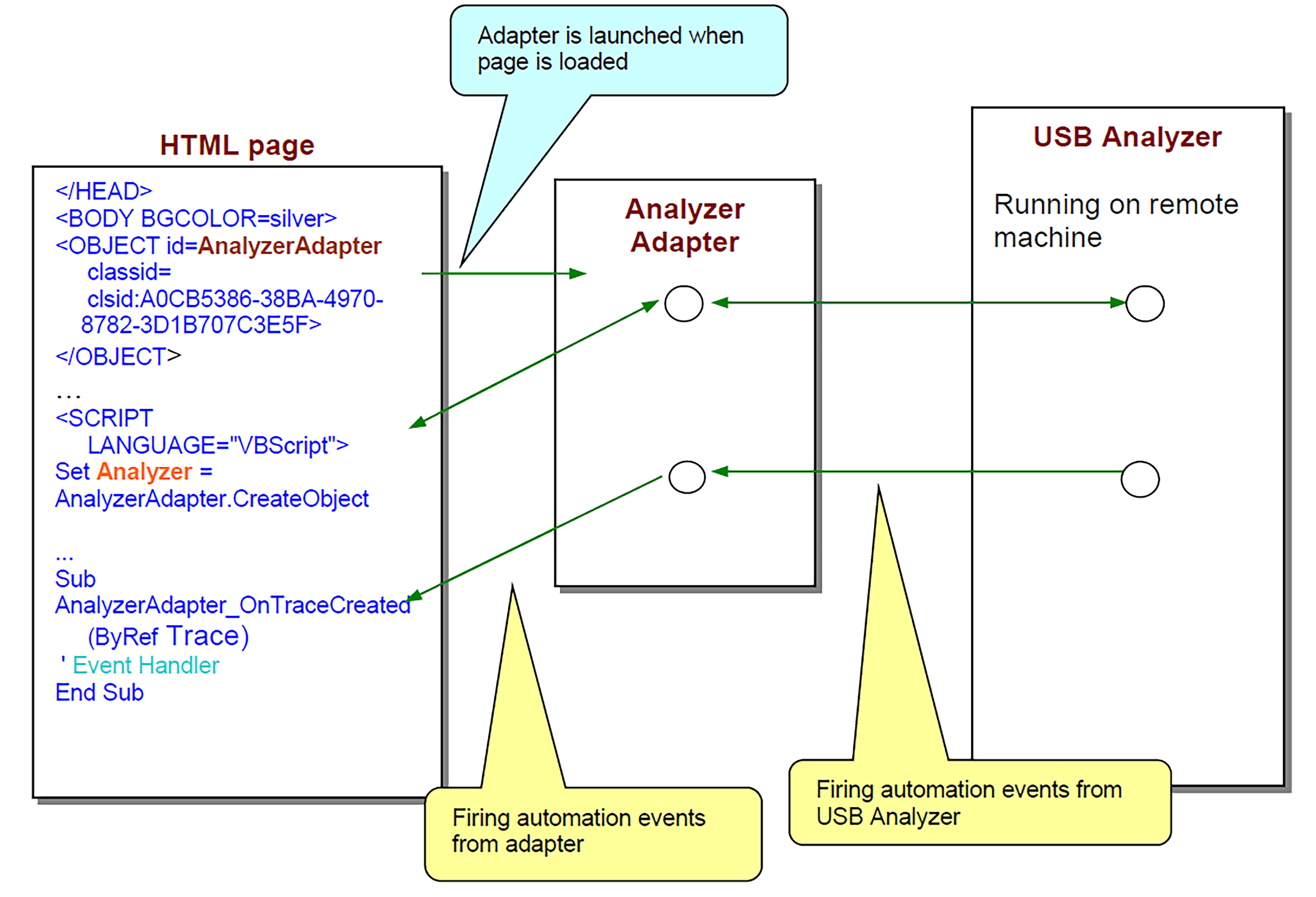
The Teledyne LeCroy USB Analyzer COM API includes an additional COM server, CATCAnalyzerAdapter, to provide full support for automation using script languages. The CATCAnalyzerAdapter automation server:
-
Allows launching and accessing Teledyne LeCroy analyzer automation servers dynamically at runtime.
-
Allows launching and accessing Teledyne LeCroy analyzer automation servers remotely, when the remote server has all necessary DCOM settings and permissions.
-
Handles automation events from Teledyne LeCroy analyzer automation servers.
-
Overrides limitations imposed by the script engines used in HTML browsers and Windows Script Host.
The following diagram and the examples below show how the CATCAnalyzerAdapter automation server is used as an intermediate between an HTML page and the USB Protocol Suite analyzer server to create automation objects dynamically, handle events, and control operation remotely.
IAnalyzerAdapter Interface
Classid: A0CB5386-38BA-4970-8782-3D1B707C3E5F
ProgID: CATC.AnalyzerAdapter
COM server: CATCAnalyzerAdapter.exe
Primary default interface: IAnalazerAdapter
IAnalyzerAdapter::CreateObject
HRESULT CreateObject ([in] BSTR class_id,
		          [in, optional] BSTR host_name,
		    out, retval] IDispatch** ppNewObj );
This method instantiates a CATC Analyzer object on a local or remote machine and attaches it to the adapter.
|
Parameters |
|
|---|---|
|
class_id |
String representation of classid or ProgId
|
|
host_name |
Name of the remote server where the Analyzer object should be instantiated. Empty value means local host. |
|
ppNewObj |
Pointer to the created remote object. NULL if the object has not been instantiated or accessed. |
Remarks
Only CATC Analyzer COM servers can be instantiated through this method. The Detach method (see below) should be called when work with the remote object is completed.
Note: The pointer returned in ppNewObj should be released separately.
Example: VBScript
</HEAD>

<OBJECT id=AnalyzerAdapter

classid=clsid:A0CB5386-38BA-4970-8782-3D1B707C3E5F>

</OBJECT>

...

<input type="button" value="Connect" name="BtnConnect">

<INPUT NAME="RemoteServer">


<SCRIPT LANGUAGE="VBScript">

<!--

Sub BtnConnect_onclick

On Error Resume Next


 Set Analyzer = AnalyzerAdapter.CreateObject("CATC.USBTracer", RemoteServer.value)


if Not Analyzer Is Nothing Then

window.status = "USBTracer connected"

else

		msg = "Unable to connect to USBTracer"

		MsgBox msg, vbCritical

		window.status = msg

End If

End Sub

-->

</SCRIPT>
Example: WSH
' Create CATC analyzer adapter first.

Set AnalyzerAdapter = WScript.CreateObject("CATC.AnalyzerAdapter", "Analyzer_")

RemoteServer = "EVEREST"

Set Analyzer = AnalyzerAdapter.CreateObject("CATC.USBTracer", RemoteServer)

Analyzer.StartRecording ( Analyzer.ApplicationFolder & "my.rec" )

...
IAnalyzerAdapter::Attach
HRESULT Attach([in] IDispatch* pObj);
This method attaches a CATC Analyzer object to the adapter.
|
Parameters |
|
|---|---|
|
pObj |
Pointer to the CATC Analyzer object to be attached. |
Remarks
Only CATC Analyzer COM servers can be attached to the adapter. If some other Analyzer object was previously attached to the adapter, it is detached by this call.
When the Analyzer object gets attached to the adapter, a client application using the adapter becomes able to handle automation events fired by the remote Analyzer object through the adapter.
Example: VBScript
</HEAD>

<OBJECT id=AnalyzerAdapter

classid=clsid:A0CB5386-38BA-4970-8782-3D1B707C3E5F>

</OBJECT>

...

<input type="button" value="Connect" name="BtnConnect">


<SCRIPT LANGUAGE="VBScript">

<!--

Sub BtnConnect_onclick

On Error Resume Next

Set Analyzer = CreateObject("CATC.USBTracer")

' VBScript function creates object locally.

if Not Analyzer Is Nothing Then

	AnalyzerAdapter.Attach Analyzer ' Attach analyzer to the adapter.


window.status = "USBTracer connected"

else

		msg = "Unable to connect to USBTracer"

		MsgBox msg, vbCritical

		window.status = msg

End If

End Sub

-->

</SCRIPT>
Example: WSH
' Create CATC analyzer adapter first.

Set AnalyzerAdapter = WScript.CreateObject("CATC.AnalyzerAdapter", "Analyzer_")

' VBScript functioncreates object locally.

Set Adapter = WScript.CreateObject("CATC.AnalyzerAdapter")

AnalyzerAdapter.Attach Analyzer ' Attach analyzer object to the adapter.

Analyzer.StartRecording (Analyzer.ApplicationFolder & "my.rec")

...
IAnalyzerAdapter::Detach
HRESULT Detach();
This method detaches the CATC Analyzer object from the adapter.
Remarks
This method detaches an Analyzer object from the adapter. This method does not guarantee that all resources associated with the detached object are freed. All existing pointers to that object should be released to destroy the remote object.
Example: VBScript
</HEAD>

<OBJECT id=AnalyzerAdapter

classid=clsid:A0CB5386-38BA-4970-8782-3D1B707C3E5F>

</OBJECT>

...

<input type="button" value="Connect"    name="BtnConnect">

<input type="button" value="Disconnect" name="BtnDisconnect">

<INPUT NAME="RemoteServer">

<SCRIPT LANGUAGE="VBScript">

<!--

Sub BtnConnect_onclick

On Error Resume Next

 Set Analyzer = AnalyzerAdapter.CreateObject("CATC.USBTracer", RemoteServer.value)

if Not Analyzer Is Nothing Then

window.status = "USBTracer connected"

else

		msg = "Unable to connect to USBTracer"

		MsgBox msg, vbCritical

		window.status = msg

End If

End Sub

Sub BtnDisconnect_OnClick

AnalyzerAdapter.Detach ' Detach the analyzer object from adapter.

Set Analyzer = Nothing

' Release the pointer to the analyzer returned by CreateOject().

	window.status = "USBTracer disconnected"

End Sub

-->

</SCRIPT>
Example: WSH
' Create CATC analyzer adapter first.

Set AnalyzerAdapter = WScript.CreateObject("CATC.AnalyzerAdapter", "Analyzer_")

RemoteServer = "EVEREST"

Set Analyzer = AnalyzerAdapter.CreateObject("CATC.USBTracer", RemoteServer)

Analyzer.StartRecording (Analyzer.ApplicationFolder & "my.rec")

...

AnalyzerAdapter.Detach  ' Disconnect the remote analyzer from the adapter.

Set Analyzer = Nothing  ' Release the analyzer.

' Release the adapter.

Set AnalyzerAdapter = Nothing
IAnalyzerAdapter::IsValidObject
HRESULT IsValidObject([in] IDispatch *pObj,
  [out, retval] VARIANT_BOOL* pVal );
This method helps to determine whether some automation object can be attached to the adapter.
|
Parameters |
|
|---|---|
|
pObj |
Pointer to the object validated. |
|
pVal |
Pointer to the variable receiving result.
|
Remarks
Only CATC Analyzer COM servers can be attached to the adapter.
Example: VBScript
</HEAD>

<OBJECT id=AnalyzerAdapter

 classid=clsid:A0CB5386-38BA-4970-8782-3D1B707C3E5F>

</OBJECT>

...

<input type="button" value="Connect"    name="BtnConnect">

<input type="button" value="Disconnect" name="BtnDisconnect">

<INPUT NAME="RemoteServer">

<SCRIPT LANGUAGE="VBScript">

<!--

Sub BtnConnect_onclick

       'Launch MS Excel instead of USBTracer!!!

Set Analyzer = CreateObject("Excel.Application")

Analyzer.Visible = True


If Not AnalyzerAdapter.IsValidObject(Analyzer) Then

MsgBox "The object cannot be attached", vbCritical

Set Analyzer = Nothing

		Exit Sub

End If

End Sub

-->

</SCRIPT>