
BusEngine and Updates
BusEngine, Serdes BusEngine, and Firmware updates often need to be performed when you update the USB Protocol Suite software. These updates can be performed automatically or manually. Both processes are described.
NOTE: During Firmware and/or Bus Engine updates, you must maintain power and communication connectivity (USB or Ethernet) to the device for the entire update process, and you must allow it to complete the operation. Failure to do so might result in an inoperable unit that would need to be shipped back to Teledyne LeCroy for repair.
Update the BusEngines
The BusEngine core is the heart of the Analyzer. Using state-of-the-art Electronically Programmable Logic Device (EPLD) technology, it incorporates both the high speed recording engine and the configurable building blocks that implement data/state/error detections, triggering, capture filtering, external signal monitoring, and event counting and sequencing. The BusEngine program and the Serdes BusEngine program, and the Firmware that manages the internal microcontroller, are fully field upgradeable.
Within a new software release, it may be necessary to update the Analyzer BusEngine and Serdes BusEngine hardware for proper operation. The Readme file lets you know if this is necessary.
Update the Firmware
Within a new software release, it may also be necessary to update the Analyzer firmware for proper operation. The Readme file informs you if this is necessary.
Automatic Updates
When the USB Protocol Suite software is upgraded, the software may become incompatible with the BusEngine, Serdes BusEngine, and/or Firmware. The next time you connect to the analyzer, the application will prompt you if any of the components needs to be updated.
Follow the on-screen instructions to complete the update.
Manual Updates to Firmware, BusEngine, and Serdes BusEngine
You can manually update the Firmware, BusEngine™, and/or Serdes BusEngine by performing the following steps:
-
Select Setup > Update Device on the Menu Bar to display the Update Device dialog (below):
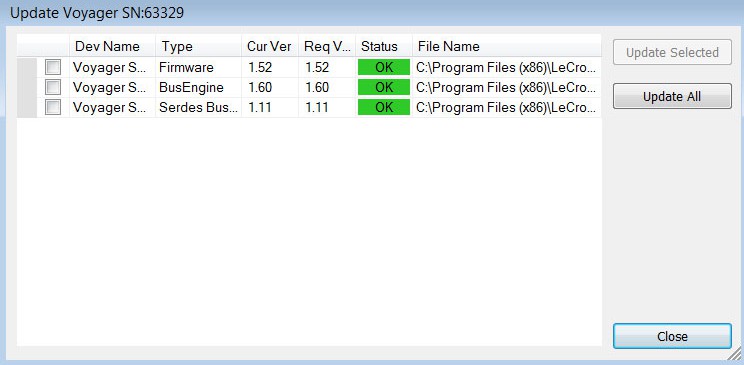
Update Device Dialog The window shows the Device Name, Type, Current Version, Required Version, Status, and File Name.
NOTE: Updating the CATCSync Bus Engine can take up to 40 minutes. For that reason, it is recommended that you do not update it when its current status is OK.
-
To update the Firmware, BusEngine, and/or Serdes BusEngine, first select its checkbox.
-
Click Update Selected or click Update All to update all three.
-
The most current files were copied to your \LeCroy\USB Protocol Suite directory when you installed the program.
-
Power-cycle the analyzer. Re-initialization takes a couple of minutes.