
Tables begin with the keyword TABLE and end with the keyword ENDTABLE. The table name follows the TABLE keyword. Table names must be unique, which means that two tables cannot have the same name, and a table and a field cannot share the same name either. Table entries begin and end with braces. The elements of each entry are:
{ FieldValue "Summary Pane String" "Decode Pane String" }
If only one string is present, it will be used for both the Summary and Decode panes.
Once we have our table in place, we can alter our command_code field to use the table method to look up the appropriate string as follows:
FIELD command_code (Fixed 1 Byte) (Table tableCommmands) IN_SUMMARY "Command/Response" 150 "Command"
Below are two snapshots from the Decode pane. The HEX image below shows the command_code field formatted in hex while the next image (From Table) shows the field formatted from the table.
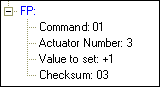
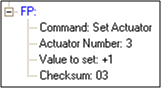
Our decode of the Set Actuator command now looks like this:
"Fictitious Protocol" 0x7f000000
DECODE
TABLE tableCommands
{ 0 "Request Status" "Request Status"}
{ 1 "Set Actuator" "Set Actuator"}
{ 2 "Read Sensor" "Read Sensor"}
{ Default "???" "(unknown)"}
ENDTABLE
FIELD command_code (Fixed 1 Byte) (Table tableCommands) IN_SUMMARY "Command/Response" 150 "Command"
FIELD actuator_number (Fixed 1 Byte) (Decimal) "Actuator Number" VERIFY (FieldIsBetween 1 32)
FIELD actuator_value (Fixed 2 Bytes) (Decimal) "Value to set"
FIELD checksum (Fixed 1 Byte) (Hex) IN_SUMMARY "C'sum" 40 "Checksum" VERIFY (FPChecksum)
END_MAIN_PATH
This is quite a change from our starting point.