
In the description of FP, we state that there are 32 actuators. The actuator numbers are 1 through 32, which means the actuator_number field should not contain any value less than 1 or greater than 32. We can check this by adding a VERIFY statement to the end of the actuator_number field and using a Verify Method. The resulting new statement is:
FIELD actuator_number (Fixed 1 Byte) (Decimal) "Actuator Number" VERIFY (FieldIsBetween 1 32)
FieldIsBetween takes two parameters, a low value and a high value. The method is inclusive, which means if the field value is 1 or 32 or any value in between it will pass the test. If the field value is less than 1 or greater than 32 the test will fail, and the field will be tagged in the Decode pane in red and the expected value displayed, as shown in this snippet from the Frame Display.
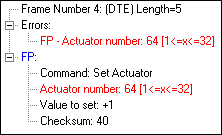
In addition, the frame number on the Summary pane will also be in red.
Verify Methods can be used to validate a message checksum as in:
FIELD checksum (Fixed 1 Byte) (Hex) "Checksum" VERIFY (FPChecksum)
Our decode of the Set Actuator command now looks like this:
"Fictitious Protocol" 0x7f000000
DECODE
FIELD command_code (Fixed 1 Byte) (Hex) "Command"
FIELD actuator_number (Fixed 1 Byte) (Decimal) "Actuator Number" VERIFY (FieldIsBetween 1 32)
FIELD actuator_value (Fixed 2 Bytes) (Decimal) "Value to set"
FIELD checksum (Fixed 1 Byte) (Hex) "Checksum" VERIFY (FPChecksum)
END_MAIN_PATH