
Create a file called "Custom Attributes ATT.dh" in the "My Decoders" directory. In it, paste the text below.
TABLE tMyTable APPENDS_AND_OVERWRITES GATT_UUIDs
{ 0x7f000001 "My Service" "My Service" }
ENDTABLE
This simple code is remarkably powerful.
-
The ATT decoder is configured to look for a file with this exact name. If it exists, whatever is in this file becomes part of the ATT decoder. If it does not exist, the decoder does not care. The file must have a specific name and be in a specific place for this to work.
-
Your table may be named anything unique. That is, tMyTable can be whatever you want as long as it does not conflict with any Frontline table names. The analyzer will tell you if there is a problem.
-
APPENDS_AND_OVERWRITES means that whatever is in your table will replace what is in the Frontline table.
Best practice is to include your company name or initials in your table name which would eliminate any chance of conflict.
-
GATT_UUIDs is the name of the Frontline table.
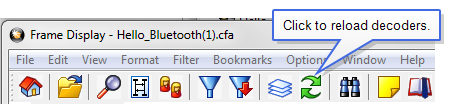
To summarize what’s happening here, you are replacing the entry for 0x7f000001 (Hello Bluetooth) with your own interpretation. Reload the decoders and you will see that frame 76 now shows “My Service” instead of "Hello Bluetooth".