
Statement starts with the keyword GROUP followed by a name. The name may optionally be followed by a string called a label. The GROUP is followed by a list of DecoderScript statements contained within braces.
Groups can be either labeled or unlabeled. For example:
GROUP labeled "labeled"
GROUP unlabeled
The difference lies in how they appear in the Decode Pane. For a labeled group, a sub-tree is displayed named with the given label. The user has to open the sub-tree to see the contained elements displayed. If the GROUP does not have a label, then the GROUP's contents are displayed but no Node for the GROUP is displayed. There are other uses for GROUPs without labels that we will introduce later. The image below shows how unlabeled vs. labeled groups appear in the Decode Pane. On the left is a straight decode of a Set Actuator Response, while on the right is a decode where the Response and Data Byte Count fields have been included in a GROUP labeled with the label "Response".
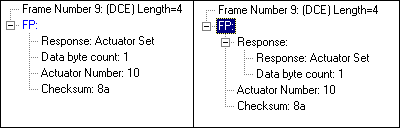
If you recall from the description of FP, the Set Actuator command is just one of three possible commands. We've got a decode of the Set Actuator command, now we want to add a decode for the Read Sensor command. In order to separate the two, we'll put the Set Actuator FIELDS into a group.
GROUP cmdSetActuator "Set Actuator"
{
FIELD command_code (Fixed 1 Byte) (Table tableCommands) IN_SUMMARY "Command/Response" 150 "Command"
FIELD actuator_number (Fixed 1 Byte) (Decimal) "Actuator Number" VERIFY (FieldIsBetween 1 32)
FIELD actuator_value (Fixed 2 Bytes) (Decimal) "Value to set"
FIELD checksum (Fixed 1 Byte) (Hex) IN_SUMMARY "C'sum" 40 "Checksum" VERIFY (FPChecksum)
}
The format of the Read Sensor command is as follows:
|
Command Code |
Sensor Number |
Checksum |
Our Read Sensor group will look like this:
GROUP cmdReadSensor "Read Sensor"
{
FIELD command_code (Fixed 1 Byte) (Table tableCommands) IN_SUMMARY "Command/Response" 150 "Command"
FIELD sensor_number (Fixed 1 Byte) (Decimal) "Sensor Number" VERIFY (FieldIsBetween 1 32)
FIELD checksum (Fixed 1 Byte) (Hex) IN_SUMMARY "C'sum" 40 "Checksum" VERIFY (FPChecksum)
}
Notice that the command_code and checksum fields are identical in both groups. To avoid retyping the same information, we use the form:
FIELD field_name ;
Such a statement means: decode the field according to a FIELD definition given elsewhere named field_name. (There does not have to be a space between the field name and the semi-colon; we do that for readability.) This statement is particularly useful when you need to decode a certain field in multiple paths within your decoder. The full FIELD definition may be placed out of the main line of control and then referenced with the field name followed by a semi-colon. We can rewrite our Read Sensor group as follows:
GROUP cmdReadSensor "Read Sensor"
{
FIELD command_code ;
FIELD sensor_number (Fixed 1 Byte) (Decimal) "Sensor Number" VERIFY (FieldIsBetween 1 32) FIELD checksum ;
}
Incidentally, it is also possible to reference a GROUP multiple times using the same construction. This is useful if you have a series of statements that occur frequently. For example, a date sequence where the first byte is the day, the second the month and the third the year could be grouped into a GROUP date. Anywhere that same sequence is used, just enter GROUP date; in the decoder and all three field statements in the group will be decoded.
We now run into a dilemma. The command_code field tells us whether the command is a Set Actuator or a Read Sensor command. How do we know which one it is? The answer is to use a conditional to test the value of command_code and then decide whether to decode sensor_number or actuator_number and actuator_value based on the value of command_code.