
The GROUP FIELD statement allows you to combine some of the best features of a GROUP with those of a FIELD. This allows you to display an expandable group in the Decode Pane with a value on the entry.
A GROUP FIELD statement is composed of a FIELD statement with the keyword GROUP on the front. Any element that is valid for a FIELD statement is valid for a GROUP FIELD.
GROUP FIELD field_name [remaining elements follow those for a FIELD]
{
element
element
…
}
Groups do not have sizes. The SizeMethod item defines the size of the field, not the group as a whole.
A typical use is to display a set of bit flags, as in this example:
GROUP FIELD status_byte (Fixed 3 Bits) (Binary) "Status" NO_MOVE
{
FIELD active_flag (Fixed 1 bit) (Binary) "Active flag"
FIELD overflow_flag (Fixed 1 bit) (Binary) "Overflow flag"
FIELD error_flag (Fixed 1 bit) (Binary) "Error flag"
}
Notice the NO_MOVE flag on the GROUP FIELD. The resulting display in the Decode Pane resembles below.
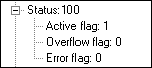
The combined value of the flags is always revealed but they are not shown individually (which takes a good bit of vertical screen space) unless the branch is expanded. This is especially a good means of handling such a field when all the flags are zero except in a few rare cases.
Here is a contrasting example:
GROUP FIELD response (Fixed 1 Byte) (Table Responses) "Response"
{
FIELD data_count (Fixed 1 Byte) (Decimal) "Count of data bytes" VERIFY (MustBe 1)
FIELD data (Fixed 1 Byte) (Decimal) "Data"
}
This is used to display a three-byte sequence consisting of a response code, a byte count (which must have the value one), and a response-specific data byte. The resultant display is similar to:
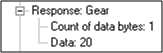
Imagine a protocol message that carries a sequence of such responses. As it first opens, the Decode Pane shows a list of responses (e.g. "Gear" in our case) and any one of them can be expanded to see the details.