
The detail tag on a GROUP is optional (unlike a FIELD). The choice of including one or not has one important effect as illustrated in the following examples:
GROUP str "Structure"
{
FIELD str_code (Fixed 1 Byte) (Hex) "Structure code"
FIELD str_size (Fixed 1 Byte) (Decimal) "Structure size"
FIELD str_data (FromField Bytes structure_size 0) (StringOfDecimal 10) "Structure data"
}
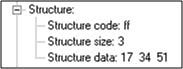
Here the GROUP has a detail tag. This gives rise to an expandable branch in the Decode Pane as shown below.
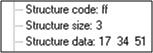
Remove the "Structure" tag and the expandable branch goes away. The items within the group are displayed as leaves of the current branch as shown below.
The GROUP statement serves one vital purpose that has nothing to do with actually grouping fields. This stems from the fact that you can have a GROUP without a detail tag. Then, nothing appears for it in the Decode Pane and it serves purely as an IF statement, as in:
GROUP early_dialect IF (FieldIs EqualTo 2 word_count)
{
GROUP andx ;
FIELD byte_count ;
FIELD tree_andx_service ;
}
GROUP late_dialect IF (FieldIs EqualTo 3 word_count)
{
GROUP andx ;
FIELD optional_support (Fixed 2) (Hex) "Optional Support"
FIELD byte_count ;
FIELD tree_andx_service ;
}
The GROUP statements check the value of the FIELD word_count. If the word_count is 3, the FIELD optional_ support is present. If the word_count is 2, FIELD optional_support is not present. Since the GROUPs have no detail tags, nothing is displayed for them.
There is no ELSE mechanism so you must create the effect by using contrasting GROUPs. To extend the above example, you might add:
GROUP other_dialect IF NOT (FieldIsInRange word_count 2 3)
{
GROUP andx ;
FIELD byte_count ;
}