
Abort()
Abort()
|
Parameters |
|
|---|---|
|
None |
|
Return value
An integer that should be passed back to the application unchanged.
Comments
Called when an input context renders the currently pending transaction done, but is not itself a member of that transaction. An example would be an input transaction that represents some sort of reset condition that renders all pending transactions invalid. The input transaction is not consumed by this action and will go on to be considered for other pending transactions.
Example
if ( IsReset )
return Abort();
AddCell()
AddCell(<name string>, <value string>, <description
string or null>, <color integer or list>,
<additional_info any>)
|
Parameters |
Default |
Comments |
|---|---|---|
|
name string |
|
Displays in the name field of the cell. |
|
value string |
|
Displays in the value field of the cell. |
|
description string or null |
|
Displays in tool tip. |
|
color integer or list |
If not specified, a default color is used |
Color can be specified as either a packed color value in an integer, or as an array of RGB values ranging from 0-255. Displays in the name field of the cell. |
|
additional_info any |
|
Used to create special cells or modify cell attributes. The values are predefined constants, and you can use zero or more at a time. Possible values include:
|
Return value
None.
Comments
Adds a display cell to the current output context. Cells are displayed in the order that they are added. The name and value strings are displayed directly in the cell.
Example
# Create a regular cell named Normal with a value

"Cell" and tool tip "Normal cell":
AddCell( "Normal", "Value1", "Normal cell" );

# Use the _MONOCOLOR value in the additional_info parameter to create a cell with a color value of 0x881122 in both the name and value fields:
AddCell( "MonoColor", "Value2", "MonoColor cell", 0x881122, _MONOCOLOR );

# Use the _MONOFIELD value to create a cell with only a name field:
AddCell( "MonoField", "Value3", "MonoField cell", [255, 200, 200], _MONOFIELD );

# Use the _ERROR value to create a cell with a red value field:
AddCell( "Error", "Value4", "Error cell", 0xcc1155, _ERROR );

# Use the _WARNING value to create a cell with a yellow value field:
AddCell( "Warning", "Value5", "Warning cell", 0x00BB22, _WARNING );

# Use the [_FIXEDWIDTH, w] value to create a cell with a fixed width of 20 in conjuction with the error value to create a fixed width cell with a red value field:
AddCell( "Fixed Width 20", "Value6", "Fixed Width and Error cell", 0x001122, [_FIXEDWIDTH, 20], _ERROR );
The output of the example is:

AddDataCell()
AddDataCell(<data_value raw, list or integer>,
<additional_info any>, ...)
|
Parameters |
Comments |
|---|---|
|
data_value raw, list, or integer |
Interpreted the same way as GetNBits interprets data_source |
|
additional_info any |
Used to create special cells or modify cell attributes. Possible values are:
|
Return value
None.
Comments
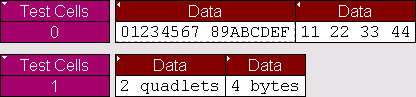
Creates an expandable/collapsible cell for viewing raw data such as data payloads. Data can be raw bytes, an integer, or a list. If an integer is used, it will be interpreted as 4 bytes of data. Specifying _BYTES or _DWORDS in an additional_info field will force data to be interpreted as bytes or quadlets. _COLLAPSED, _EXPANDED, _HIDDEN and _SHOWN are all interpreted the same is in a regular AddCell call.
Example
# Creates a data cell with 2 dwords (32-bit integers) of data.
AddDataCell( '0123456789ABCDEF', _DWORDS );

# Creates a data cell with 4 bytes.	Integer data values are always interpreted as 32 bits of data.
AddDataCell( 0x11223344, _BYTES );
The output of the example is:
AddEvent()
AddEvent(<Group string>, <Value string> )
|
Parameter |
Meaning |
Comments |
|---|---|---|
|
Group string |
The name of the group |
Corresponds to the name of a field that might be encountered while decoding. |
|
Value string |
A value that will be associated with the group |
Corresponds to a field value that might be encountered while parsing. |
Return value
None.
Comments
Events are used for transaction searching and for transaction summary. This function is only effective when called during the ProcessData() phase of decoding. Event groups and values are stored globally for transaction levels and new ones are created as they are encountered. Each transaction contains information as to which events were associated with it.
Example
AddEvent( "DataLength", Format( "%d", out.DataLength ));
AddSeparator()
AddSeparator(<additional_info any>, ...)
|
Parameters |
Comments |
|---|---|
|
additional_info any |
Used to create special cells or modify cell attributes. The values are predefined constants:
|
Return value
None.
Comments
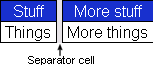
Creates a separator cell. _COLLAPSED, _EXPANDED, _HIDDEN, and _SHOWN are all interpreted the same is in a regular AddCell call.
Example
AddCell( "Stuff", "Things" );
# AddSeparator adds a space between the previous and subsequent cells.
AddSeparator();
AddCell( "More stuff", "More things" );
The output of the example is:
BeginCellBlock()
BeginCellBlock(<name string>, <value string>, <description string or null>, <color integer or list>, <additional_info any>)
|
Parameters |
Default |
Comments |
|---|---|---|
|
name string |
|
Displays in the name field of the cell. |
|
value string |
|
Displays in the value field of the cell. |
|
description string or null |
|
Displays in tool tip. |
|
color integer or list |
If not specified, a default color is used |
Color can be specified as either a packed color value in an integer, or as an array of RGB values ranging from 0-255. Displays in the name field of the cell. |
|
additional_info any |
|
Used to create special cells or modify cell attributes, these values are predefined constants. You can use zero or more of them at a time. Possible values include:
|
Return value
None.
Comments
Begins a cell block and adds a block header cell. This is a special cell that can be collapsed and expanded. The collapsed/expanded state of this cell affects cells in the group according to their _COLLAPSED, _EXPANDED attributes. All calls to AddCell after a call to BeginCellBlock() will put the new cells into this group until a call to EndCellBlock is made. Cell blocks can be nested.
Example
# Begin the 'red' group.	For clarity these cells will be red:
BeginCellBlock( "Red Group", null, null, 0x0000ff, _MONOFIELD );

# This cell will be displayed when the red group is in the expanded state:
AddCell( "Red is", "Expanded", null, 0x0000ff, _EXPANDED );

# This cell will be displayed when the red group is collapsed:
AddCell( "Red is", "Collapsed", null, 0x0000ff, _COLLAPSED );

# This begins the nested blue group. Nothing in the blue group will be displayed unless the red group is expanded:
BeginCellBlock( "Blue Group", null, null, 0xff0000, _MONOFIELD, _EXPANDED, [_BLOCKNAME, "BlockName"] );

# This cell is only displayed when the blue group is visible and expanded:
AddCell( "Blue is", "Expanded", null, 0xff0000, _EXPANDED );

# This cell is also only displayed when the blue group is visible and expanded:
AddCell( "Blue", "Too", null, 0xff0000, _EXPANDED );

# This cell is only displayed when the blue group is visible and collapsed:
AddCell( "Blue is", "Collapsed", null, 0xff0000, _COLLAPSED );

# This ends the blue group.
EndCellBlock();

# Cells with the _SHOWN attribute are always displayed.	This is the default:
AddCell( "Always", "Shown", null, 0x0000ff, _SHOWN );

# This cell will never be displayed. In a real script this would be driven by a variable:
AddCell( "Never", "Shown", null, 0x0000ff, _HIDDEN );

# This ends the red group.
EndCellBlock();
The output of the example is:



Complete()
Complete()
|
Parameters |
|
|---|---|
|
None |
|
Return value
An integer that should be passed back to the application unchanged.
Comments
This should be called when it has been decided that an input context has been accepted into a transaction, and that the transaction is complete. The return value of this function should be passed back to the application from the ProcessData function. This function could be used to associate the input context with the output context.
Example
if ( done )
return Complete();
EndCellBlock()
EndCellBlock()
|
Parameters |
|
|---|---|
|
None |
|
Return value
None.
Comments
Ends a cell block that was started with BeginCellBlock().
Example
See BeginCellBlock().
GetBitOffset()
GetBitOffset()
|
Parameters |
|
|---|---|
|
None |
|
Return value
None.
Comments
Returns the current bit offset that is used in NextNBits or PeekNBits.
Example
raw = 'F0F0';# 1111000011110000 binary
result1 = GetNBits ( raw, 2, 4 );
result2 = PeekNBits(5);
result3 = NextNBits(2);
Trace ( "Offset = ", GetBitOffset() );
The example generates this Trace output:
Offset = D
PeekNBits()
PeekNBits(<bit_count integer>)
|
Parameters |
Comments |
|---|---|
|
bit_count |
An integer |
Return value
None.
Comments
Reads bit_count bits from the data source. The difference between PeekNBits and NextNBits is that PeekNBits does not advance the global bit offset. PeekNBits can be used to make decisions about how to parse the next fields without affecting subsequent calls to NextNBits. If PeekNBits is called without a prior call to GetNBits, the result is undefined. Note that bits are indexed starting at bit 0.
Example
raw = 'F0F0';# 1111000011110000 binary
  result1 = GetNBits ( raw, 2, 4 );
  result2 = PeekNBits(5);
  result3 = NextNBits(2);
Trace ( "result1 = ", result1, " result2 = ", result2, " result3 = ", result3 );
This will generate this Trace output:
result1 = C result2 = 7 result3 = 0
In the call to GetNBits: starting at bit 2, reads 4 bits (1100), and returns the value 0xC.
In the call to PeekNBits: starting at bit 6, reads 5 bits (00111), and returns the value 0x7.
In the call to NextNBits: starting at bit 6, reads 2 bits (00), and returns the value 0x0.
Pending()
Pending()
|
Parameters |
|
|---|---|
|
None |
|
Return value
An integer that should be passed back to the application unchanged.
Comments
This should be called when it has been decided that an input context has been accepted into a transaction, but that the transaction still requires further input to be complete. This function could be used to associate input contexts with the output context. The return value of this function should be returned to the application in the ProcessData function.
Example
if ( done )
return Complete();
else return Pending();
Reject()
Reject()
|
Parameters |
|
|---|---|
|
None |
|
Return value
An integer that should be passed back to the application unchanged.
Comments
Called when it is decided that the input context does not meet the criteria for being a part of the current transaction. The output context should not be modified before this decision is made. The return value of this function should be returned by the ProcessData function.
Example
if ( UnknownValue )
return Reject();