
Warning: The Voyager M480x Power Delivery (PD) Exerciser allows the customer to set Voltages and Current levels to be delivered to/from Devices and Hosts and their connecting cables which may exceed their capabilities.
-
This can cause damage to the devices under test and their cables. Use caution when writing scripts so that these limitations are not exceeded.
-
Power-cycle the M480x unit after PD usage to insure that the go back to their default Voltage and Current states.
The Teledyne LeCroy Voyager M480x is the first protocol analyzer for testing next-generation USB4 80Gb/s systems. The new platform leverages Teledyne LeCroy probe technology to support Gen-4 (PAM-3) signaling as well as USB4 Gen-3, Gen-2, Thunderbolt™ in addition to legacy USB 3.2 speeds. Based on the Voyager platform, the M480x captures asymmetric link operation and tunneled DisplayPort 2.1 with complete decoding of USB4 protocol.
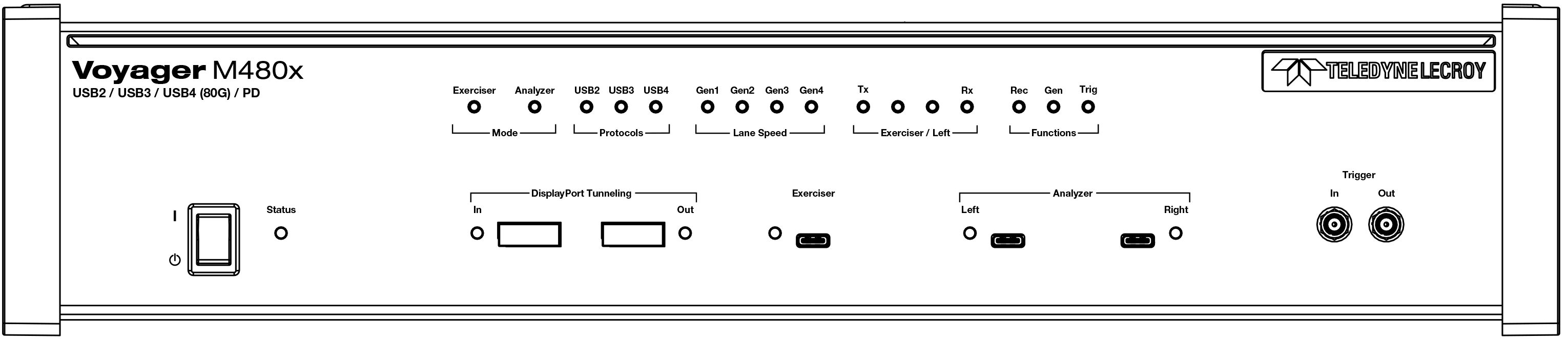
See the ReadMe file from the software installation site for the latest on host machine requirements and supported operating systems: https://teledynelecroy.com/sw/usb/
USB4, USB 3.2, and USB 2.0 Features
The system can monitor traffic between USB 2.0 links using standard high-speed compliant cables. USB 3.2 SS Gen 1 (5Gbps) and USB 3.2 SS+ Gen 2 (10Gbps) links require using compliant USB Type-C™ connector cables. USB4 requires USB4-compliant cables.
If configured for USB4 testing, the system supports monitoring between links using USB4 Type-C™ connector cables. Analysis of 80 Gbps traffic requires the use of short, low-loss, high quality cables, as provided by Teledyne LeCroy with your M480x product. Use of other cables may compromise the signal quality and prevent capturing of the traffic. Electronically Marked cables may be used in either of the connectors marked “Left” and “Right”. The E-Marked cable should be connected to the Downstream Facing Port (typically a host connector), as opposed to an Upstream Facing Port, to allow for Alt-Mode negotiation.
Features
In addition to the features it has in common with other analyzers, the M480x also has the following specifications.
General
Supports the following USB speeds: USB4 80/40/20 Gb/s, USB 3.2 20Gb/s, 10Gb/s, 5Gb/s, USB 2.0, 480 Mb/s, 12 Mb/s, and 1.5 Mb/s
Physical Components
32 GB of physical data-recording memory