
MsgBox()
Displays a message in a dialog box, waits for the user to click a button, and returns an Integer indicating which button the user clicked.
MsgBox(prompt, type, title)
|
Parameters |
|||||||||||||||||||||||||||||||
|---|---|---|---|---|---|---|---|---|---|---|---|---|---|---|---|---|---|---|---|---|---|---|---|---|---|---|---|---|---|---|---|
|
prompt |
Required. String expression displayed as the message in the dialog box. |
||||||||||||||||||||||||||||||
|
title |
Optional. String expression displayed in the title bar of the dialog box. If title is omitted, the script name appears in the title bar. |
||||||||||||||||||||||||||||||
|
type |
Optional. Numeric expression that is the sum of values specifying the number
|
||||||||||||||||||||||||||||||
Return Values
This function returns an integer value indicating which button was clicked.
|
Constant |
Description |
|
_MB_OK |
OK button was clicked. |
|
_MB_CANCEL |
Cancel button was clicked. |
|
_MB_YES |
Yes button was clicked. |
|
_MB_NO |
No button was clicked. |
|
_MB_RETRY |
Retry button was clicked. |
|
_MB_IGNORE |
Ignore button was clicked. |
|
_MB_ABORT |
Abort button was clicked. |
Remarks
This function works only for VS Engines controlled via a GUI. For VSEs controlled by COM/Automation™ clients, it does nothing.
This function "locks" the application, which means that there is no access to other application features until the dialog box is closed. To prevent too many MsgBox calls (in case a script is not written correctly), VSE keeps track of all function calls demanding user interaction and doesn't show dialog boxes if some customizable limit is exceeded (returns _MB_OK in this case).
Example:
…
  if(Something)
  {
    …
    str = "Something happened!!!\nShould we continue?"
    result = MsgBox(str ,
              _MB_YESNOCANCEL | _MB_EXCLAMATION,
              "Some Title");
    if(result != _MB_YES)
      ScriptDone();
      # Go on…
    }
InputBox()
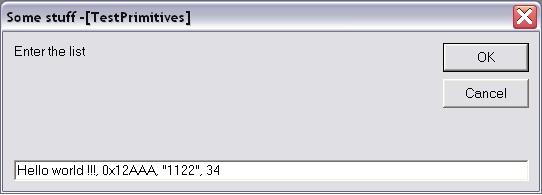
Displays a prompt in a dialog box, waits for the user to input text or click a button, and returns a CSL list object or string containing the contents of the text box.
InputBox(prompt, title, default_text, return_type)
|
Parameters |
||||||||||
|---|---|---|---|---|---|---|---|---|---|---|
|
prompt |
Required. String expression displayed as the message in the dialog box. |
|||||||||
|
title |
Optional. String expression displayed in the title bar of the dialog box. If title is omitted, the script name appears in the title bar. |
|||||||||
|
default_text |
Optional. String expression shown in the text box as the default response
|
|||||||||
|
return_type |
Optional. It specifies the contents of the return object. The return_type argument values are:
|
|||||||||
Return Values
Depending on the return_type argument, this function returns either a CSL list object or the text typed in the text box as it is.
If return_type = _IB_LIST (by default), the text in the text box is considered to be a set of list items divided by ',' (only hexadecimal, decimal and string items are currently supported).
For example, the text:
Hello world !!!, 12, Something, 0xAA, 10, "1221"
produces a CSL list object (5 items):
list = [ "Hello world !!!", 12, "Something", 0xAA, 10, "1221" ];
list [0] = "Hello world !!!"
list [1] = 12
list [2] = "Something"
list [3] = 0xAA
list [4] = 10
list [5] = "1212"
Note: Although the dialog box input text parser tries to determine a type of list item automatically, text enclosed in quote signs " " is always considered to be a string.
Remarks
This function works only for VS Engines controlled via a GUI. For VSEs controlled by COM/Automation™ clients, it does nothing.
This function "locks" the application, which means that there is no access to other application features until the dialog box is closed. To prevent too many InputBox calls (in case a script is not written correctly), VSE keeps track of all function calls demanding user interaction and does not show dialog boxes if some customizable limit is exceeded. (In that case, it returns a null object.)
Example
…
  if(Something)
  {
  …
  v = InputBox("Enter the list", "Some stuff",
              "Hello world !!!, 0x12AAA, Some, 34");
  ReportText (FormatEx("input = %s, 0x%X, %s, %d", v[0],v[1],v[2],v[3]));
  …    # Go on…
  str = InputBox("Enter the string", "Some stuff",
            "<your string>", _IB_STRING);
  ReportText(str);
  }
GetUserDlgLimit()
Returns the current limit of user dialogs allowed in the verification script. If the script reaches this limit, no user dialogs are shown and the script does not stop. By default, this limit is set to 20.
GetUserDlgLimit()
Example
…
result = MsgBox(Format("UserDlgLimit = %d", GetUserDlgLimit()),
                      _MB_OKCANCEL | _MB_EXCLAMATION, "Some Title !!!");
SetUserDlgLimit(2);   # Set the limit to 2.
…
SetUserDlgLimit()
Sets the current limit of user dialogs allowed in the verification script. If the script reaches this limit, no user dialogs are shown and the script does not stop. By default, this limit is set to 20.
SetUserDlgLimit()
Example
…
result = MsgBox(Format("UserDlgLimit = %d", GetUserDlgLimit()),
                      _MB_OKCANCEL | _MB_EXCLAMATION, "Some Title !!!");
SetUserDlgLimit(2);    # Set the limit to 2.
…