
The following steps describe the interaction between the application and a verification script run over a recorded trace:
Before sending any information to the script main processing function ProcessEvent() (which must be present in any verification script),VSE looks for function OnStartScript() and calls it if it is found. In this function, some setup routines can be made, like specifying the channels, specifying the trace events to pass to the script, and setting up initial values of the global script-specific global variables.
Then VSE goes through the recorded trace and checks if the current frame in the trace meets specified sending criteria. If it does, VSE calls the script main processing function ProcessEvent(), providing some information about the current event in the script input context variables.
See Input context variables for a full description of verification script input context variables.
ProcessEvent() is the main verification routine, in which all processing of incoming trace events is done. Basically, when the whole verification program consists of a few stages, this function processes the event sent to the script, verifies that information contained in the event is appropriate for the current stage, and decides if VSE should continue script running. If the whole result is clear on the current stage, it tells VSE to complete execution of the script.
The completion of the test before the whole trace has been evaluated is usually done by setting the output context variable: out.Result = _VERIFICATION_PASSED or _VERIFICATION_FAILED.
See Output context variables for a full description of verification script output context variables.
Note: Not only does a verification script verify recorded traces by some criteria, but it is also possible to extract some information of interest and post-process it later by third-party applications. (There is a set of script functions to save extracted data in text or binary files or send it to other applications via COM/Automation™ interfaces.)
When script running is finished, VSE looks for the function OnFinishScript() and calls it if it is found. In this function, some resetting procedures can be done.
The following picture presents the interaction between the application and a running verification script:
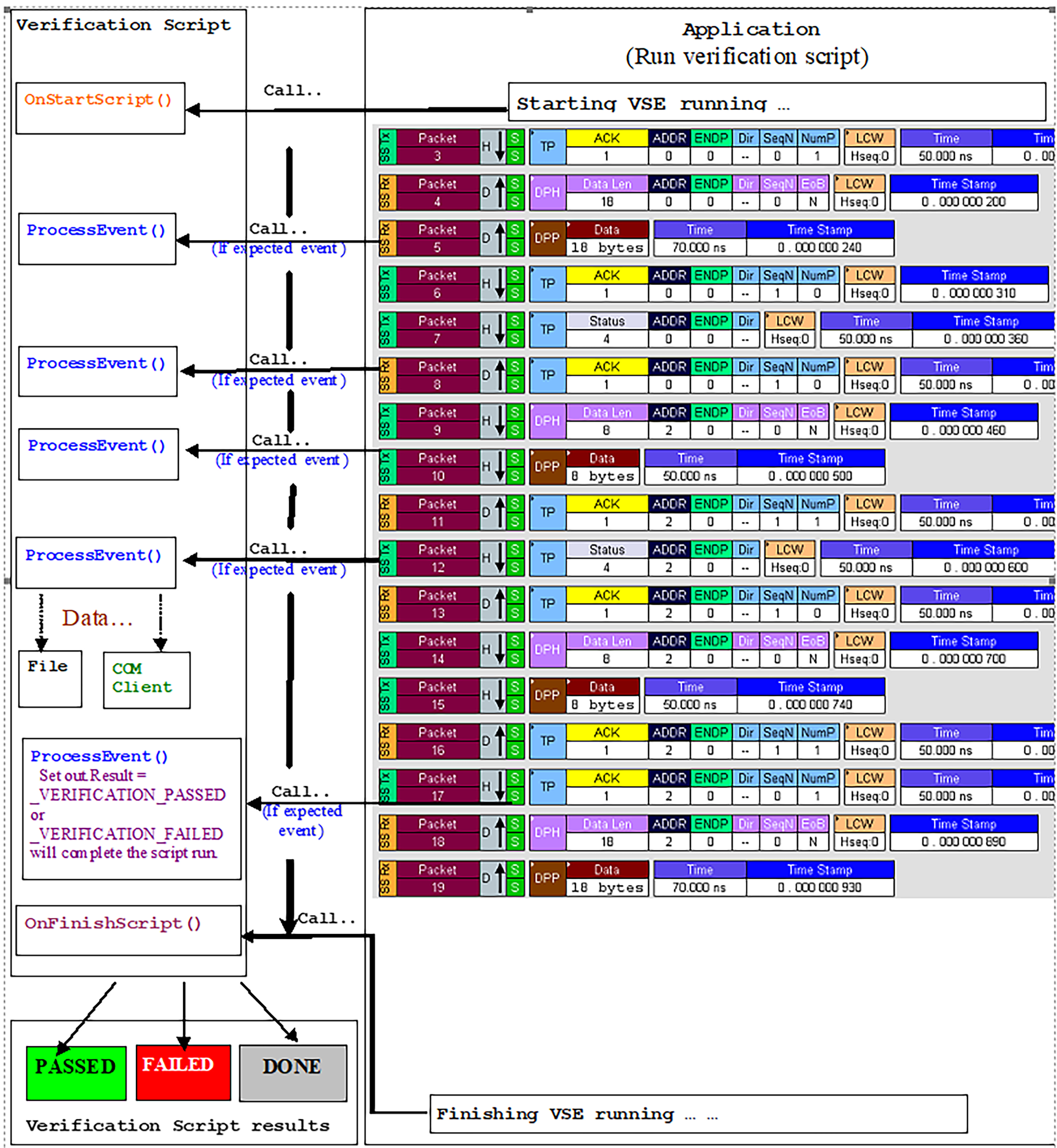
Note: Verification script result <DONE> means that the script is intended for extracting and displaying some information from recorded traces only, and you do not care about results. To specify that your script is for displaying information only, call the function ScriptForDisplayOnly() somewhere in your script (in OnStartScript(), for instance).