
In addition to Power Delivery commands, the PD Exerciser also provides a command set to manage USB Type-C connections. It includes low-level commands for manipulating voltages, capacitors and resistors, as well as high-level commands that let you have SINK, SINKAS, SOURCE, and DRP state machines, described in the Type-C specification, with the facility to customize different behaviors and characteristics. Note that currently, Type-C state machines are only followed when the related commands are running; Type-C state machines are not followed in parallel to other Power Delivery commands execution.
PD_SetResistorRp
Call PD_SetResistorRp( state, current, line )
Sets resistor Rp On/Off.
|
Parameters |
|
|---|---|
|
state |
Possible values:
|
|
current |
Possible values:
|
|
line |
Possible values:
|
Result: None
Examples
Call PD_SetResistorRP( PD_ON, CC_RP_CUR_1_5, CC_LINE_2 )
PD_SetResistorRd
Call PD_SetResistorRd( state, line )
Sets resistor Rd On/Off.
|
Parameters |
|
|---|---|
|
state |
Possible values:
|
|
line |
Possible values:
|
Result: None
Example
Call PD_SetResistorRd( PD_ON, CC_LINE_1 )
PD_SetResistorRa
Call PD_SetResistorRa( state, line )
Sets resistor Ra On/Off.
|
Parameters |
|
|---|---|
|
state |
Possible values:
|
|
line |
Possible values:
|
Result: None
Example
Call PD_SetResistorRa( PD_ON, CC_LINE_2 )
PD_SetVBusCap10MicroFarad
Call PD_SetVBusCap10MicroFarad( state )
Sets the VBus Capacitor(10 Micro Farad) On/Off.
|
Parameters |
|
|---|---|
|
state |
Possible values:
|
Result: None
Example
Call PD
_SetVBusCap10MicroFarad( PD_ON )
PD_SetVBusCap1MicroFarad
Call PD_SetVBusCap1MicroFarad( state )
Sets the VBus Capacitor(1 Micro Farad) On/Off.
|
Parameters |
|
|---|---|
|
state |
Possible values:
|
Result: None
Example
Call PD_SetVBusCap1MicroFarad( PD_ON )
PD_SetVBusSetting
Call PD_SetVBusSetting( PD_Vbus_Settings $settings )
Customizes the behavior of the PD_SetVBus command.
|
Parameters |
||
|---|---|---|
|
$settings |
Type is PD_Set_Vbus_Settings, shown below: |
|
|
Field Names |
Default Values |
Description |
|
WaitTimeout |
PD_DEFAULT_TIMEOUT_INFINIT |
Timeout (in microseconds) on waiting for Vbus line voltage to reach to the specified level. |
|
LowerVoltageTolerance |
PD_SET_VBUS_NO_VOLTAGE_TOLERANCE |
The accepted voltage deviation (in millivolt) for returning from PD_SetVbus command. The command returns when the voltage gets greater than Desired Voltage – LowerVoltageTolerance |
|
UpperVoltageTolerance |
PD_SET_VBUS_NO_VOLTAGE_TOLERANCE |
The accepted voltage deviation (in millivolt) for returning from PD_SetVbus command. The command returns when the voltage gets less than Desired Voltage + UpperVoltageTolerance |
|
AttemptExactVoltage |
PD_FALSE |
If is set to PD_TRUE, the PD_SetVBus command repeats setting voltage to get closer to the requested voltage by using feedback from Vbus line. It is not recommended for normal use cases. |
|
AttemptExactVoltageInterval_us |
50000 |
The delay (in microseconds) before reading voltage from Vbus line in AttempExactVoltage process. |
Result: None
Example
$vbus_setting = PD_Set_Vbus_Settings
{
  WaitTimeout = 5000000 # 5 seconds
  LowerVoltageTolerance = 250 # milliVolt
  UpperVoltageTolerance = 500 # milliVolt
}
Call PD_SetVBusSetting( $vbus_setting )

# The next command sets the voltage to 8 Volt and returns as soon as 7.750 <= Voltage <= 8.5 is seen on the Vbus line
Call PD_SetVBus( PD_ON, 8000 )
PD_SetVBUS
Call PD_SetVBus( state, voltage_milli_volt )
Sets VBUS On/Off. The command is blocked until the voltage get applied to specified level.
|
Parameters |
|
|---|---|
|
state |
Possible values:
|
|
voltage_milli_volt |
The voltage applied on VBUS. voltage_mili_volt cannot be greater than 20500 mV. In order to apply voltages greater than 5V, the corresponding checkbox should be selected in recording options. |
Result: None
Example
Call PD_SetVBus( PD_ON, 5000 )
PD_WaitForVBUS
Call PD_WaitForVBUS( voltage_mv, wait_timeout_us, compare_operator )
Compares VBUS voltage with the desired value within a specific time.
|
Parameters |
|
|---|---|
|
voltage_mv |
The desired VBUS voltage value (in millivolts) to be compared with the VBUS voltage value. |
|
wait_timeout_us |
The function will monitor the VBUS voltage within this timeout (in microseconds). If VBUS voltage reaches to the desired value during this timeout then the function returns PD_RESULT_OK otherwise it returns PD_RESULT_FAILED with sub-result set to PD_SUBRESULT_TIMEOUT_OCCURRED. |
|
compare_operator |
The desired comparator. Possible values:
|
|
Result |
Evaluate the command results (including sub-results) using the IfMatched/ElseMatched command. Result Values:
|
Example
call PD_WaitForVBus(VBUS_VOLTAGE_V5_SAFE_MIN, 1000000, PD_COMPARE_GREATER)
PD_SetVCONN
Call PD_SetVConn( state, cc_line, voltage_mili_volt )
Sets VCONN On/Off.
|
Parameters |
|
|---|---|
|
state |
Possible values:
|
|
cc_line |
Possible values:
|
|
voltage_mili_volt |
The desired VCONN voltage in mV. |
Result: None
Example
Call PD_SetVConn( PD_ON, CC_LINE_2, 3000 )
PD_SetLoadOnVBUS
Call PD_SetLoadOnVBus( state )
Enables/Disables load on VBUS.
|
Parameters |
|
|---|---|
|
state |
Possible values:
|
Result: None
Example
Call PD_SetLoadOnVBus( PD_ON )
PD_SetResistor100K
Call PD_SetResistor100K( state, cc_line )
Sets the Resistor100K on the specified CC line.
|
Parameters |
|
|---|---|
|
state |
Possible values:
|
|
cc_line |
Possible values:
|
Result: None
Example
Call PD_SetResistor100K( PD_ON, CC_LINE_1 )
PD_SetResistor95_3K
Call PD_SetResistor95_3K( state, cc_line )
Sets the Resistor95.3K on the specified CC line.
|
Parameters |
|
|---|---|
|
state |
Possible values:
|
|
cc_line |
Possible values:
|
Result: None
Example
Call PD_SetResistor95_3K( PD_ON, CC_LINE_1 )
PD_SetResistor264K
Call PD_SetResistor264K( state, cc_line )
Sets the Resistor264K on the specified CC line.
|
Parameters |
|
|---|---|
|
state |
Possible values:
|
|
cc_line |
Possible values:
|
Result: None
Example
Call PD_SetResistor264K( PD_ON, CC_LINE_1 )
PD_SetBCSourceMode
Call PD_SetBCSourceMode( state )
Enables/Disables Battery Charger Source Mode.
|
Parameters |
|
|---|---|
|
state |
Possible values:
|
Result: None
Example
Call PD_SetBCSourceMode( PD_ON )
PD_SetCapacitor400pF
Call PD_SetCapacitor400pF( state, cc_line )
Sets the Capacitor400pF on the specified CC line.
|
Parameters |
|
|---|---|
|
state |
Possible values:
|
|
cc_line |
Possible values:
|
Result: None
Example
Call PD_SetCapacitor400pF( PD_ON, CC_LINE_1 )
PD_SetCC1Capacitor390pF
Call PD_SetCC1Capacitor390pF( state )
Enables/Disables the Capacitor 390pF on CC1.
|
Parameters |
|
|---|---|
|
state |
Possible values:
|
Result: None
Example
Call PD_SetCC1Capacitor390pF( PD_ON )
PD_ReportSafeStateStatus
Call PD_ReportSafeStateStatus( lines )
Enables/Disables USB Safe States report on the specified lines.
|
Parameters |
|
|---|---|
|
lines |
Possible values:
|
Result: None
Example
#Enables USB Safe States report on DP_LINE_2, DM_LINE_2, SBU_LINE_1, SBU_LINE_2
#lines and disables the report on all other lines.
call PD_ReportSafeStateStatus(DP_LINE_2 | DM_LINE_2 | SBU_LINE_1 | SBU_LINE_2)
PD_SetVbusToCCWithResistor53_2K
Call PD_SetVbusToCCWithResistor53_2K( state, cc_line )
Puts VBUS voltage on specified CC line using the 53.2K resistor
|
Parameters |
|
|---|---|
|
state |
Possible values:
|
|
cc_line |
Possible values:
|
Result: None
Example
Call PD_SetVbusToCCWithResistor53_2K( PD_ON, CC_LINE_1 )
PD_AllowVbusWithoutCCTerm
Call PD_AllowVbusWithoutCCTerm( state )
Allows/prevents sourcing VBUS without any CC terminations.
|
Parameters |
|
|---|---|
|
state |
Possible values:
|
Result: None
Example
Call PD_AllowVbusWithoutCCTerm( PD_ON )
PD_TerminateCCLines
Call PD_TerminateCCLines( CC1_Resistor, CC2_Resistor )
Terminates CC lines with the specified resistors.
|
Parameters |
|
|---|---|
|
CC1_Resistor |
Possible values:
|
|
CC2_Resistor |
Possible values:
|
Result: None
Example
Call PD_TerminateCCLines( CC_RP_1_5, CC_OPEN )
PD_WaitForUUTPinState
Call PD_WaitForUUTPinState( pin_state, state_duration, pin_selector, timeout )
Waits until either a timeout being occurred or a specific UUT pin state being detected for a specific duration of time.
|
Parameters |
|
|---|---|
|
pin_state |
The specific UUT pin state to check. Possible values:
|
|
state_duration |
Time duration (in microseconds) to check the presentation of the UUT specified pin state. |
|
pin_selector |
The CC line(s)
|
|
timeout |
If the timeout (in microseconds) occurs, the function will return. |
Result: None
Example
Call PD_WaitForUUTPinState(CC_PIN_STATE_SRC_RD, 50000, CC_PIN_SELECTOR_CC2, 200000)
PD_SetStartDRPSetting
Call PD_SetStartDRPSetting( PD_Start_DRP_Settings $settings )
Used to customize behavior and characteristics of the Exerciser when acts as a DRP device. Settings will be applied to PD_StartDRP function.
|
Parameters |
||
|---|---|---|
|
$settings |
Type is PD_Start_DRP_Settings, shown below: |
|
|
Field Name |
Default Values |
Description |
|
Timeout |
PD_DEFAULT_TIMEOUT_INFINIT |
The timeout in microseconds for connecting as a SINK or SOURCE. Should be greater than 5000us. |
|
WithRa |
PD_FALSE |
Whether or not to provide Ra on one of CC lines. |
|
WithAccessory |
PD_FALSE |
If set to PD_TRUE, checks whether or not the UUT transitions to the AudioAccessory state. |
|
AdvertizedCurrent |
CC_RP_CUR_1_5 |
Advertised current level on Rp. |
|
WithVConn |
PD_FALSE |
Whether or not to turn on the VCONN. |
|
VConnVoltage_mV |
VCONN_VOLTAGE_DEFAULT |
The VCONN voltage level when starting sourcing. |
|
AccessoryStateDuration |
1000000 (us) |
Time duration to check whether or not the UUT is in AudioAccessory state. |
|
StartWithSNK |
PD_FALSE |
If is set to PD_TRUE, DRP state machine starts from Unattached.SNK state instead of Unattached.SRC state. |
|
WithTrySRC |
PD_FALSE |
If is set to PD_TRUE, Exerciser supports Try.SRC state machine. |
|
WithTrySNK |
PD_FALSE |
If is set to PD_TRUE, Exerciser supports Try.SNK state machine. |
Result: None
Example
$startdrp_setting = PD_Start_DRP_Settings
{
  WithTrySRC = PD_TRUE
}
Call PD_SetStartDRPSetting( $startdrp_setting )
PD_StartDRP
Call PD_StartDRP()
Starts the DRP state machine for connecting to a Type-C device. The command quits if it times out or if the Exerciser transitions to Attached.Src or Attached.SNK. Usually called after the PD_SetStartDRPSetting function.
Parameters: None
Result: Evaluate command results (including sub-results) using the IfMatched/ElseMatched command.
Result Values
|
|
PD_RESULT_OK |
|
PD_RESULT_FAILED |
Example
Call PD_StartDRP()
PD_SetStartSourceSetting
Call PD_SetStartSourceSetting( PD_Start_Source_Settings $settings )
Used to customize behavior and characteristics of the Exerciser when it acts as a SOURCE device. Settings will be applied to the PD_StartSource command.
|
Parameters |
||
|---|---|---|
|
$settings |
Type is PD_Start_Source_Settings, shown below: |
|
|
Field Names |
Default Values |
Description |
|
Timeout |
PD_DEFAULT_TIMEOUT_INFINIT |
The timeout (microsecondss) for connecting as SOURCE. Should be greater than 5000us. |
|
WithRa |
PD_FALSE |
Whether or not to provide Ra on one of CC lines. |
|
WithAccessory |
PD_FALSE |
If set to PD_TRUE, checks whether or not the UUT transitions to the AudioAccessory state. |
|
AdvertizedCurrent |
CC_RP_CUR_1_5 |
Advertised current level on Rp. |
|
WithVConn |
PD_FALSE |
Whether or not to turn on VCONN. |
|
VConnVoltage_mV |
VCONN_VOLTAGE_DEFAULT |
The VConn voltage level when start sourcing. |
|
AccessoryStateDuration |
1000000 (us) |
Time duration to check whether or not the UUT is in AudioAccessory state. |
Result: None
Example
$startsrc_setting = PD_Start_Source_Settings
{
  WithRa = PD_TRUE
}
Call PD_SetStartSourceSetting( $startsrc_setting )
PD_StartSource
Call PD_StartSource()
Starts the SOURCE state machine for connecting to a Type-C device. The command is terminated if a timeout occurs or the Exerciser transitions to Attached.SRC state. Usually called after the PD_SetStartSourceSetting function.
Parameters: None
Result: Results (including sub-results) can be evaluated using the IfMatched/ElseMatched command.
Result Values
|
|
PD_RESULT_OK |
|
PD_RESULT_FAILED |
Example
Call PD_StartSource()
PD_SetStartSinkSetting
Call PD_SetStartSinkSetting( PD_Start_Sink_Settings $settings )
Used to customize the behavior and characteristics of the Exerciser when it acts as a SINK device. Settings will be applied to the PD_StartSink command.
|
Parameters |
||
|---|---|---|
|
$settings |
Type is PD_Start_Sink_Settings, shown below: |
|
|
Field Name |
Default Values |
Description |
|
Timeout |
PD_DEFAULT_TIMEOUT_INFINIT |
The timeout (in microseconds) for connecting as a SINK. Should be greater than 5000us. |
|
WithRa |
PD_FALSE |
Whether or not to provide Ra on one of CC lines. |
|
WithAccessory |
PD_FALSE |
Whether or not to support SINKAS state machine. |
|
AdvertizedCurrent |
CC_RP_CUR_1_5 |
When WithAccessory setting is PD_TRUE, indicates advertised current level on Rp. |
|
StartWithSNK |
PD_TRUE |
Applies when WithAccessory setting is PD_TRUE. If is set to PD_FALSE, SINKAS state machine starts from Unattached.Accessory state instead of Unattached.SNK state. |
|
AccessoryStateDuration |
1000000 us |
When WithAccessory setting is PD_TRUE: The time that Execiser stays in Powered.Accessory or Audio.Accessory states. |
|
PoweredAccessoryExitState |
PD_TYPE_C_STATE_NONE |
When WithAccessory setting is PD_TRUE: The exit state from Powered.Accessory state. |
Result: None
Example
$startsnk_setting = PD_Start_Sink_Settings
{
  WithAccessory = PD_TRUE
}
Call PD_SetStartSinkSetting( $startsnk_setting )
PD_StartSink
Call PD_StartSink()
Starts a SINK or SINKAS state machine for connecting to a Type-C device. The command is terminated if a timeout occurs or if the Exerciser transitions to Attached.SNK. When the Exerciser acts as SINKAS, with no exit state for Powered.Accessory state, that state will be the last state and the command is terminated after specified time for this state duration. Usually called after the PD_SetStartSinkSetting function.
Parameters: None
Result: Evaluate command results (including sub-results) using the IfMatched/ElseMatched command.
|
Result Values |
|
PD_RESULT_OK |
|
PD_RESULT_FAILED |
Example
Call PD_StartSink()
Electronic Load Box Control
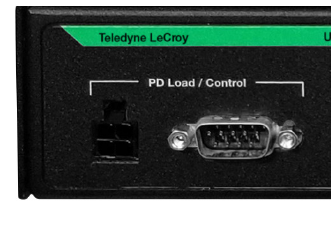
Voyager M310e platform supports a new capability to control external electronic load box through RS-232 interface. This allows the PD exerciser to directly control the load box instead of using a legacy approach (such as M310C/M310P/M4x, which need to be controlled through PC with API using external trigger cable). This allows more flexibility with an easier communication interface and simpler commands in the PD script.
The new PD load interface connectors are located in the rear of Voyager M310e.
PD_ConfigureLoadBox
Call PD_ConfigureLoadBox( command, level_a, level_b )
Configures the load box connected to the Analyzer board through a RS-232 port.
|
Parameters |
|
|---|---|
|
command |
Possible values:
|
|
level_a: level_b: |
The current levels in milliamperes. The Load Box switches from level_a to level_b when called with PD_LOAD_BOX_UPDATE, PD_LOAD_BOX_PRESET or PD_LOAD_BOX_IMMEDIATE. |
Result: None
Examples
Call PD_ConfigureLoadBox( PD_LOAD_BOX_UPDATE, 1500, 1700 )
Call PD_ConfigureLoadBox( PD_LOAD_BOX_TRIGGER )
PD_WaitForLoadBox
Call PD_WaitForLoadBox( timeout_us )
Waits for the specified time for the load box to be ready for work.
|
Parameters |
|
|---|---|
|
Timeout_us |
The command timeout in microseconds. If the load box is not ready and timeout occurs, the $PDResult.Result will be set to false to be used in the IfMatched/ElseMatched command to make a decision. |
Result: None
Example
Call PD_WaitForLoadBox( 1000 ) # Wait for Load Box to be ready up to 1000 us