
Teledyne LeCroy offers a single license with features in it for all USB analyzers.
-
There are purchased and trial features.
-
Purchased features are permanent (or optionally subject to SW maintenance if any).
-
Trial features expire on a set date which is programmed at Teledyne LeCroy. It is valid till the end of the expiration date.
-
Both features may co-exist on an analyzer. The union of selected features will be enabled.
-
A one-time activation process may need to be completed on an analyzer in order to use trial features.
All new analyzers mentioned above will be activated at Teledyne LeCroy facility before shipping. In this case customers don't have to activate them.
Activation Process
In most cases, activation is done automatically. Users will need to manually activate an analyzer only if it has trial features on non-activated analyzer and there is no Internet connection. In this case, connect the host PC with a connected analyzer to the Internet and click Activate trial button on the License Information dialog. The software will explain the particular steps to complete. You can also contact Teledyne LeCroy for assistance.
Download Trial Features
This process works the same way as downloading purchased features. Teledyne LeCroy will provide a file with trial features that must be downloaded onto the analyzer and activated (if needed). The software will indicate the status of trial features.
Pop-ups
The software checks trial licenses available on the device automatically upon connection and shows a pop-up window with license-related information, if needed. There are some cases when such a notifications are shown, like a trial is about to expire, a trial expires tomorrow, a trial has recently expired, or activation required.
License Information
Purchased and trial features can be seen in License Information: Help > Display License information.
You can view license information by selecting Display License Information from the Help menu. The License Information window provides a list of the named features supported by the current software version (see below).
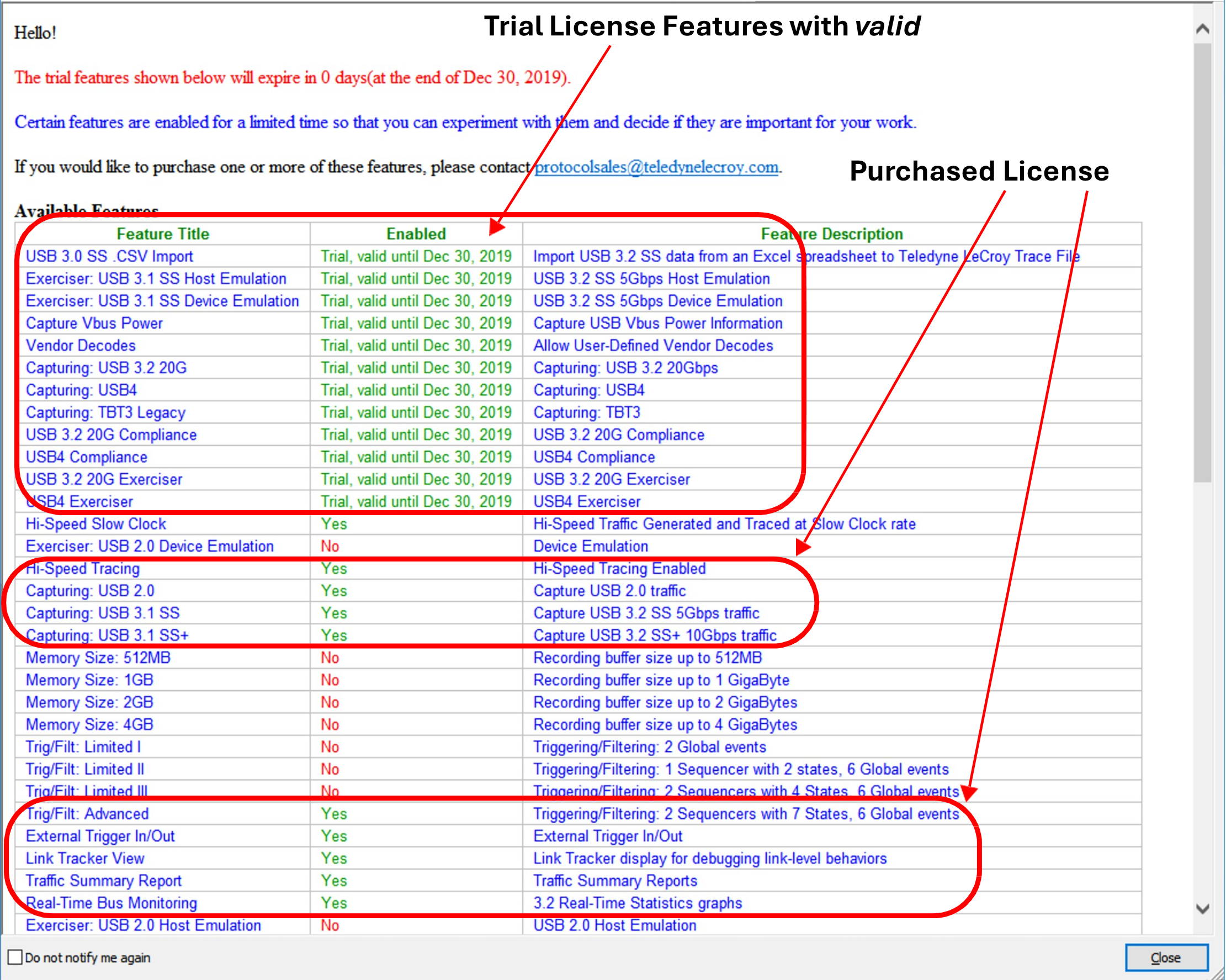
Named features enabled on your host machine are indicated by Yes in the Purchased column. Names features enabled on your host machine for a Trial period are indicated by Trial valid until DATE. Named features that are not enabled on your host machine are indicated by No in the Enabled column. Whether or not named features are enabled depends on the license key stored in your analyzer.
If you try to use a feature for which you do not yet have a license, the program typically displays the License Protection Message. Named features that are not enabled on your host machine are indicated by No in the Purchased column. To use the feature, you must purchase a license.
Update the Software License
A current license agreement with Teledyne LeCroy entitles the Analyzer owner to continued technical support and access to software updates as they are published on the Teledyne LeCroy website.
If your license expires, you must obtain a license key from Teledyne LeCroy (refer to the contact information at the back of this manual.)
After you obtain a license key, follow these steps to install it:
-
From the Help menu, select Display License Information to display the License Information window.
-
Select Install License File.
-
Do one of the following:
-
Enter the path and filename for the license key. OR
-
Browse to the directory that contains the license key and select the *.lic file.
-
3. Click Open.
Register Online
To register the product online, go to Help > Register Product Online.