
The Net Protocol Suite provides a device simulator to make the API development more flexible by connecting to the simulator instead of the real analyzer during development. It comes with two versions for Windows, Gui and Console. Only the Console is available for Linux.
GUI Version
Users can find the device simulator GUI in the following path after installing the Net Protocol Suite:
C:\Users\Public\Documents\LeCroy\Net Protocol Suite\DeviceSim
Note: The GUI version is only accessible from the Windows installation.
The following screenshot shows the GUI:
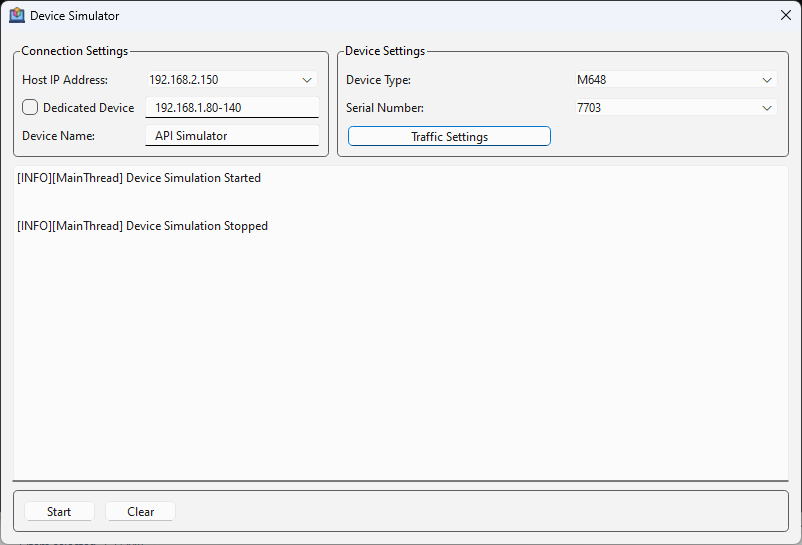
Host Ip Address: It will enumerate all available IPs in the machine. The selected one will be the Ip of the simulator.
Dedicated Device: To discover a device only by specific IPs, select this and specify a single IP or a range of IPs (such as 192.168.1.80-140).
Device Name: A device name for the simulator.
Device Type: A net protocol device type (M1288, M648, …)
Serial Number: The serial number of the device that must be unique in the network.
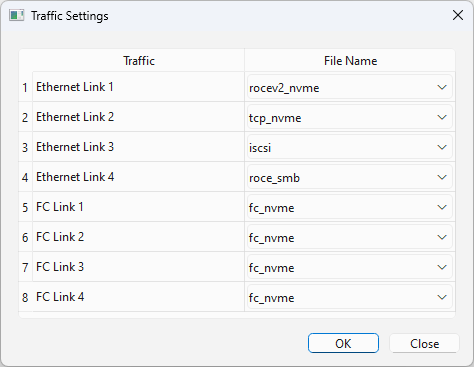
Traffic Settings: Specify the traffic in each specific link as shown bellow
Start: Pressing Start starts the simulator.
Console Version
Users can find the device simulator console in the following path after installing the Net Protocol Suite:
Windows: C:\Users\Public\Documents\LeCroy\Net Protocol Suite\DeviceSim
Linux: /usr/local/LeCroy/NetProtocolSuite/DeviceSimConsole
For the Console, users need to update a config file with the same information as explained in the GUI version before starting the simulator. The config file exists in the following path:
Windows: C:\Users\Public\Documents\LeCroy\Net Protocol Suite\DeviceSim\_internal \board_configs\config\user_config.ini
Linux: /usr/local/LeCroy/NetProtocolSuite/DeviceSimConsole/board_configs/config/user_config.ini
The content of the config file is:
-
device_address= 192.168.2.150
-
device_type=M328
A net protocol device type. It can be one of these: T328, M328, M328q, M648, M1288.
-
dedicated_device=false
If dedicated_device is set to true, users can specify a single IP or a range of IPs.
-
dedicated_address_range=192.168.1.80-140
To discover this device only by specific IPs, set this to true and specify dedicated IPs using dedicated_address_range. Can be set to true or false.
-
device_name=API Simulator
-
serial_number=7503
-
This only works with the following serial numbers:
-
T328 = [7901,7902,7903,7904]
-
M328 = [7501,7502,7503,7504]
-
M328q = [7601,7602,7603,7604]
-
M648 = [7701,7702,7703,7704]
-
M1288 = [7801,7802,7803,7804]
-
-
ethernet_traffic_1=tcp_nvme
-
ethernet_traffic_2=tcp_nvme
-
ethernet_traffic_3=iscsi
-
ethernet_traffic_4=roce_smb
-
fc_traffic_1=fc_nvme
-
fc_traffic_2=fc_nvme
-
fc_traffic_3=fc_nvme
-
fc_traffic_4=fc_nvme
Limitation and Important Notes
-
Don't use 2 instances of the device simulator with the same serial number.
-
The M648 device type doesn’t support dual user port configurations such as
LINK_CONFIG__0__A_50GPAM4__0__0. Refer to the M648 Dual User Support section in the user manual for more details. -
Jammer and exerciser port configurations are not supported.
-
For setting any type of traffic for the M1288 device type, set the
ethernet_traffic_1(both ports 1-2 and 3-4). -
Disconnect from the simulated device in the API before stopping it.
-
Don't set
fc scsiandfc nvmetraffic types simultaneously. -
Add the following rules to the firewall config in Linux systems:
-A IN_public_allow -p udp -m udp --dport 4033 -m conntrack --ctstate NEW,ESTABLISHED -j ACCEPT
-A IN_public_allow -p tcp -m tcp --dport 4000 -m conntrack --ctstate NEW,ESTABLISHED -j ACCEPT
-A IN_public_allow -p tcp -m tcp --dport 4001 -m conntrack --ctstate NEW,ESTABLISHED -j ACCEPT
-A IN_public_allow -p tcp -m tcp --dport 4002 -m conntrack --ctstate NEW,ESTABLISHED -j ACCEPT
-A IN_public_allow -p tcp -m tcp --dport 4003 -m conntrack --ctstate NEW,ESTABLISHED -j ACCEPT
-A IN_public_allow -p tcp -m tcp --sport 4000 -m conntrack --ctstate NEW,ESTABLISHED -j ACCEPT
-A IN_public_allow -p tcp -m tcp --sport 4001 -m conntrack --ctstate NEW,ESTABLISHED -j ACCEPT
-A IN_public_allow -p tcp -m tcp --sport 4002 -m conntrack --ctstate NEW,ESTABLISHED -j ACCEPT
-A IN_public_allow -p tcp -m tcp --sport 4003 -m conntrack --ctstate NEW,ESTABLISHED -j ACCEPT