The verification scripting API is made of a list of VSE objects and types as defined below.
Enumerations
Enum VSEResult
|
Type |
Name |
Result |
Comments |
|
Enum Item |
NoResult |
NA |
Result is not set. |
|
Enum Item |
Success |
NA |
Successful. |
|
Enum Item |
Failure |
NA |
Failed. |
Enum VSEPort
|
Type |
Name |
Result |
Comments |
|
Enum Item |
AllExcept (Default) |
NA |
VSE will traverse all ports except those which are removed using DontSendPort (). |
|
Enum Item |
NoneExcept |
NA |
VSE won’t traverse any port except those which are added using SendPort (). |
Note: To identify a single port, use positive integers starting from 1. E.g., 1 corresponds to "P1", 2 corresponds to "P2", etc.
Enum VSEItemType
|
Type |
Name |
Result |
Comments |
|
Enum Item |
AllExcept (Default) |
NA |
VSE will traverse all events except those which are removed using DontSendItem () or DontSendPort or DontSendPort_2. |
|
Enum Item |
NoneExcept |
NA |
VSE won’t traverse any event except those which are added using SendItem () or SendPort or SendPort_2. |
|
Enum Item |
... |
NA |
See GEVSEItemType for specific items for this enumerator. |
Enum TraceTraverseOrder
|
Type |
Name |
Result |
Comments |
|
Enum Item |
Linear (Default) |
NA |
Traverse events in order of event’s timestamp. |
|
Enum Item |
Transaction |
NA |
Traverse based on actual transaction order. (Command, data, response). |
Enum TraceTraverseType
|
Type |
Name |
Result |
Comments |
|
Enum Item |
Event (Default) |
NA |
Items in each iteration consist of all packets in the event (frame). |
|
Enum Item |
Packet |
NA |
Items in each iteration only have one packet at a time. For example, for a SCSI command event, 3 items will be sent: one each for command, transport, and link. |
Enum ByteOrder
|
Type |
Name |
Result |
Comments |
|
Enum Item |
Unknown |
NA |
Item’s endianness is not defined. |
|
Enum Item |
LittleEndian |
NA |
Little endian item. |
|
Enum Item |
BigEndian |
NA |
Big (Network) endian item. |
Enum BitOrder
|
Type |
Name |
Result |
Comments |
|
Enum Item |
LSBFirst |
NA |
Least significant bit appears first in the item’s data. |
|
Enum Item |
MSBFirst |
NA |
Most significant bit appears first in the item’s data. |
Enum GEVSEItemType: of type VSEItemType
|
Type |
Name |
Result |
Comments |
|
Enum Item |
FC |
NA |
An FC frame. |
|
Enum Item |
Ethernet |
NA |
An Ethernet frame. |
|
Enum Item |
Physical |
NA |
A link event, such as Loss of Sync, Auto-negotiation, or Link training. |
|
Enum Item |
Primitive |
NA |
A primitive or ordered set. |
Enum GETraceItemError
|
Type |
Name |
Result |
Comments |
|
Enum Item |
DELIMITER_ERROR |
NA |
The frame ended without any termination block, or EOF on the line without any received SOF, or SOF on the line if the following symbol is a control symbol. |
|
Enum Item |
FRAME_LENGTH_ERROR |
NA |
Frames with under/over length cause this error. A frame length is the number of bytes between SOF and EOF. When this value is less than 28 bytes (24 bytes for frame Header length and 4 bytes for CRC), it is considered as under-length error. For over-length error, this value cannot exceed 2112 Bytes, excluding Optional-Extended-Header, 24 bytes of frame Header length and 4 bytes of CRC. |
|
Enum Item |
ETHERNET_CRC_ERROR |
NA |
Ethernet FCS Error. |
|
Enum Item |
FC_CRC_ERROR |
NA |
One or more CRC errors occurred with the Link Layer since the bit was last cleared. If the Transport receives an Frame with an invalid CRC signaled from the Link layer, the Transport layer signals the Link layer to negatively acknowledge frame reception by asserting error during the frame acknowledgment frame reception by asserting error during the frame acknowledgment handshake. |
|
Enum Item |
BLOCK_TYPE_ERROR |
NA |
Block Type Error. |
|
Enum Item |
ORDER_SET_ERROR |
NA |
Ordered Set Error. |
|
Enum Item |
ALIGNMENT_ERROR |
NA |
Align-primitives on all the 4 lanes do not occur at the same time. |
|
Enum Item |
SYNC_HEADER_ERROR |
NA |
If both bits in the Synchronization Header have the same value, the Transmission Word causes a code violation to be reported and be decoded as two Idle Special Functions. |
|
Enum Item |
FEC_ERROR |
NA |
Uncorrectable Forward Error Correction Error. |
|
Enum Item |
AUTO_NEG_FRAME_MARKER_ERROR |
NA |
Frame Marker Error for Auto Negotiation frames. |
|
Enum Item |
AUTO_NEG_MANCHESTER_ERROR |
NA |
Manchester Violation Error for Auto Negotiation frames. |
|
Enum Item |
MARKER_INTERVAL_ERROR |
NA |
The timing between 2 align-primitives on the same lane is not acceptable. |
|
Enum Item |
TRAINING_FRAME_MARKER_ERROR |
NA |
Frame Marker Error for Training Sequence frames. |
|
Enum Item |
TRAINING_MANCHESTER_ERROR |
NA |
Manchester Violation Error for Training Sequence frames. |
|
Enum Item |
TCP_UDP_CHECKSUM_ERROR |
NA |
There is a check sum error in TCP or UDP frame. |
|
Enum Item |
CHECKSUM_ERROR |
NA |
This error set by software if during capturing trace, user sets “Detect Checksum error” in preferences.It checks checksum for TCP/UDP/ICMP/IGMP/IP/MPA/OSPF. |
|
Enum Item |
ECN_ERROR |
NA |
There is an ECN error. |
|
Enum Item |
IPG_ERROR |
NA |
There is an IPG error. |
Enum FCTraceItemError
|
Type |
Name |
Result |
Comments |
|
Enum Item |
SYMBOL_VIOLATION |
NA |
For FC 8G traffic: Invalid 10-bit symbol. Detection of a code violation does not necessarily indicate that the transmission character in which the code violation was detected is in error. Code violations might result from a prior error that altered the running disparity of the bit stream but did not result in a detectable error at the transmission character in which the error occurred. For FC 16 and 32G traffic: 64/66b block type error. |
|
Enum Item |
DISPARITY_ERROR |
NA |
Incorrect disparity was detected one or more times since the last time the bit was cleared. |
|
Enum Item |
SPACING_ERROR |
NA |
A spacing error in which fewer than two Fill Word (Idle/ARBFF or any Unknown Primitives) are received between frames. These primitives are necessary to allow for maintaining link synchronization in the absence of other transmission words. |
|
Enum Item |
ALIGNMENT_ERROR |
NA |
An error in the 32-bit data alignment. |
|
Enum Item |
DELIMITER_ERROR |
NA |
A sequence error in the frame delimiters SOF and EOF. If two SOF delimiters or two EOF delimiters are received in a row, this error will be flagged. |
|
Enum Item |
EOF_ERROR |
NA |
Receiving an invalid EOF at end of frame that might include EOFa or EOFni can cause an error in EOF. |
|
Enum Item |
PRIMITIVE_ERROR |
NA |
This is caused by receiving an undefined primitive. |
|
Enum Item |
FRAME_LENGTH_ERROR |
NA |
Frames with under & over length cause error as frame length, by counting frame length between SOF and EOF. For under length it should not be less than 24+4: (24 bytes for Header Length and 4 bytes for CRC. For Over Length total length between SOF and EOF minus Optimal-ExtendedHeader (if exist), minus Frame-Header-Length (24 Bytes), minus CRC-Length (4 Byte) should not be exceed more than 2112 Bytes. |
|
Enum Item |
CRC_ERROR |
NA |
One or more CRC errors occurred with the Link Layer since the bit was last cleared. If the Transport receives an Frame with an invalid CRC signaled from the Link layer, the Transport layer signals the Link layer to negatively acknowledge frame reception by asserting error during the frame acknowledgment handshake. |
|
Enum Item |
SYNC_HEADER_ERROR |
NA |
If both bits in the Synchronization Header have the same value, the Transmission Word causes a code violation to be reported and is decoded as two Idle Special Functions. |
|
Enum Item |
FEC_PARITY_ERROR |
NA |
FEC Parity Error. |
|
Enum Item |
ILLEGAL_PRIMITIVE_ERROR |
NA |
On 16G traffic ARB (ARBff, ARBval, and ARByx) primitives are illegal and vendor specific BB_SCs and BB_SCr primitives are illegal on all speeds. |
|
Enum Item |
TRAINING_FRAME_MARKER_ERROR |
NA |
Frame Marker Error for Training Sequence frames. |
|
Enum Item |
TRAINING_MANCHESTER_ERROR |
NA |
Manchester Violation Error for Training Sequence frames. |
Enum GELogicalField
|
|
Name |
Result |
Comments |
|
Enum Item |
START_TIME |
Integer 64 |
The start timestamp of the item in nanoseconds. |
|
Enum Item |
DURATION_TIME |
Integer 64 |
The time duration of the item in nanoseconds. |
|
Enum Item |
ANALYZER_SPEED |
String |
The bit rate of the item. (1G, 2G, 4G, 8G, 10G, 16G, 25G, 32G, 40G, 50G, 100G). |
|
Enum Item |
PORT_NO |
String |
The alias of the port on which the item was captured. By default, "P1", "P2", etc. |
|
Enum Item |
PORT_NO_2 |
String |
This logical field returns port alias name string according to exact port label on the board. It means for QSFP ports, it returns “P9”, “P10”. Actually, string value of this field is same as “Port No” column in viewer. |
|
Enum Item |
CURRENT_STATE |
String |
The analyzer sequencer state number at the time the item was captured. |
|
Enum Item |
ETHERNET_TAG |
String |
For Ethernet frame items, the VLAN tag name(s), if any. If a frame has multiple tags, they will be concatenated together like "Tag1 - Tag2 - Tag3 ....". Possible tag names are: "ISL", "VXLAN", "GRE", "NVGRE", or any 802.3 tag name. |
|
Enum Item |
DATA_LENGTH |
Integer 32 |
For frame items, the length (in bytes) of the data payload. |
|
Enum Item |
PROTOCOL_TYPE |
String |
"Ethernet" or "FC". |
|
Enum Item |
PACKET_LENGTH |
Integer 32 |
The length in bytes of the entire item. The value is formatted as a string like "<length> Bytes". |
|
Enum Item |
LANE_NO |
Integer 32 |
For link training frames at 40/50/100 G, the physical lane on which it was captured. |
|
Enum Item |
FEC_STATUS |
String |
The FEC Mode of the link. ("", "BASE-R FEC", or "Reed-Solomon FEC") |
|
Enum Item |
COUNT |
Integer 32 |
For items with a repeat count (AN, Training, Ordered Sets), the number of instances captured. |
|
Enum Item |
JAMMER_PORT_NAME |
String |
For traces from a jammer configuration, an indication of whether item was captured before/ after jammer. ("After Jam" or "Before Jam"). |
|
Enum Item |
LINK_FUNCTION_NAME |
String |
A decoded abstract of the item, depending on its type. It corresponds to the value shown in the Frame column of the application's Spreadsheet View. |
|
Enum Item |
TRANSPORT_FUNCTION_NAME |
String |
A decoded abstract of the item, depending on its type. It corresponds to the value shown in the Transport Function Name column of the application's Spreadsheet View. |
|
Enum Item |
RESPONSE_TIME |
Integer 32 |
Response time of an exchange in nanoseconds. This value is valid for first frame of an exchange, for other frame of exchange it is not applicable. |
|
Enum Item |
LATENCY |
Integer 32 |
Latency time of an exchange in nanoseconds. This value is valid for first frame of an exchange, for other frame of exchange it is not applicable. |
|
Enum Item |
PENDING_EXCHANGES |
Integer 32 |
Number of pending exchanges. This value is valid for first and last frame of exchange, for other frames of exchange it is not applicable. |
|
Enum Item |
EXCHANGE_STATUS |
String |
Status of an exchange as below: “Success;” “Fail;” “Incomplete;” |
|
Enum |
IPG_DURATION |
Integer 32 |
Interpacket Gap time in nanoseconds. |
|
Enum Item |
TCP_PAYLOAD_LENGTH |
Integer 32 |
TCP Payload length |
|
Enum Item |
PAYLOAD_LENGTH |
Integer 32 |
Higher layer payload byte length |
|
Enum Item |
TIME_DELTA |
Integer 32 |
Difference between current record start time and previous visible record start time shown in spreadsheet/exchange view |
|
Enum Item |
LATENCY |
Integer 32 |
Duration between the time command is sent from the initiator to the time the first response is sent from target |
|
Enum Item |
THROUGHPUT |
Integer 32 |
Total size of command payload sent/received over duration starting from the time the command is sent from initiator to the time the last response is sent from target or initiator |
|
Enum Item |
PRESET_STATUS |
String |
Initial condition status for Ethernet link training record |
|
Enum Item |
MARKERS_COUNT |
Integer 32 |
Number of Alignment Markers sent along with the frame record |
|
Enum Item |
PROTOCOL_ERROR |
String |
Analyzer/Software detected protocol errors |
|
Enum Item |
TLS_FUNCTION_NAME |
String |
TLS Packet type |
|
Enum Item |
FC_SP_VERSION |
Integer 32 |
Fibre Channel (FC) - Security Protocols (SP) version |
Enum ExchangeState
|
Type |
Name |
Result |
Comments |
|
Enum Item |
Start |
None |
If item is first frame of exchange, this value returned by ExchangeStatus property. |
|
Enum Item |
End |
None |
If item is last frame of exchange, this value returned by ExchangeStatus property. |
|
Enum Item |
Mid |
None |
If item is middle frame of exchange, this value returned by ExchangeStatus property. |
|
Enum Item |
NA |
None |
If traverse order is linear, NA returned by ExchangeStatus for all items. |
Global Objects
Output
|
Type |
Name |
Result |
Comments |
|
R/W Property |
Result |
VSEResult |
Set by user to indicate the result of VSE. |
|
Function |
SetProgress(min, max, pos) |
None |
Set minimum, maximum and current position of progress. |
|
Function |
AppendLog(message) |
None |
Append message to the VSE log control. |
|
Function |
AppendHTMLLog(html_message) |
None |
Append HTML message to the VSE log control. Note: This function won’t work if AppendLog() is called in the same script. Note: AppendHTMLLog does not support complex rich text rendering with tables and floats. It does support limited paragraph-based formatting that you might need in a log viewer. |
|
Function |
ClearLog() |
None |
Clear the log if applicable. Has no effect on log file. |
Trace
|
Type |
Name |
Result |
Comments |
|
R/O Property |
Name |
String |
Trace file path name. |
|
R/O Property |
ItemCount |
Integer |
Number of items (Links) within trace. |
|
R/O Property |
TriggerIndex |
Integer |
Trace’s trigger index (Link index). The returned index is 1-based. |
|
R/O Property |
TriggerTimeStamp |
Double |
Double precision floating point seconds since start to trace’s trigger. |
|
R/O Property |
PortList |
List |
Returns list of existing ports in the trace. Here is port mapping: P1: 1 P2: 2 …… P8 : 8 P9 : 1 P10: 2 When there are more than one board, port index increased sequentially for second board. |
|
R/O Property |
PortList_2 |
List of List |
Returns list of pairs. Each pair specifies board index (one base) and port label on the board. |
|
Function |
ProcessVSE(config, on_item) |
None |
This function will call on_item function for each item in the trace according to the config parameter (See CVSEConfig). It will continue until there is no item remaining or on_item returns False. on_item is a function with signature Bool(CVSEItem). |
|
Function |
GetItemByIndex(event_number) |
Item |
Retrieves an Item specified by event_number (Link index). event_number is 1-based. |
|
Function |
GetItemByPacketKey(packet_key) |
Item |
Retrieves an Item specified by packet_key. |
|
Function |
SetBookmark(packet_key, name, desc) |
None |
Creates a bookmark at specified packet key. |
|
Function |
RemoveAllBookmarks |
None |
Remove all bookmarks from trace. |
|
Function |
RemoveBookmark (packet_key) |
Boolean |
Remove bookmark from given packet_key. |
|
Function |
GetAllBookmarks |
CTraceBookmark[] |
Retrieves list of all bookmarks in trace. See Class CPacketKey table. |
Classes
Class CPacketKey
|
Type |
Name |
Result |
Comments |
|
R/O Property |
IsValid |
Boolean |
Indicates whether the packet key is valid or not. |
|
R/W Property |
Layer |
Integer |
Layer specifies layer ID of packet. You can see the enumeration in the Layer ID table. This enumeration is the type for the Layer member of CPacketKey. |
|
R/W Property |
IndexInLayer |
Integer |
Index of the packet key in its layer. It is a 1-based index. |
|
Function |
Constructor(layer, index) |
CPacketKey |
Construct a packet key with specified layer and index. Index is 1-based. |
|
Function |
Reset() |
None |
Reset the packet key to invalid state. |
Class CVSEConfig
|
Type |
Name |
Result |
Comments |
|
R/W Property |
TraverseOrder |
TraverseOrder |
Specifies the order in which VSE should send events to script. See below. |
|
R/W Property |
TraverseType |
TraverseType |
Specifies the type in which VSE should send events to script. See below. |
|
R/W Property |
AutoProgress |
Boolean |
Whether progress should be handled automatically by VSE engine or not. |
|
R/W Property |
SkipUnassociatedTraffic |
Boolean |
It is applicable only in Transaction mode. If it is TRUE, VSE skips un associated traffic during navigation. By default, it is TRUE in Transaction mode. |
|
R/W Property |
SkipNoneFrames |
Boolean |
It is applicable in both Linear and Transaction modes. If it is TRUE, VSE skips None frame events during navigating events. By default, it is FALSE in Transaction mode. |
|
Function |
SendPort(port) |
None |
port is of type VSEPort. See VSEPort enumerator. |
|
Function |
SendPort_2(boardindex, portindex) |
None |
Boardindex is 1 based integer value which specifies board index of board. Portindex is port label that specified on board. |
|
Function |
DontSendPort(port) |
None |
port is of type VSEPort. See VSEPort enumerator. |
|
Function |
DontSendPort_2(boardindex, portindex) |
None |
Boardindex is 1 based integer value which specifies board index of board. Portindex is port label that specified on board. |
|
Function |
SendItem(item_type) |
None |
item_type is of type VSEItemType. See VSEItemType enumerator. |
|
Function |
DontSendItem(item_type) |
None |
item_type is of type VSEItemType. See VSEItemType enumerator. |
Class CTraceItem
|
Type |
Name |
Result |
Comments |
|
Index |
[] |
CTraceItem |
For given item_path string, it returns the corresponding TraceItem. See item_path below for more information. |
|
R/O Property |
EventNumber |
Integer |
Event number for this item (Link index). It is 1-based. |
|
R/O Property |
PacketKeys |
PacketKey[] |
Array of packet keys which this item contains. |
|
R/O Property |
TimeStamp |
Double |
Double precision floating point seconds since start which this item occurred. |
|
R/O Property |
HasError |
Bool |
Check to see if this item has any errors. |
|
R/O Property |
ErrorList |
TraceItemError[] |
List of all errors for this item. See TraceItemError for more information. |
|
R/O Property |
StartBit |
Integer |
Starting bit of this item within the its packet. |
|
R/O Property |
Length |
Integer |
Length of this item in bits. |
|
R/O Property |
ErrorMessage |
String |
Error message of this item. |
|
R/O Property |
Data |
TraceItemData |
Retrieves the data of this item. See TraceItemData for more information. |
|
R/O Property |
Data2 |
TraceItemData |
Retrieves the data of this item. It returns “None” if field is empty. |
|
R/O Property |
DecodedData |
String |
Retrieves decoded string of current item’s data. |
|
R/O Property |
Name |
String |
This item’s name. |
|
R/O Property |
Abbreviation |
String |
This item’s abbreviation, if available. |
|
R/O Property |
Description |
String |
Description string for this item. |
|
R/O Property |
ByteOrder |
ByteOrder |
See ByteOrder for more information |
|
R/O Property |
BitOrder |
BitOrder |
See BitOrder for more information |
|
R/O Property |
ExchangeStatus |
ExchangeState |
See Enum ExchangeState for more information. |
|
R/O Property |
PortNo |
Integer |
Retrieves one based port number of current item. |
|
R/O Property |
PortNo_2 |
List |
Retrieves 1 based port number of current item in a list. First item in list specifies board index, and second item specifies port number which is same as port label on the board. |
|
R/O Property |
PortAlias |
String |
Retrieves port alias name of current item. |
|
R/O Property |
ItemPath |
item_path |
Retrieves path of item if item is a field. |
|
R/O Property |
ItemPathLongName |
item_path |
Retrieves path of item if item is a field. The path contains long(full) name of fields. |
|
Function |
GetItemByPath(item_path) |
CTraceItem |
Retrieves an item uniquely specified by item_path argument. item_path is of type String and is described below. |
|
Function |
GetItemByName(item_name) |
CTraceItem |
Retrieves the first sub item of this item with name equal to item_name parameter. |
|
Function |
GetAllItemsByName(item_name) |
CTraceItem[] |
Retrieves a list of all sub item of this item with name equal to item_name parameter. If user passes “*”, it returns all items (fields) of event. You can also specify a field name with *, like TCP Header.*, in this case it returns all subfields of TCP Header field. |
|
Function |
GetMetaFieldData(logical_file_id) |
LogicalField |
Retrieves TraceItemData of the logical field under this item specified by logical_file_id. See GELogicalField for more information. |
|
Function |
GetMetaFieldDataList(logical_file_id) |
LogicalField |
Retrieves list of TraceItemData of the logical field under this item specified by logical_file_id. See GELogicalField for more information. This function is applicable for Multi PDU protocols like iSCSI, NVMe and SMP. When a frame contains multi command PDU, you can get value of logical fields that are related to each of PDUs like RESPONSE_TIME and PENDING_EXCHANGES. |
|
Function |
SetBookmark(name, desc) |
None |
Creates bookmark at this item |
|
Function |
GetBookmark() |
CTraceBookmark |
Retrieves bookmark from this item. See Class CTraceBookmark |
|
Function |
GetColumnData(Column_Name) |
String |
Retrieves the column value of the current item based on the Spreadsheet view Column Name. |
Layer ID
The Layer ID enumeration is the type for the Layer member of CPacketKey.
|
Type |
Name |
Result |
Comments |
|
Enum Item |
LAYER_LINK |
Integer 32 |
Specifies Link layer |
|
Enum Item |
LAYER_SEQUENCE |
Integer 32 |
Specifies transport layer |
|
Enum Item |
LAYER_SCSI_CMD |
Integer 32 |
Specifies SCSI command layer |
|
Enum Item |
LAYER_LS_CMD |
Integer 32 |
Specifies ELS command layer |
|
Enum Item |
LAYER_SW_CMD |
Integer 32 |
Specifies switch command layer |
|
Enum Item |
LAYER_GS_CMD |
Integer 32 |
Specifies GS command layer |
|
Enum Item |
LAYER_FICON_CMD |
Integer 32 |
Specifies FICON command layer |
|
Enum Item |
LAYER_NVME_CMD |
Integer 32 |
Specifies NVMe layer |
|
Enum Item |
LAYER_MAD_CMD |
Integer 32 |
Specifies MAD layer |
|
Enum Item |
LAYER_ISCSI_CMD |
Integer 32 |
Specifies iSCSI layer |
|
Enum Item |
LAYER_NVME_LS_CMD |
Integer 32 |
Specifies NVMe Link Service layer |
|
Enum Item |
LAYER_SMB_CMD |
Integer 32 |
Specifies SMB layer |
|
Enum Item |
LAYER_MPA_CMD |
Integer 32 |
Specifies MPA layer |
|
Enum Item |
LAYER_IWARP_CMD |
Integer 32 |
Specifies iWarp layer |
Class CTraceBookmark
|
Type |
Name |
Result |
Comments |
|
R/W Property |
Name |
String |
Specifies name of bookmark. |
|
R/W Property |
Description |
String |
Specifies description of bookmark. |
|
R/W Property |
PacketKey |
Specifies packet key of packet. |
Types
Type TraceItemData
TraceItemData is a variant type consists of either Integer(8/16/32/64), String, floating point or TraceItemBytes. Actual type of the variant will be decided by engine at runtime depending on the operation which is being done.
Type TraceItemBytes
Array of bytes. Each byte is accessible through indexing [] operator.
item_path string
A string that can uniquely identify a field within an item. This string consists of field_names separated by a period. If a field is repeated in a given context, it is going to be treated as an array. Thus the user should specify which index he/she wants by specifying the index number in the square brackets. For example, consider the following packet which is presented by merging TCP header directly into the Ethernet payload:
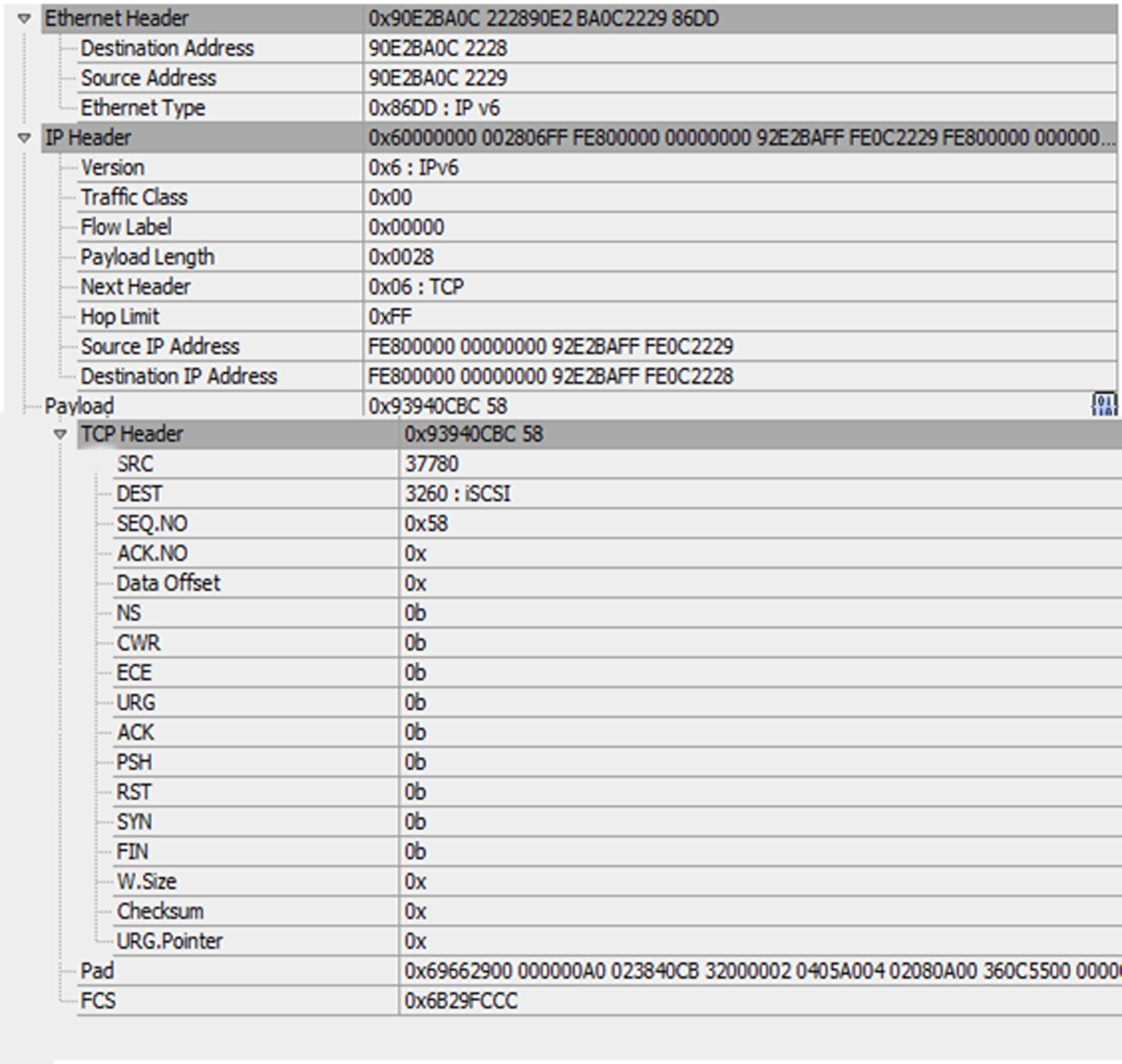
Here is a list of sample itempaths in the above example:
-
"Payload.TCP Header.SRC"
-
"Ethernet Header.Source Address"
Note: If there were two consequent TCP Headers in the above example, the first item would be: "Payload.TCP Header[0].SRC"
Period and square bracket characters in the field names can be represented by using escape sequences. An escape sequence is initiated with back-slash character. Character next to back-slash is considered as escaped character. Currently supported escape sequences are "\\", "\.", "\[", abd "\]" without quotation marks. Using any escaped characters other than those mentioned will result in an error.
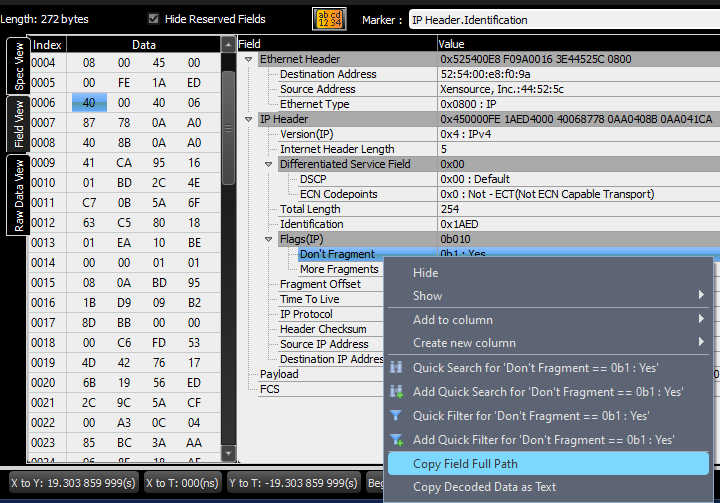
There are shortcuts for referencing field names, depending on which pane of the Frame Inspector view they are displayed in:
|
Pane |
Shortcut |
|
First Pane |
“<Field Name>” |
|
Second Pane |
“.<Field Name>” |
|
Third Pane |
“..<Field Name>” |
Note: You can copy an item_path string from Net Protocol Suite. To do so, right-click on any field in the Inspector View and click “Copy Field Full Path” as shown below. In this example, “IP Header.Flags(IP).Don't Fragment” is copied to the clipboard and can be used in VSE.