Integrated in Teledyne LeCroy’s Voyager M4x, M480x, and M4120 platforms, the USB4 Exerciser generates USB4 traffic so you can test how a product under test (PUT) responds to link training, protocol errors, and other conditions you control from a script. The Exerciser emulates either end of the link — a host or a device — and the PUT provides the other end.
Important: Operating the USB4 Exerciser requires the unit to be licensed appropriately. Generating traffic at Gen 4 requires the separate USB4 Gen 4 Exerciser license and a Voyager M480x or M4120.
Before You Begin
The Exerciser evolves with each software release, so install the latest USB Protocol Suite software and update the unit’s firmware before you start.
Exerciser scripts are written in the Voyager Exerciser language. This manual covers only the elements specific to USB4; for the language itself, see the Voyager Exerciser Language Manual, also available in the application at Help > Other Manuals.
Connect the PUT
Connect the PUT to the port labeled Exerciser.
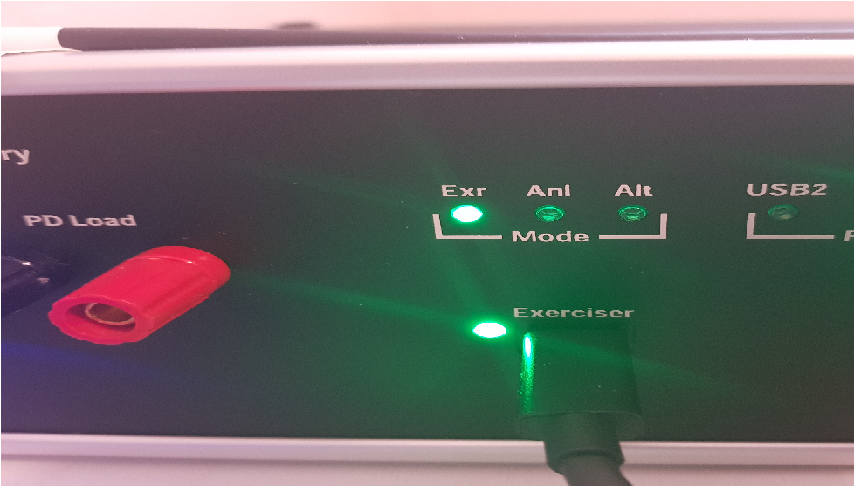
The connector is orientation-sensitive. If the LED next to the port is red, the cable is connected wrong side-up; flip it.
Configure the Recording
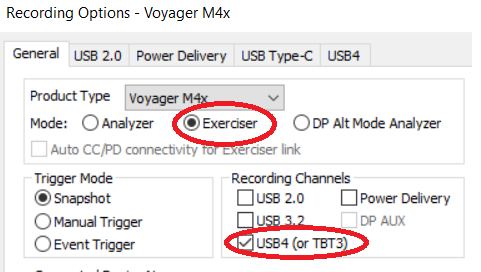
Open Recording Options and, on the General tab, set the working mode to Exerciser and select the USB4 recording channel. To capture PD traffic alongside USB4, also select Power Delivery.
On the same tab, under Connected Device Name, type a label in the Exerciser Connector field.
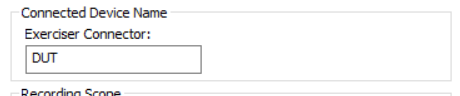
The label identifies the PUT in the captured trace.

Choose the Link Speed
Each script sets the link speed through the Link Configuration Register. To generate traffic at Gen 4 (PAM3), enable Gen 4 support before the link is trained:
Set $USB4SBRegisters.LC_Gen3Support = USB4_TRUE
Set $USB4SBRegisters.LC_Gen4Support = USB4_TRUE
Many of the example scripts enable Gen 4 support. On a unit that does not support Gen 4, set LC_Gen4Support to USB4_FALSE before running the script; otherwise the Exerciser does not start and reports a license error.
See Sideband Registers for the full Link Configuration Register (12) and Gen 4 TxFFE Register (14) field lists.
For best results at Gen 4, first run USB4 Gen 4 Receiver Tuning in Exerciser mode for your test setup. See Application Startup.
Run a Script
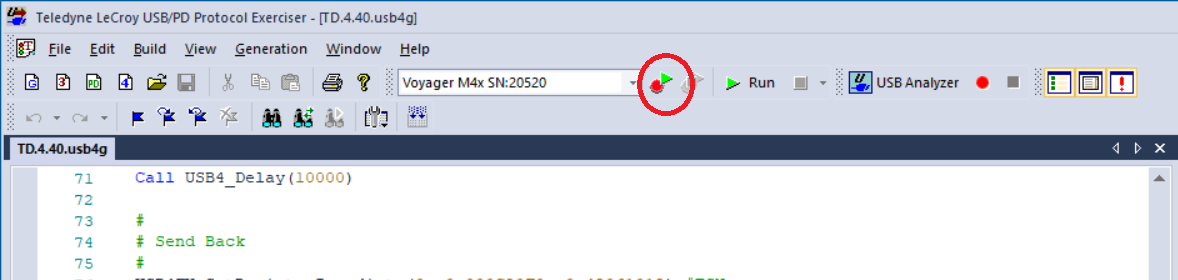
Click the USB/PD Exerciser icon in the main toolbar to open the script editor. Example scripts are installed in:
C:\Users\Public\Documents\LeCroy\USB Protocol Suite\Examples\USB4 Exerciser
The examples are organized by the role the Exerciser plays, Host Emulator or Device Emulator, and then by task:
|
Folder |
Contents |
|
Connection Manager (Host Emulator only) |
Router configuration, path setup, buffer allocation, CLx and uni-directional mode. |
|
Link State Transition |
USB4 link training, low power states, and tunneled USB3 state transitions. |
|
Tunneled USB3 |
Tunneled USB3 adapter configuration, transfers, and packet manipulation. |
|
USB4 Link Error Injections |
FEC, ECC, and CLSE error injection, training and bonding failures. |
|
Misc |
HS-only mode, raw and tunneled TLPs, and Exerciser flow control. |
Start with Simple Host Emulator.usb4g or Simple Device Emulator.usb4g, depending on whether the PUT is a device or a host. Each brings the link up to bonding state and is a useful base to build on. Both enable Gen 4 support, so if your unit does not support Gen 4, change LC_Gen4Support as described in Choose the Link Speed before running them.
With the PUT connected, click the Run Exerciser icon in the script editor toolbar.