
Decoding Assignments
The Analysis > Decoding Assignments... menu controls the decoding settings for the opened trace file. The default set of Decoding Assignments are set in the Setup > Preferences > Decoding Assignment menu (see Preferences). The decoded ports and types of traffic can be seen by selecting Analysis > Decoding Assignments in the Main Menu. If there is traffic in the trace that needs special decoding you can add port assignments and traffic types in the same window on a trace by trace basis. After the new assignments are made and the window is closed, the trace file decoding will automatically be updated to apply the new assignments.
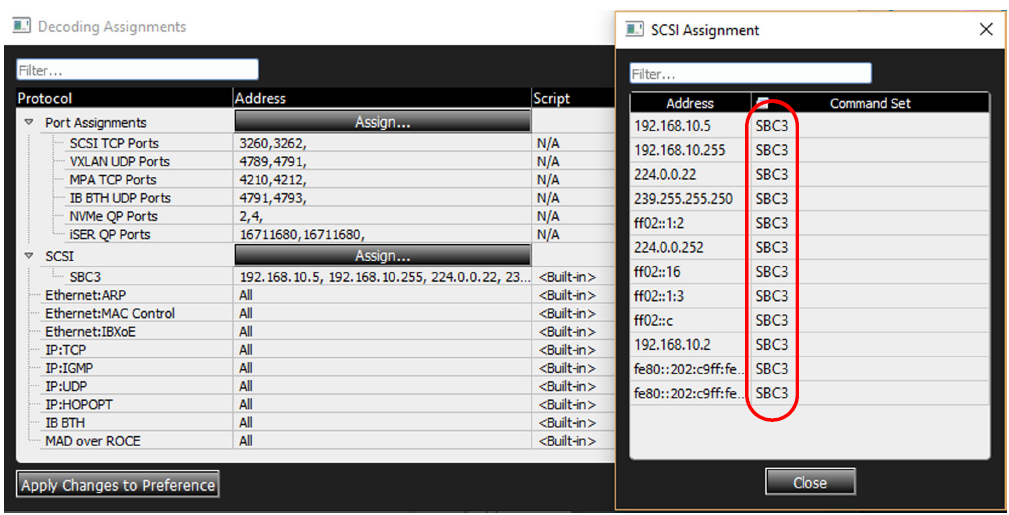
The first option in the Analysis menu allows you to set decoding assignments by selecting Analysis > Decoding Assignments. When Decoding Assignments is selected the default Port Assignments and SCSI assignments will be displayed. You can also see the default SCSI traffic types that were decoded. You can also see the default SCSI decoding assignments. In this case all SCSI traffic used the SBC3 Command Set.
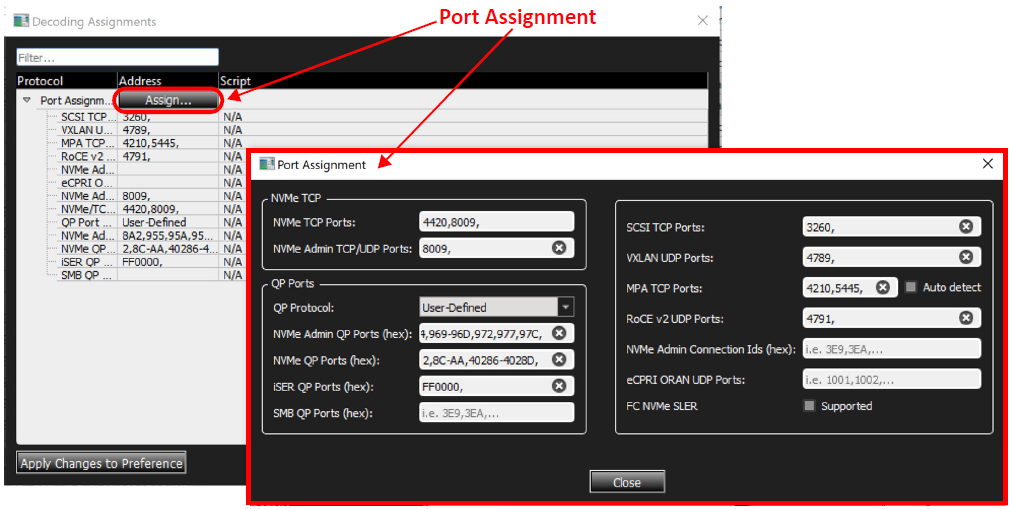
eCPRI ORAN UDP Ports: Specifies UDP port numbers for ORAN over IP/UDP.
QP Ports: Gives user the option to choose any of the following:
-
User defined: Means if the software captures the connection phase, it extracts the QP port and uses it for the desired protocol, otherwise the user can add QP ports manually to “NVMe QP port” or “iSER QP Port” or “iSER QP Port”.
-
NVMe: Means software considers any QP port as NVMe.
-
iSER: Means software considers any QP port as iSER.
-
SMB: Means software considers any QP port as SMB
There are two types of data traffic that can be associated with different Decoding Assignments:
-
Port Assignments: See Port Assignments (Default Set from Preferences).
-
Small Computer System Interface (SCSI) Assignments: See Default SCSI Decoding Assignments Found in Trace.
Port Assignments (Default Set from Preferences)
Initially the Net Protocol Suite software will decode all of the default port assignments set in the Preferences (see Preferences) and display them when you select Analysis > Decoding Assignments. In the captured trace the following Port Assignments and data traffic were decoded:
-
SCSI TCP Ports
-
VXLAN UDP Ports
-
MPA TCP Ports (with Auto Detect)
-
IB BTY UDP Ports
-
NVMe QP Ports
-
iSER QP Ports
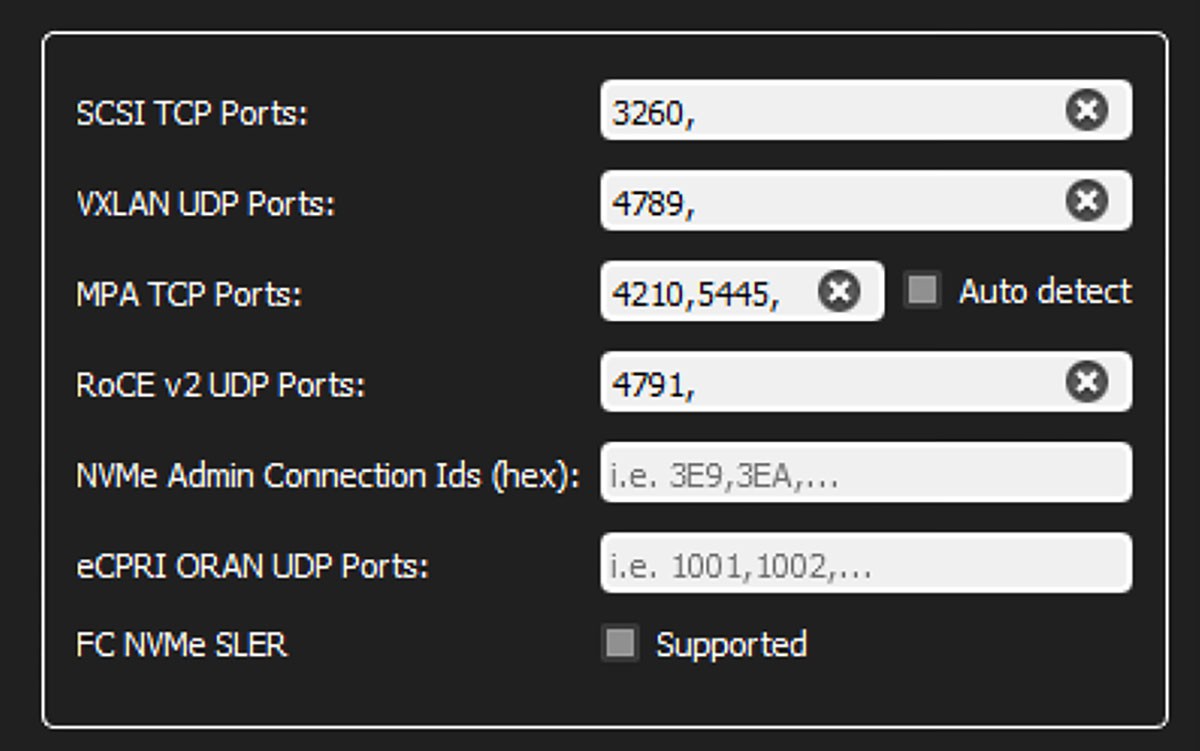
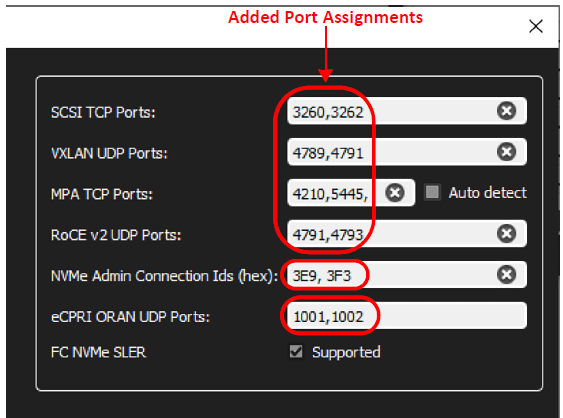
If you know there are more ports in the system that were not decoded, you can add port numbers by typing into the appropriate Port type.
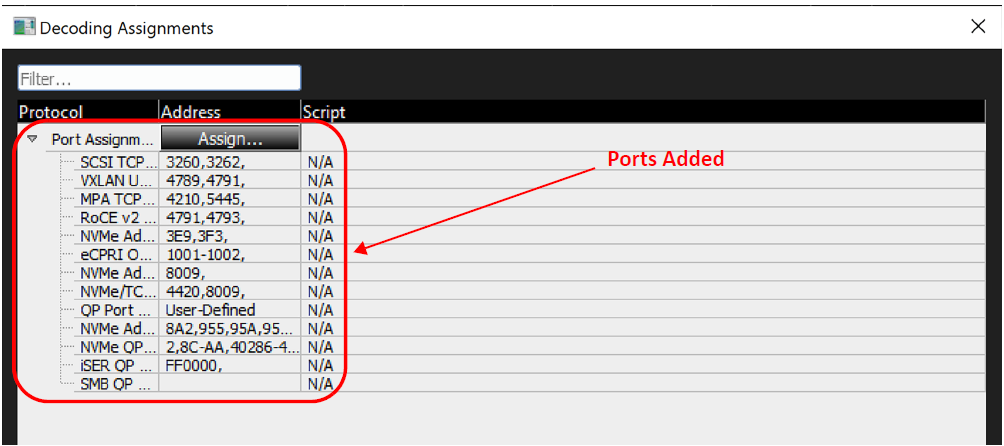
Select Analysis > Decoding Assignments to see the updated Port Number assignments.
Default SCSI Decoding Assignments Found in Trace
Initially, only SBC3 SCSI data traffic was detected.
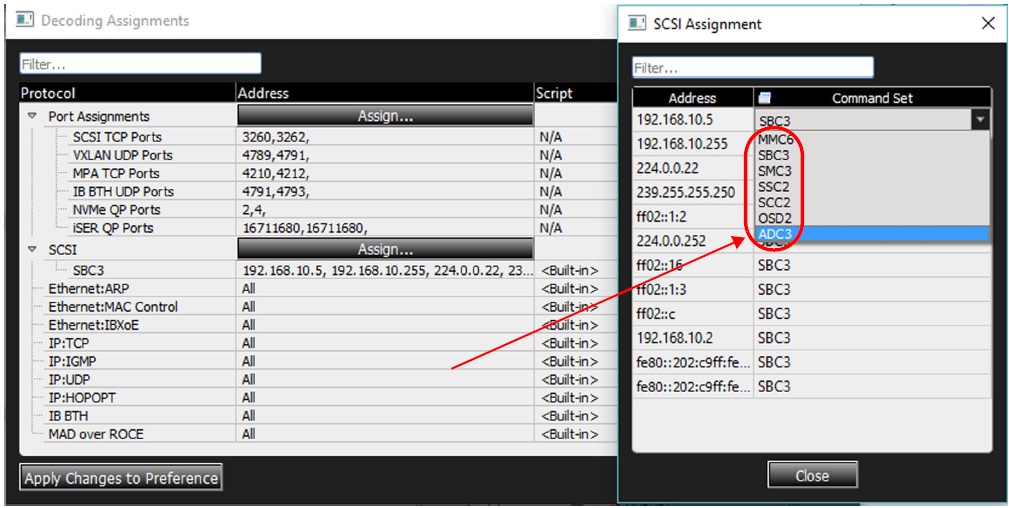
If other types of SCSI traffic should have been decoded at specific address, you can update the types of traffic and addresses with the following decoding assignments:
-
MMC—Multi-Media Commands
-
SBC—Block Commands
-
SMC—Medium Changer Commands
-
SSC
-
SCC—Controller Commands
-
OSD—Object-Based Storage Devices Commands
-
ADC—Automation/Drive Interface Commands
Note: The latest supported protocols and specifications are listed in Supported Protocol Decoders.
Script Column
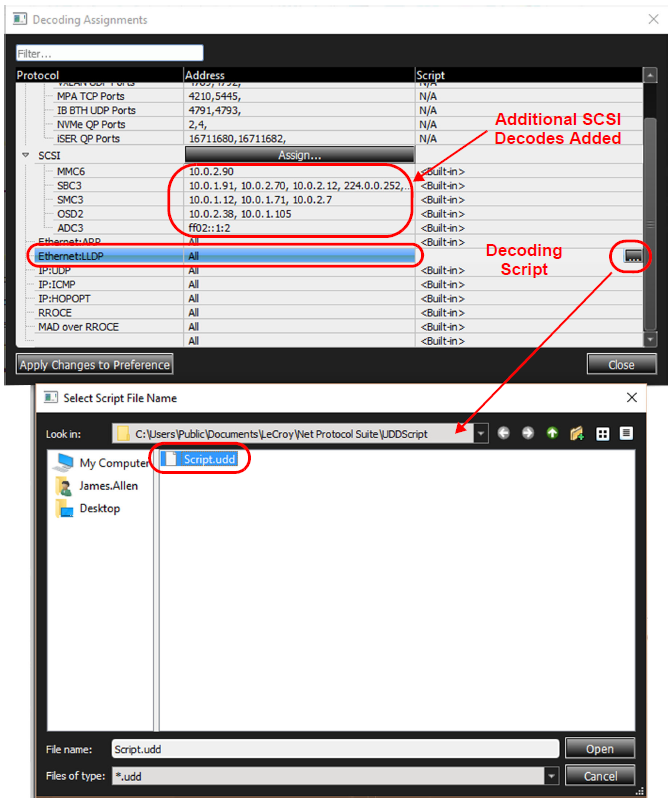
The Script column identifies the script that will be used to decode the protocol. <Built-in> means that a built-in decoder will be used.
-
Double-click in the cell to specify the path to a user-defined script (.udd).
See the Net Protocol Suite User-DeMMC: Multi-Media Commandsfined Decoding manual for details on how to write a decoding script.
-
To select traffic types and apply a custom decoding script, double-click the far right tab

An example has been placed in the directory shown below.

SMB Session Assignment
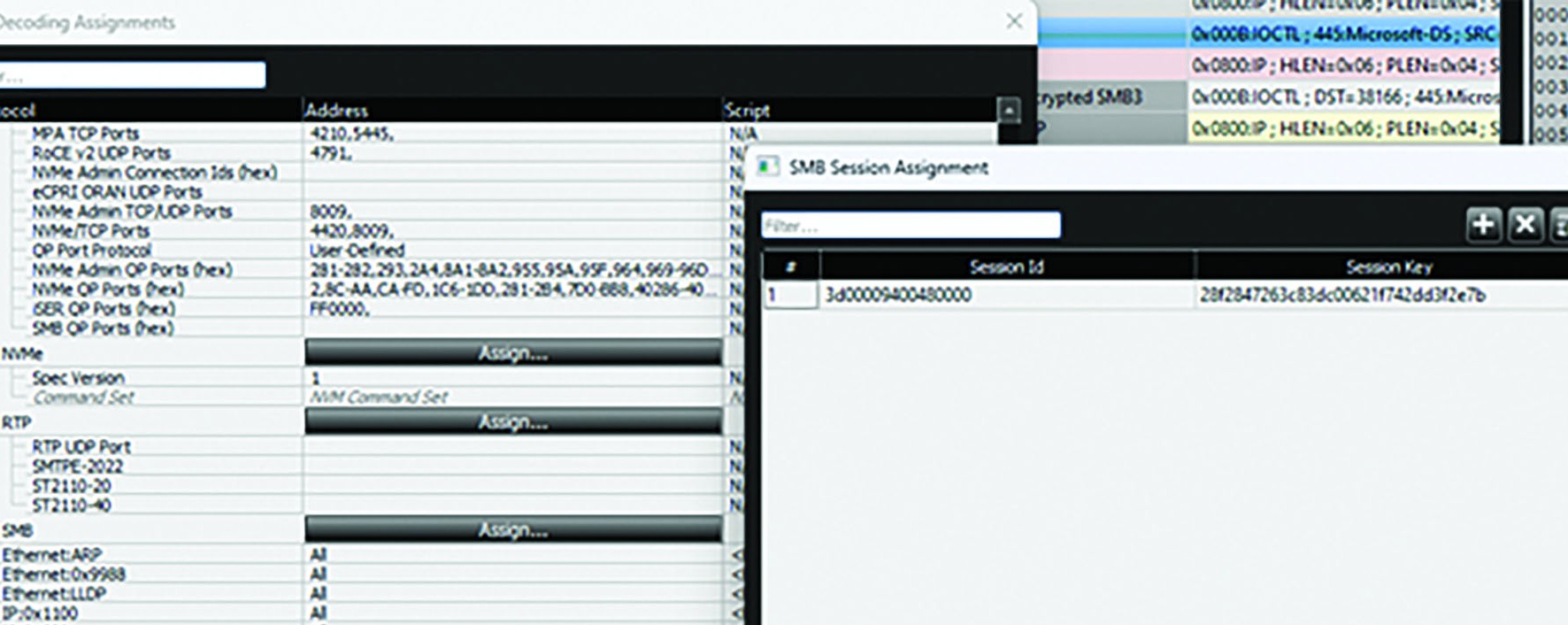
To decrypt SMB frames, Net Protocol Suite tries to detect the session key from a recorded trace. If it cannot be found, you must enter the session key manually.
Note: When the correct SMB session key is assigned, the viewer can decode SMB frames. Search, Filter, and Traffic summaries also work for SMB frames. However, Trigger and Jammer event/action summaries do not work.
TLS Decoding Assignment
If the key log file is not specified in the preferences during recording, or if it does not contain the secrets for the recorded trace, it can be added to the trace file.
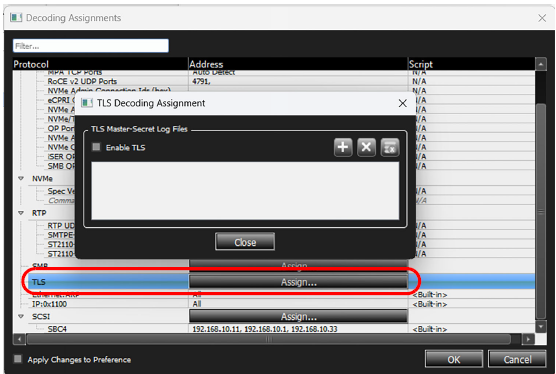
Note: When the correct TLS log file is assigned, the viewer can decode TLS frames. Additionally, Search, Filter, and Traffic summaries features will work for TLS frames.
Supported TLS Versions and Ciphers
Versions
-
TLS 1.3
Ciphers
-
TLS_AES_128_GCM_SHA256 {13h, 01h}
-
TLS_AES_256_GCM_SHA384 {13h, 02h}
Software-based TLS Decryption
A valid key log file for the captured TLS session is required as described above. Additionally, the trace file must contain the entire TLS handshake and all frames of the session in order for the Net Protocol Suite software to decrypt the session successfully. If any of the handshake is not present, the software will not establish the correct decryption key. If any frames within the session are missed, the software will not be able to decrypt beyond the first missed frame.
Hardware-assisted TLS Decryption – SierraNet M1288 only
The SierraNet M1288 supports hardware-assisted TLS decryption by tracking TLS session state in the analyzer hardware. Using this feature, the Net Protocol Suite software can decrypt recorded TLS traffic starting at any recording point without requiring the recording to begin at the session handshake. This makes post‑capture analysis and troubleshooting of encrypted traffic possible even when recordings begin mid‑session.
Key capabilities:
-
Tracks TLS session state per connection (client/server pairing and session metadata).
-
Enables decryption of TLS traffic from arbitrary points in a recording, not only from the handshake.
-
Supports decryption even when TLS records are missing or filtered in the middle of a recording by reconstructing session context from available client/server data.
Supporting Key Update tracking
To support tracking of TLS Key Update events, enable TLS in Preferences → Decoding Assignment and assign the secret-key log file for that analyzer as shown below. For best results, specify a shared network folder location that can be read by Net Protocol Suite and that your system under test is configured to write the secret-key log files to. The Net Protocol Suite software monitors the assigned secret‑key log files and automatically picks up any changes.
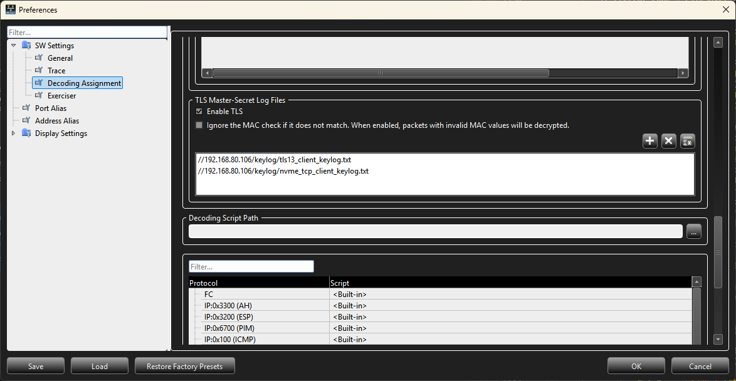
Note: After the assigned secret key log file is updated with new secret keys, the Net Protocol Suite needs at least 2 seconds to detect the update and program the new keys into the analyzer for hardware tracking of Key Update events. If the keys are not available in the analyzer before the first Key Update event, then hardware tracking and decryption for the traffic after Key Update will not function.
TLS Supported Port Configurations
The SierraNet M1288 analyzer supports hardware-assisted TLS decryption for the following link configurations:
-
P3/P4 Single Analyzer 100GPAM4CR1 (requires external SierraNet M1288 Probe)
-
P3/P4 Single Analyzer 100GPAM4CR2 (requires external SierraNet M1288 Probe)
-
P3/P4 Single Analyzer 50GPAM4 (requires external SierraNet M1288 Probe)
-
P1/P2 Single Analyzer 100GPAM4CR1
-
P1/P2 Single Analyzer A_100GPAM4CR2
-
P1/P2 Single Analyzer A_50GPAM4
Warning and error notifications
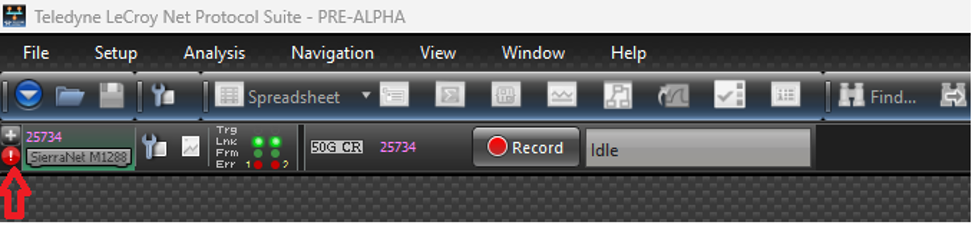
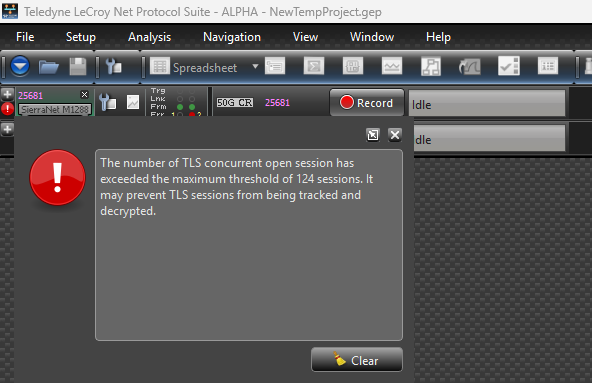
Net Protocol Suite displays TLS tracking and recording warnings/errors as a blinking notification icon on the affected project’s chain. Hovering the icon shows the full message in a popup. Dismissing (clearing) the popup closes that message; the icon will stop blinking and be removed if no other messages remain for that project chain. If multiple messages exist, the next message is shown and the icon remains until all messages are cleared.
List of errors and warnings
|
Type |
Description |
|---|---|
|
Error |
The number of TLS concurrent open session has exceeded the maximum threshold of 124 sessions. It may prevent TLS sessions from being tracked and decrypted. |
|
Warning |
The total TLS session count has exceeded the maximum threshold of 1024 sessions. It may prevent TLS sessions from being tracked and decrypted. |
|
Warning |
This project supports TLS, but no TLS secret key file has been specified in the preferences. As a result, TLS Key Updates and traffic after that cannot be tracked by the analyzer. To enable tracking, add a secret key file under Preferences > Decoding Assignment > TLS. Ignore this warning if TLS is not used. |
|
Warning |
The following Key log file size is more than 20 MB. Copying and parsing such a large file from a network share can noticeably delay the programming of secret keys to the analyzer. It is recommended to clear or truncate this file. |
Definitions:
-
-
-
TCP connection: A set of packets with same src/dest MAC/IP addresses and src/dest TCP ports.
-
Live Sessions: The number of TCP/TLS sessions which have been opened but not closed yet at a given moment of time.
-
Session Counting: A session will be counted two times if it is opened, then closed, then opened again with the exact same set of TCP connection addresses.
-
-
Limitations
-
-
-
There is no recording filter or trigger on TLS encrypted traffic.
-
Duplicate traffic in a recorded trace prevents decryption. Net Protocol Suite cannot decrypt TLS if the same encrypted traffic (with identical TCP connection) appears more than once in a recorded trace. However, it can be done in separate recordings.
-
Max Live Sessions is 124.
-
Max Sessions Cap is 1024 per 2 seconds.
-
-
IPSec Decoding Assignment
If the decryption information is not specified in the preferences before start recording, the appropriate decryption information can be added to the trace file later.
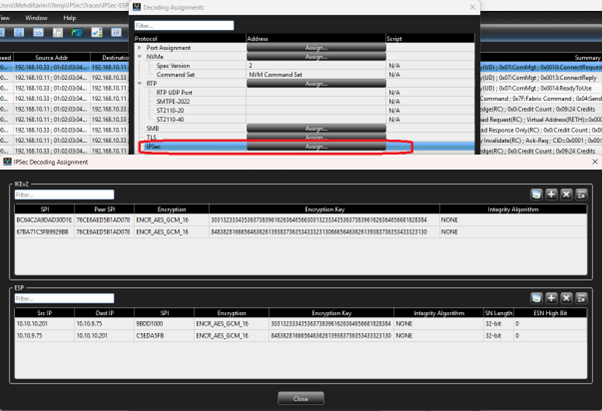
IKEv2 Columns
-
SPI: Security Parameter Index
-
Peer SPI: Peer Security Parameter Index
-
Encryption: Encryption Algorithm type
-
Encryption Key: Encryption Key related to the specified algorithm
-
Integrity Algorithm: Integrity Algorithm type used to specify ICV size
ESP Columns
-
Src IP: Source IP related to the SPI
-
Dest IP: Destination IP related to the SPI
-
SPI: Security Parameter Index
-
Encryption: Encryption Algorithm type
-
Encryption Key: Encryption Key related to the specified algorithm
-
Integrity Algorithm: Integrity Algorithm type used to specified ICV size
-
SN Length: Sequence Number Length. Can be 32 or 64 bits.
-
ESN High Bit: Extended Sequence Number upper 32 bits when SN length is 64 bits.
Functionalities
-
Import Wireshark ESP or IKEv2 log file: Users can import Wireshark csv log files for both ESP and IKEv2, and it will create new sessions based on the entry items or update existing ones.
-
ESP log file: at least 8 comma-separated values as below orders:
-
Protocol (IPv4 vs IPv6): It is used to detect ESP from IKEv2 files
-
Src IP
-
Dest IP
-
SPI
-
Encryption
-
Encryption Key
-
Authentication
-
Authentication key
-
SN (Optional): if it is not specified, it is considered as 32-bit
-
ESN High Bits (Optional): if it is not specified, it is considered as zero.
-
-
oIKEv2 log file: 8 comma-separated values as below orders:
-
Initiator's SPI
-
Responder's SPI
-
SK_ei
-
SK_er
-
Encryption Algorithm
-
SK_ai
-
SK_ar
-
Integrity Algorithm
-
-
Add a new session
-
Remove selected session
-
Remove all sessions
Note: When the correct IPSec decryption information is assigned, the viewer can decode IPSec frames. Additionally, Search, Filter, and Traffic summaries features will work for IPSec frames.
IPSec Decryption Limitations
-
There is no recording filter or trigger on IPSec decrypted data
-
IP Fragmentation is not supported